Original Industrial Spare Part
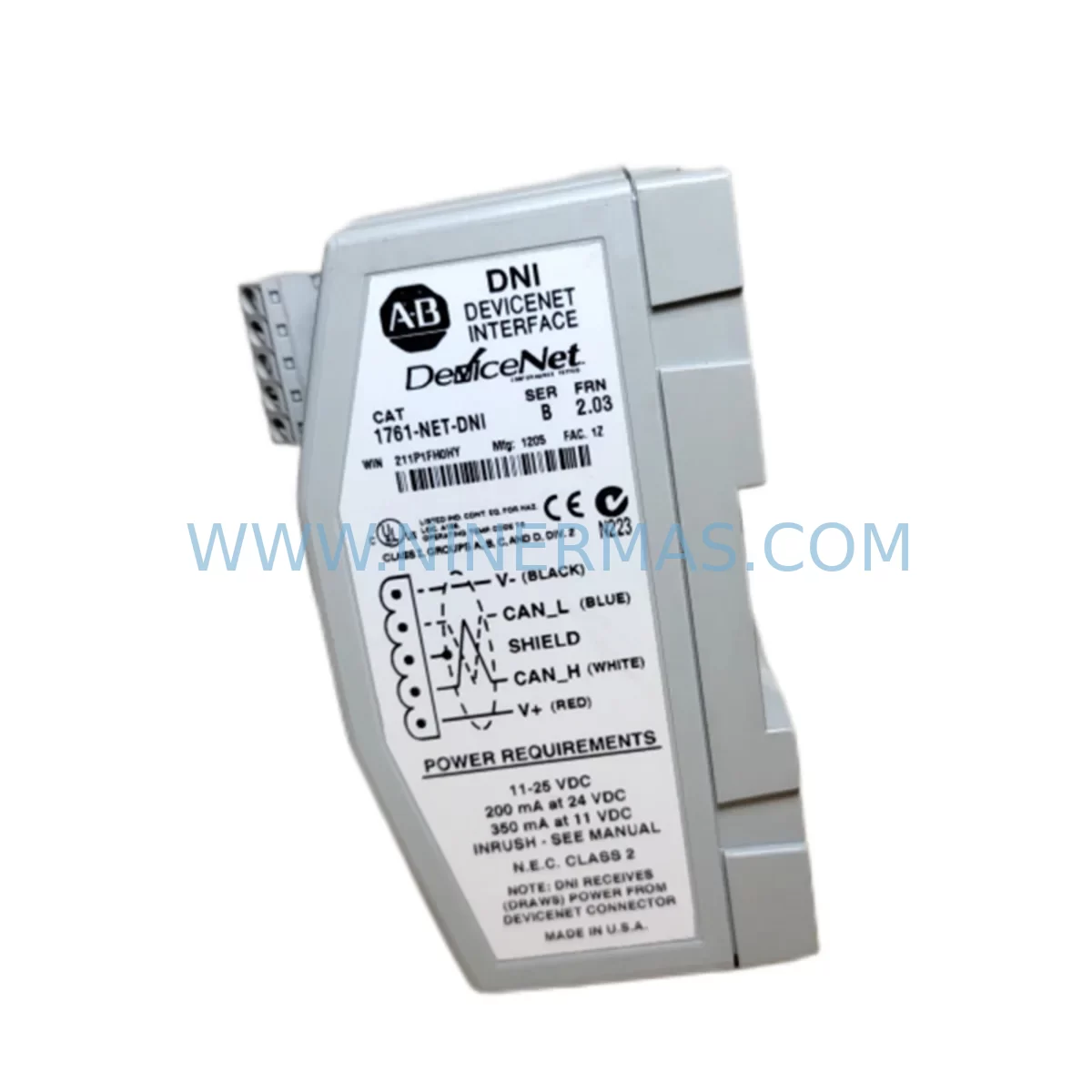
Allen-Bradley 1761-NET-DNI Retrofit-Compatible DeviceNet for Legacy Systems
Verify the part, confirm the platform family, and move straight into quotation with the right commercial details.
RFQ Ready
- SKU1761-NET-DNI
- CategoryPLC & Industrial Automation Modules
- BrandAllen-Bradley
- SupportAvailability, lead time, condition, and shipping coordination
How Buyers Usually Use This Page
- Confirm the exact part number and platform family before sending the quote request.
- Use direct email when quantity, condition, and destination are already defined internally.
- Switch to the broader brand or category archive when you need alternates nearby.
Series Navigation
Move through the most common platform families behind this part.
Product RFQ
Send this part directly for quotation.
Include quantity, required condition, destination country, and target delivery timing. Current reference: Allen-Bradley 1761-NET-DNI Retrofit-Compatible DeviceNet for Legacy Systems with SKU 1761-NET-DNI.
Allen-Bradley 1761-NET-DNI Retrofit-Compatible DeviceNet Interface for Legacy Systems
The Allen-Bradley 1761-NET-DNI is a DeviceNet network interface module designed to connect MicroLogix 1000 and MicroLogix 1200 programmable logic controllers to a DeviceNet fieldbus network. As many industrial facilities continue to operate legacy automation platforms built around the MicroLogix and SLC 500 families, the 1761-NET-DNI remains a critical component for maintaining network communication integrity, extending system service life, and enabling controlled migration to modern control architectures — all without forcing a full system replacement or unplanned production shutdown.
For maintenance engineers and automation integrators managing aging control infrastructure, sourcing a verified replacement 1761-NET-DNI is often the fastest and most cost-effective path to restoring DeviceNet communication after a module failure. NINERMAS maintains ready stock of the 1761-NET-DNI, with each unit subject to full functional testing prior to shipment and backed by a 12-month warranty.
Upgrade Compatibility Table
| Parameter | Details |
|---|---|
| SKU / Part Number | 1761-NET-DNI |
| Brand / Series | Allen-Bradley / MicroLogix Networking |
| Interface Type | DeviceNet (CAN-based, ISO 11898) |
| Compatible Controllers | MicroLogix 1000 (1761-Lxxx), MicroLogix 1200 (1762-Lxxx) |
| Communication Port | DH-485 / RS-232 to DeviceNet bridge |
| DeviceNet Data Rate | 125 kbps, 250 kbps, 500 kbps (selectable) |
| Node Address | 0–63, configurable via rotary switch |
| Power Supply | DeviceNet bus-powered (11–25 VDC) |
| Installation Form Factor | DIN rail or panel mount |
| Retrofit Compatibility | Direct replacement for existing 1761-NET-DNI installations |
| Protocol Migration Support | Bridges legacy DH-485 to DeviceNet without controller replacement |
| Commissioning Requirement | Node address setting, baud rate match, EDS file load in RSNetWorx |
| Warranty | 12 Months — NINERMAS Quality Guarantee |
Retrofit Planning for Existing Automation Systems
When a 1761-NET-DNI fails in a running production environment, the immediate impact is loss of DeviceNet communication between the MicroLogix controller and field devices — including variable frequency drives, distributed I/O blocks, smart sensors, and valve manifolds connected on the same network segment. Before installing a replacement unit, the retrofit team should verify several key parameters to ensure a smooth transition with minimal downtime.
First, confirm the existing node address setting on the failed module. The 1761-NET-DNI uses rotary switches to set the MAC ID (node address from 0 to 63). The replacement unit must be configured to the same address before powering up the network. Mismatched node addresses will cause duplicate node errors and prevent the DeviceNet scanner — typically a 1747-SDN scanner card installed in an SLC 500 rack or a 1756-DNB DeviceNet bridge module in a ControlLogix chassis — from establishing communication with the MicroLogix.
Second, verify the baud rate. The DeviceNet segment baud rate must be consistent across all nodes. If the existing network runs at 250 kbps, the replacement 1761-NET-DNI must be set to 250 kbps before connection. Connecting at a mismatched baud rate will disrupt all other nodes on the segment, including 1794-ADN FLEX I/O adapters, PowerFlex 40 or PowerFlex 400 drives, and any other DeviceNet-connected devices sharing the trunk cable.
Third, check the DH-485 or RS-232 port connection between the 1761-NET-DNI and the MicroLogix controller. The 1761-NET-DNI connects to the MicroLogix via the controller’s communication port using a 1761-CBL-PM02 or equivalent programming cable. Inspect the cable and connector for damage during the replacement process. If the MicroLogix 1200 is also connected to an HMI panel — such as a PanelView 300 Micro or a third-party operator terminal — via the same DH-485 network, confirm that the HMI communication is not disrupted by the module swap.
Fourth, after physical installation, use RSNetWorx for DeviceNet to scan the network and verify that the 1761-NET-DNI appears at the correct node address with the correct EDS (Electronic Data Sheet) file loaded. If the EDS file is not already present in the RSNetWorx library, it can be downloaded from Rockwell Automation’s product compatibility and download center. Once the node is recognized, verify that the MicroLogix controller’s ladder logic program — particularly any MSG instructions or explicit messaging blocks targeting DeviceNet nodes — is executing without communication faults.
For facilities planning a longer-term migration from MicroLogix to a more current platform such as the Micro820 or Micro850 controller, the 1761-NET-DNI can serve as a bridging component during the transition period, maintaining DeviceNet connectivity while the new controller platform is being commissioned in parallel. This approach allows the plant to keep the existing DeviceNet field devices — including 1734-ADN Point I/O adapters, Bulletin 160 or 520 drives, and legacy photoelectric or proximity sensors with DeviceNet output — in service without requiring immediate replacement of the entire field device layer.
Downtime Control During System Migration
Replacing a 1761-NET-DNI in a live production environment requires careful sequencing to minimize control interruption. The recommended approach is to pre-configure the replacement module — setting the correct node address and baud rate — before taking the system offline. This allows the physical swap to be completed in the shortest possible window, typically under 15 minutes for an experienced technician familiar with the MicroLogix platform.
Before powering down the MicroLogix controller, save a backup copy of the controller program using RSLogix 500 or RSLogix Micro. Store the backup on a laptop or USB drive kept at the control panel. This ensures that if the controller loses its program during the power cycle — which can occur if the controller’s battery-backed RAM is degraded — the program can be immediately reloaded without waiting for a remote file transfer.
If the MicroLogix is part of a larger control loop that includes analog input modules, thermocouple modules, or high-speed counter modules installed in a 1762 expansion rack, confirm that the process can tolerate a brief open-loop condition during the swap. For critical loops — such as temperature control in a furnace or pressure regulation in a compressor system — coordinate with the process team to place the loop in manual mode before initiating the replacement.
After restoring power and confirming DeviceNet communication, monitor the controller’s I/O status for at least one full process cycle before returning the system to automatic operation. Check for any latched fault bits in the DeviceNet scanner’s fault table and clear them after verifying that all nodes are communicating correctly. Document the replacement with the module serial number, installation date, and node configuration for future maintenance reference.
Retrofit Support FAQ
Q1: Is the replacement 1761-NET-DNI a direct drop-in for the original module?
Yes. The replacement 1761-NET-DNI is functionally identical to the original Rockwell Automation production unit. It uses the same DIN rail mounting footprint, the same rotary node address switches, and the same DeviceNet and DH-485/RS-232 connectors. No wiring changes or program modifications are required, provided the node address and baud rate are set to match the existing network configuration before installation.
Q2: What pre-shipment testing is performed on each unit?
Each 1761-NET-DNI unit supplied by NINERMAS undergoes functional verification prior to shipment, including power-on testing, communication port integrity check, and DeviceNet node enumeration test. Units that do not pass all test criteria are not shipped. A 12-month warranty is provided from the date of shipment, covering defects in materials and workmanship under normal operating conditions.
Q3: Can the 1761-NET-DNI be used with MicroLogix 1100 or 1400 controllers?
The 1761-NET-DNI is specifically designed for MicroLogix 1000 and MicroLogix 1200 controllers. MicroLogix 1100 and 1400 controllers use a different communication architecture and are not compatible with the 1761-NET-DNI. For DeviceNet connectivity on MicroLogix 1100 or 1400 platforms, a different interface solution is required. Contact NINERMAS for guidance on the appropriate module for your specific controller model.
Q4: How quickly can the 1761-NET-DNI be shipped, and is long-term supply available?
NINERMAS maintains inventory of the 1761-NET-DNI to support urgent replacement requirements. Standard orders are processed and shipped within 1–3 business days. For facilities with ongoing maintenance programs or planned retrofit projects requiring multiple units, NINERMAS can discuss scheduled supply arrangements to ensure parts availability throughout the project lifecycle.
| Product Series | MicroLogix |
|---|---|
| Country of Origin | US |
Catalog Continuation
More Allen-Bradley modules in the catalog.
Use the brand lane to compare nearby part numbers, platform-adjacent modules, and other inquiry-ready listings before sending your final RFQ.




Catalog Continuation
Alternative parts within PLC & Industrial Automation Modules.
Stay inside the same system family when you need substitutes, adjacent modules, or a broader shortlist for procurement review.



SKU: HDD02.2-W040N-HS12-01-FW FWA-DIAX04-ELS-05VRS-MS
Rexroth HDD02.2-W040N-HS12-01-FW Service-Ready Spare Part

SKU: I5DAE375F10010000S
Lenze I5DAE375F10010000S Service-Ready Spare Part for Industrial Maintenance