
Original Industrial Spare Part
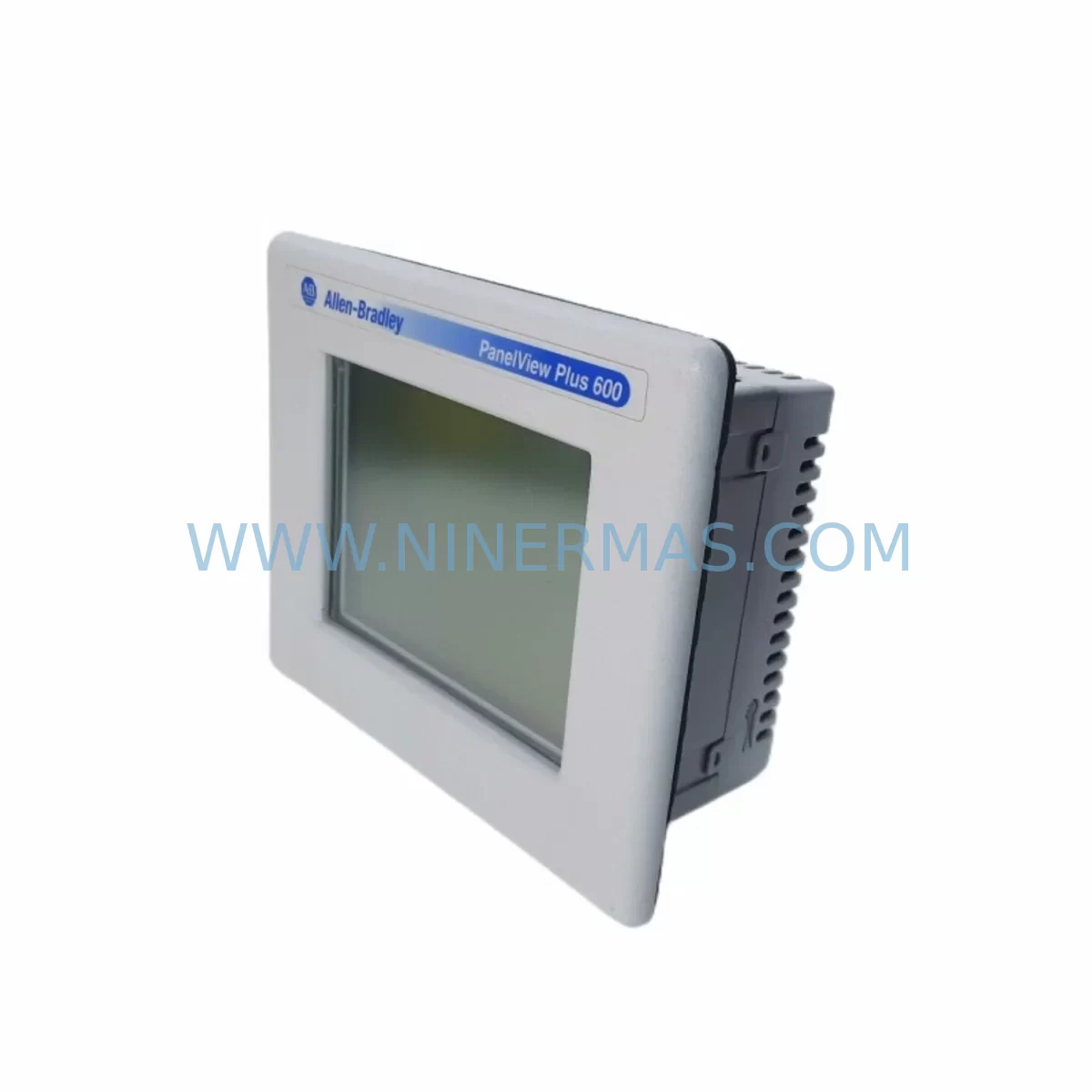
Allen-Bradley 2711P-T6M5D Retrofit HMI for Legacy Systems
Verify the part, confirm the platform family, and move straight into quotation with the right commercial details.
RFQ Ready
- SKU2711P-T6M5D
- CategoryPLC & Industrial Automation Modules
- BrandAllen-Bradley
- SupportAvailability, lead time, condition, and shipping coordination
How Buyers Usually Use This Page
- Confirm the exact part number and platform family before sending the quote request.
- Use direct email when quantity, condition, and destination are already defined internally.
- Switch to the broader brand or category archive when you need alternates nearby.
Series Navigation
Move through the most common platform families behind this part.
Product RFQ
Send this part directly for quotation.
Include quantity, required condition, destination country, and target delivery timing. Current reference: Allen-Bradley 2711P-T6M5D Retrofit HMI for Legacy Systems with SKU 2711P-T6M5D.
Allen-Bradley 2711P-T6M5D Retrofit-Compatible HMI Terminal for Legacy Systems
The Allen-Bradley 2711P-T6M5D is a 6-inch color touch-screen operator terminal from the PanelView Plus 600 series, designed for human-machine interface applications across a wide range of industrial automation environments. As legacy HMI platforms age and original units reach end-of-life, the 2711P-T6M5D has become one of the most sought-after retrofit-compatible replacements for facilities operating on Rockwell Automation control architectures. Whether you are managing a phased upgrade, restoring a failed panel, or extending the operational life of an existing control system, this unit delivers a direct-fit solution with minimal disruption to your production environment.
The 2711P-T6M5D supports EtherNet/IP and DH-485 communication protocols, making it compatible with a broad range of Allen-Bradley controllers including the ControlLogix, CompactLogix, and MicroLogix families. Its 6-inch QVGA display, integrated keypad, and Windows CE-based runtime environment allow engineers to load existing FactoryTalk View ME application files with minimal rework, preserving original HMI screen logic, alarm configurations, and tag databases. This significantly reduces engineering hours during replacement and helps control downtime to within a single maintenance window.
Before installation, engineers should verify several critical compatibility parameters. First, confirm that the panel cutout dimensions match the 2711P-T6M5D bezel footprint — the unit requires a standard PanelView Plus 600 cutout and uses a rear-mount locking mechanism. Second, review the power supply requirements: the terminal operates on 24V DC and should be fed from a dedicated Allen-Bradley 1606-XLP or equivalent regulated DC power supply to avoid voltage fluctuation that could cause display resets or communication dropouts. Third, confirm the communication cable routing — if migrating from a legacy DH+ network using a 1747-PIC or 1784-U2DHP programming cable, a protocol bridge or updated communication module may be required to interface with the EtherNet/IP port on the 2711P-T6M5D.
For facilities running SLC 500 or PLC-5 controllers, the retrofit path typically involves updating the communication driver within FactoryTalk View ME and remapping any DH+ or DH-485 tag references to the appropriate EtherNet/IP node addresses. In cases where the original HMI application was developed on an older PanelView 600 or PanelView Plus 600e unit, the application can generally be imported and converted using FactoryTalk View Studio ME without requiring a full screen rebuild. Engineers should validate all alarm setpoints, trend displays, and recipe parameters after conversion to ensure data integrity before returning the system to production.
Backplane and rack considerations are not applicable to this standalone panel-mount terminal, but I/O connectivity through the controller must be verified. If the associated controller — such as a CompactLogix L33ER or MicroLogix 1400 — is also being upgraded as part of the same project, the HMI tag database should be rebuilt against the new controller program to avoid unresolved tag references at runtime. Where the controller remains unchanged, the existing program and tag structure can typically be retained without modification.
In high-vibration or dusty environments such as mining, cement, or heavy manufacturing, the 2711P-T6M5D’s sealed front panel and NEMA 4/4X-rated enclosure compatibility provide reliable protection against ingress. For installations in hazardous or high-EMI zones, ensure that the control cabinet includes appropriate surge protection devices and that all cable shields are properly grounded at the panel entry point. Pairing the terminal with a 1783-US5T or similar managed Ethernet switch helps maintain stable EtherNet/IP communication in electrically noisy environments.
Every 2711P-T6M5D unit supplied by NINERMAS undergoes pre-shipment functional testing, including power-on verification, display calibration check, communication port validation, and firmware version confirmation. Units are shipped with a 12-month warranty covering manufacturing defects and operational failures under normal use conditions. Stock is maintained to support both immediate single-unit replacement orders and longer-term spare parts programs for facilities managing multiple PanelView Plus 600 installations across their plant network.
Upgrade Compatibility Table
| Parameter | Details |
|---|---|
| SKU / Part Number | 2711P-T6M5D |
| Series | PanelView Plus 600 |
| Display Size | 6-inch Color Touch Screen (QVGA) |
| Operating System | Windows CE |
| Communication Ports | EtherNet/IP, DH-485, RS-232 |
| Power Supply | 24V DC (Nominal) |
| Enclosure Rating | NEMA 4/4X Front Panel Compatible |
| Compatible Controllers | ControlLogix, CompactLogix, MicroLogix, SLC 500, PLC-5 (via bridge) |
| HMI Software | FactoryTalk View ME (Studio ME for development) |
| Retrofit Compatibility | Direct replacement for PanelView Plus 600 / 600e series |
| Installation Type | Panel Mount, Rear Locking |
| Pre-Shipment Testing | Power-on, display, communication port, firmware verification |
| Warranty | 12 Months from shipment date |
| Country of Origin | United States |
Retrofit Planning for Existing Automation Systems
Successful retrofit of the 2711P-T6M5D into an existing control cabinet requires a structured approach that accounts for both hardware and software compatibility. Begin by auditing the existing HMI application version and the FactoryTalk View ME runtime version installed on the outgoing unit. If the original terminal is still partially functional, export the application file (.MER) before removal to serve as the baseline for the replacement unit.
On the hardware side, verify that the 24V DC power supply — commonly an Allen-Bradley 1606-XLP72E or equivalent — can support the additional load of the new terminal without exceeding its rated output current. Check the existing terminal block wiring for the power feed and communication cables. If the cabinet uses a 1747-SDN DeviceNet Scanner or 1756-ENBT EtherNet/IP bridge module for controller-to-HMI communication, confirm that the module firmware is compatible with the FactoryTalk View ME version being deployed on the 2711P-T6M5D.
For facilities migrating from older PanelView 550 or PanelView 900 terminals, the application conversion process requires use of FactoryTalk View Studio ME’s import utility. Screen layouts, button functions, and numeric display objects generally convert cleanly, but custom ActiveX controls or legacy graphic objects may require manual recreation. Plan for a commissioning period of two to four hours per terminal to allow for application loading, tag verification, and operator acceptance testing.
Where the control system includes a 1756-L71 ControlLogix controller with a 1756-EN2T EtherNet/IP communication module, the HMI-to-controller link is established via standard EtherNet/IP messaging. Ensure that the controller’s Ethernet port is configured with a static IP address and that the HMI shortcut in the FactoryTalk View ME application points to the correct controller path. For multi-controller architectures, verify that all shortcut definitions are updated before deploying the application to the replacement terminal.
Signal isolators and I/O conditioning modules installed upstream of the controller are not affected by the HMI replacement, but any analog input scaling parameters displayed on the HMI — such as flow rates, pressure readings, or temperature values — should be verified against the controller’s I/O module configuration after commissioning to confirm that engineering unit conversions are displaying correctly on the new terminal.
Downtime Control During System Migration
Minimizing unplanned downtime during an HMI replacement is a primary concern for facilities operating continuous processes. The 2711P-T6M5D supports a direct application transfer workflow: once the replacement unit is powered and connected to the network, the FactoryTalk View ME application can be loaded from a USB flash drive or downloaded from a FactoryTalk View Studio ME development workstation over EtherNet/IP. This eliminates the need for a dedicated programming laptop at the panel during the swap, reducing the time the control system operates without a functional HMI interface.
To further reduce risk, prepare the replacement terminal fully in a staging environment before the scheduled maintenance window. Load the application, configure the communication shortcuts, set the terminal’s IP address, and verify that all screens navigate correctly using a simulated controller connection. When the maintenance window opens, the physical swap — removing the old terminal, installing the 2711P-T6M5D, connecting power and communication cables, and confirming runtime operation — can typically be completed in under 60 minutes for a prepared unit.
Retain the original HMI application file and a backup of the controller program on a secure workstation before beginning any physical work. If the replacement terminal encounters an unexpected runtime error during commissioning, having the original application and controller backup allows the team to restore the previous configuration without extended production loss. Document the terminal’s IP address, communication path, and application version in the cabinet’s maintenance log for future reference.
Retrofit Support FAQ
Q1: Is the 2711P-T6M5D a direct drop-in replacement for other PanelView Plus 600 models?
Yes. The 2711P-T6M5D is dimensionally and electrically compatible with other PanelView Plus 600 series terminals sharing the same 6-inch form factor. Existing panel cutouts, power wiring, and communication cable connections are reusable in most installations. Application files developed for other PanelView Plus 600 units load directly onto the 2711P-T6M5D without screen rebuilding.
Q2: What pre-shipment testing is performed before dispatch?
Each unit undergoes power-on functional testing, display and touch calibration verification, communication port validation (EtherNet/IP and DH-485), and firmware version confirmation. A test report is available upon request. All units are shipped with a 12-month warranty covering manufacturing defects and operational failures under normal operating conditions.
Q3: Can this unit communicate with SLC 500 or PLC-5 controllers?
Direct DH+ communication requires a protocol bridge such as the 1761-NET-AIC or a 1784-PKTX interface. For DH-485 networks, the 2711P-T6M5D connects natively via its RS-232/DH-485 port. EtherNet/IP communication with SLC 500 controllers equipped with a 1761-NET-ENI module is also supported. Compatibility should be verified against the specific controller firmware version before deployment.
Q4: What is the long-term supply availability for the 2711P-T6M5D?
NINERMAS maintains stock of the 2711P-T6M5D to support both immediate replacement orders and ongoing spare parts programs. For facilities managing multiple PanelView Plus 600 installations, we offer long-term supply arrangements with reserved stock allocation. Contact our team to discuss volume requirements and scheduled delivery programs.
| Product Series | 2711 |
|---|---|
| Country of Origin | US |
Catalog Continuation
More Allen-Bradley modules in the catalog.
Use the brand lane to compare nearby part numbers, platform-adjacent modules, and other inquiry-ready listings before sending your final RFQ.




Catalog Continuation
Alternative parts within PLC & Industrial Automation Modules.
Stay inside the same system family when you need substitutes, adjacent modules, or a broader shortlist for procurement review.



SKU: HDD02.2-W040N-HS12-01-FW FWA-DIAX04-ELS-05VRS-MS
Rexroth HDD02.2-W040N-HS12-01-FW Service-Ready Spare Part

SKU: I5DAE375F10010000S
Lenze I5DAE375F10010000S Service-Ready Spare Part for Industrial Maintenance



