Original Industrial Spare Part
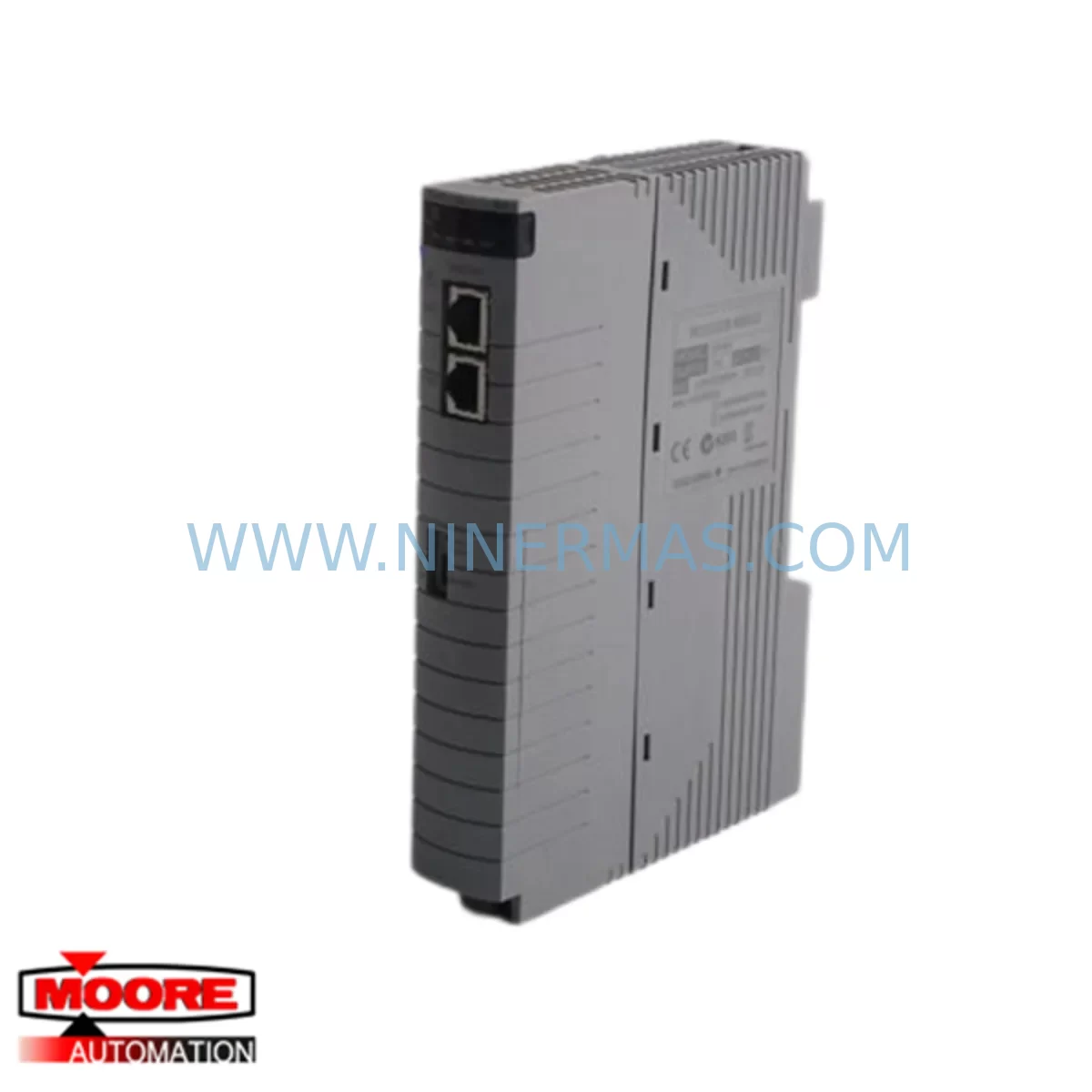
YOKOGAWA CP451-50 S2 Service-Ready Spare Part
Verify the part, confirm the platform family, and move straight into quotation with the right commercial details.
RFQ Ready
- SKUCP451-50 S2
- CategoryDCS Distributed Control Systems
- BrandYokogawa
- SupportAvailability, lead time, condition, and shipping coordination
How Buyers Usually Use This Page
- Confirm the exact part number and platform family before sending the quote request.
- Use direct email when quantity, condition, and destination are already defined internally.
- Switch to the broader brand or category archive when you need alternates nearby.
Series Navigation
Move through the most common platform families behind this part.
Product RFQ
Send this part directly for quotation.
Include quantity, required condition, destination country, and target delivery timing. Current reference: YOKOGAWA CP451-50 S2 Service-Ready Spare Part with SKU CP451-50 S2.
YOKOGAWA CP451-50 S2 Service-Ready Spare Part for Industrial Maintenance
The YOKOGAWA CP451-50 S2 is a critical CPU/controller module within the CENTUM VP and CENTUM CS Distributed Control System (DCS) platform — one of the most widely deployed process automation architectures in refining, petrochemical, power generation, and pharmaceutical manufacturing. When this module fails or degrades, the consequences extend far beyond a single loop: entire control domains can go offline, triggering unplanned shutdowns that cost thousands of dollars per hour. Maintaining a verified, service-ready CP451-50 S2 spare in your critical spares inventory is not optional — it is a fundamental pillar of any responsible maintenance strategy.
At NINERMAS, every CP451-50 S2 unit is sourced from authorized supply channels, inspected against original YOKOGAWA specifications, and tested prior to shipment. Each unit ships with a 12-month warranty, full traceability documentation, and is packaged in ESD-safe materials to protect sensitive electronics during transit and storage. Whether you are responding to an emergency breakdown, executing a planned annual overhaul, or building out your critical spares library, the CP451-50 S2 from NINERMAS is ready to deploy.
Spare Maintenance Table
| Parameter | Specification / Detail |
|---|---|
| Part Number / SKU | CP451-50 S2 |
| Brand | YOKOGAWA |
| Compatible Platform | CENTUM VP, CENTUM CS 3000, CENTUM CS 1000 |
| Module Function | Field Control Station CPU / Controller Module |
| Processor Architecture | Dual-redundant capable, real-time control processing |
| Communication Interface | V-net / Vnet/IP compatible (platform dependent) |
| Power Supply Requirement | 24 VDC (supplied via backplane / power supply module) |
| Operating Temperature | 0°C to 55°C (32°F to 131°F) |
| Humidity | 10% to 90% RH, non-condensing |
| Mounting | DIN rail / backplane slot installation |
| Origin | Japan |
| Condition | Original / Service-Ready |
| Warranty | 12 Months |
| Pre-shipment Testing | Yes — functional verification prior to dispatch |
| Packaging | ESD-safe anti-static packaging |
| Lead Time | In-stock: ships within 2–5 business days |
| Application Industries | Oil & Gas, Petrochemical, Power, Pharmaceutical, Pulp & Paper |
| Maintenance Recommendation | Inspect every 12–24 months; replace on first sign of CPU fault alarm or redundancy switchover failure |
Maintenance Planning for Continuous Operation
The CP451-50 S2 does not operate in isolation. It sits at the heart of a Field Control Station (FCS) that integrates dozens of interdependent components — and a disciplined maintenance engineer knows that replacing the CPU module is only the first step in restoring full system integrity. During any CP451-50 S2 replacement event, the following associated components should be inspected, tested, or replaced as part of the same maintenance window:
Power Supply Modules (e.g., PW481, PW482 series): The FCS power supply feeds the backplane directly. A degraded power supply can cause intermittent CPU resets that mimic CPU module failure. Always verify output voltage stability and ripple before concluding the CP451-50 S2 is the root cause. If the power supply is more than five years old, proactive replacement during the same outage window eliminates a second unplanned shutdown.
I/O Modules (e.g., AAI141, AAI543, ADV151 series): After a CPU module swap, all I/O modules in the FCS should be scanned for communication errors. Analog input modules such as the AAI141 and AAI543 are particularly sensitive to backplane signal integrity issues that can develop during a CPU fault event. Confirm that all channel diagnostics are clear before returning the station to automatic control.
Communication Modules and V-net / Vnet/IP Interface Cards: The CP451-50 S2 communicates with the engineering workstation, HIS (Human Interface Station), and other FCS nodes via the V-net or Vnet/IP network. Inspect the network interface cards, fiber optic transceivers, and Ethernet switches in the control network cabinet. A degraded network card can prevent the replacement CPU from synchronizing with the redundant partner, leaving the system in a non-redundant state.
Redundancy Modules and Synchronization Links: If your FCS is configured for dual-redundant CPU operation, the redundancy synchronization cable and the partner CPU module (e.g., a second CP451-50 S2 or compatible redundancy partner) must be verified. A failed synchronization link will prevent automatic failover and negate the value of the redundant architecture.
Backplane and Chassis (e.g., EB401, EB501 series): Inspect the backplane connector pins for oxidation, mechanical damage, or contamination. A corroded backplane slot can cause the new CP451-50 S2 to report intermittent faults even after a successful module swap. Clean connector surfaces with approved contact cleaner and verify seating torque on all module retaining screws.
Terminal Blocks and Field Wiring Terminations: During any FCS maintenance event, inspect the terminal blocks associated with critical I/O loops. Loose or corroded terminations on 4–20 mA signal circuits can introduce noise that the new CPU module will flag as process anomalies, generating nuisance alarms during commissioning.
Signal Isolators and Barriers: In hazardous area installations, Zener barriers and galvanic isolators in the signal conditioning chain should be tested for correct isolation resistance and signal fidelity. A failed isolator can corrupt the analog signal before it reaches the I/O module, making it impossible to confirm that the CP451-50 S2 replacement was successful.
Fuses and Circuit Protection: Check all fuse holders in the FCS power distribution panel. Blown or weakened fuses are a common secondary finding during CPU replacement events and should be replaced as a matter of course during the maintenance window.
HMI and Engineering Workstation Connectivity: After the CP451-50 S2 is installed and the FCS is restarted, verify that the Human Interface Station (HIS) and CENTUM VP engineering workstation can communicate with the new module. Confirm that all control loops are visible, all alarms are acknowledged, and that the FCS status in the system view shows normal operation before releasing the unit back to operations.
Site Replacement Workflow
Replacing a CP451-50 S2 in a live CENTUM VP or CENTUM CS environment requires a structured approach to minimize downtime and avoid introducing new faults. The following workflow reflects best practices for maintenance engineers executing a planned or emergency CPU module replacement:
Step 1 — Pre-Replacement Verification: Before removing the faulty module, confirm the FCS fault code in the CENTUM VP system view. Document the current redundancy status, active alarms, and the last known good configuration download date. If the system is in redundant mode, initiate a controlled switchover to the partner CPU before touching the primary module.
Step 2 — Module Removal: Power down the affected FCS slot following YOKOGAWA’s lockout/tagout procedure. Remove the CP451-50 S2 by releasing the module retaining latch and sliding it straight out of the backplane slot. Avoid touching the backplane connector pins. Place the removed module in an ESD-safe bag for failure analysis.
Step 3 — New Module Installation: Remove the replacement CP451-50 S2 from its ESD-safe packaging. Verify the hardware revision and firmware version against the system’s compatibility matrix in the CENTUM VP engineering documentation. Slide the module into the backplane slot until the connector is fully seated and the retaining latch clicks into place.
Step 4 — Configuration Download and Verification: Power up the FCS and initiate a configuration download from the CENTUM VP engineering workstation. Monitor the download progress and confirm that all control blocks, I/O assignments, and communication parameters are correctly loaded. Check the system view for any residual fault indicators.
Step 5 — Loop Checks and Return to Service: Perform a loop check on all critical control loops associated with the FCS. Confirm that analog inputs, digital outputs, and communication links are functioning within specification. Obtain sign-off from the operations supervisor before returning the FCS to automatic control mode.
This structured approach reduces mean time to repair (MTTR), prevents secondary faults caused by rushed installation, and ensures full system compatibility — particularly important when replacing legacy CP451-50 S2 units in older CENTUM CS installations that are being maintained alongside newer CENTUM VP infrastructure.
Spare Parts Support FAQ
Q1: Is the CP451-50 S2 from NINERMAS an original YOKOGAWA module or a third-party replacement?
Every CP451-50 S2 supplied by NINERMAS is an original YOKOGAWA module sourced from authorized supply channels. We do not supply counterfeit, cloned, or third-party substitute modules. Each unit is accompanied by traceability documentation and has been functionally tested prior to shipment. If you require a certificate of conformance or test report, please contact our sales team before placing your order.
Q2: What is the warranty coverage and what does it include?
All CP451-50 S2 units supplied by NINERMAS carry a 12-month warranty from the date of shipment. The warranty covers manufacturing defects and functional failures under normal operating conditions. It does not cover damage caused by incorrect installation, overvoltage events, physical impact, or operation outside the specified environmental parameters. In the event of a warranty claim, NINERMAS will arrange for replacement or repair at no additional cost to the customer.
Q3: How do I confirm compatibility between the CP451-50 S2 and my existing CENTUM VP or CENTUM CS system?
Compatibility depends on your FCS hardware generation, firmware version, and system configuration. Before ordering, please provide your FCS model number, the current firmware version displayed in the CENTUM VP engineering workstation, and the hardware revision of the module you are replacing. Our technical team will cross-reference this information against YOKOGAWA’s compatibility matrix and confirm suitability before shipment. We strongly recommend this verification step for any CPU module replacement to avoid configuration mismatches.
Q4: Can NINERMAS support long-term supply of CP451-50 S2 modules for multi-year maintenance contracts?
Yes. NINERMAS specializes in long-term spare parts support for industrial automation systems, including legacy YOKOGAWA CENTUM platforms that are no longer in active production. We maintain strategic inventory of high-demand modules and can establish blanket purchase agreements or annual supply contracts to ensure your maintenance team always has access to critical spares. Contact our sales team to discuss volume pricing, lead time guarantees, and consignment stock arrangements tailored to your plant’s maintenance schedule.
| Product Series | CENTUM VP |
|---|---|
| Country of Origin | JP |
Catalog Continuation
More Yokogawa modules in the catalog.
Use the brand lane to compare nearby part numbers, platform-adjacent modules, and other inquiry-ready listings before sending your final RFQ.

Catalog Continuation
Alternative parts within DCS Distributed Control Systems.
Stay inside the same system family when you need substitutes, adjacent modules, or a broader shortlist for procurement review.
SKU: CC-PDIL51 CC-PDOD51 CC-PAIH51 CC-PAOH51
Honeywell CC-PDIL51 Service-Ready Spare Part for Industrial Maintenance