Original Industrial Spare Part
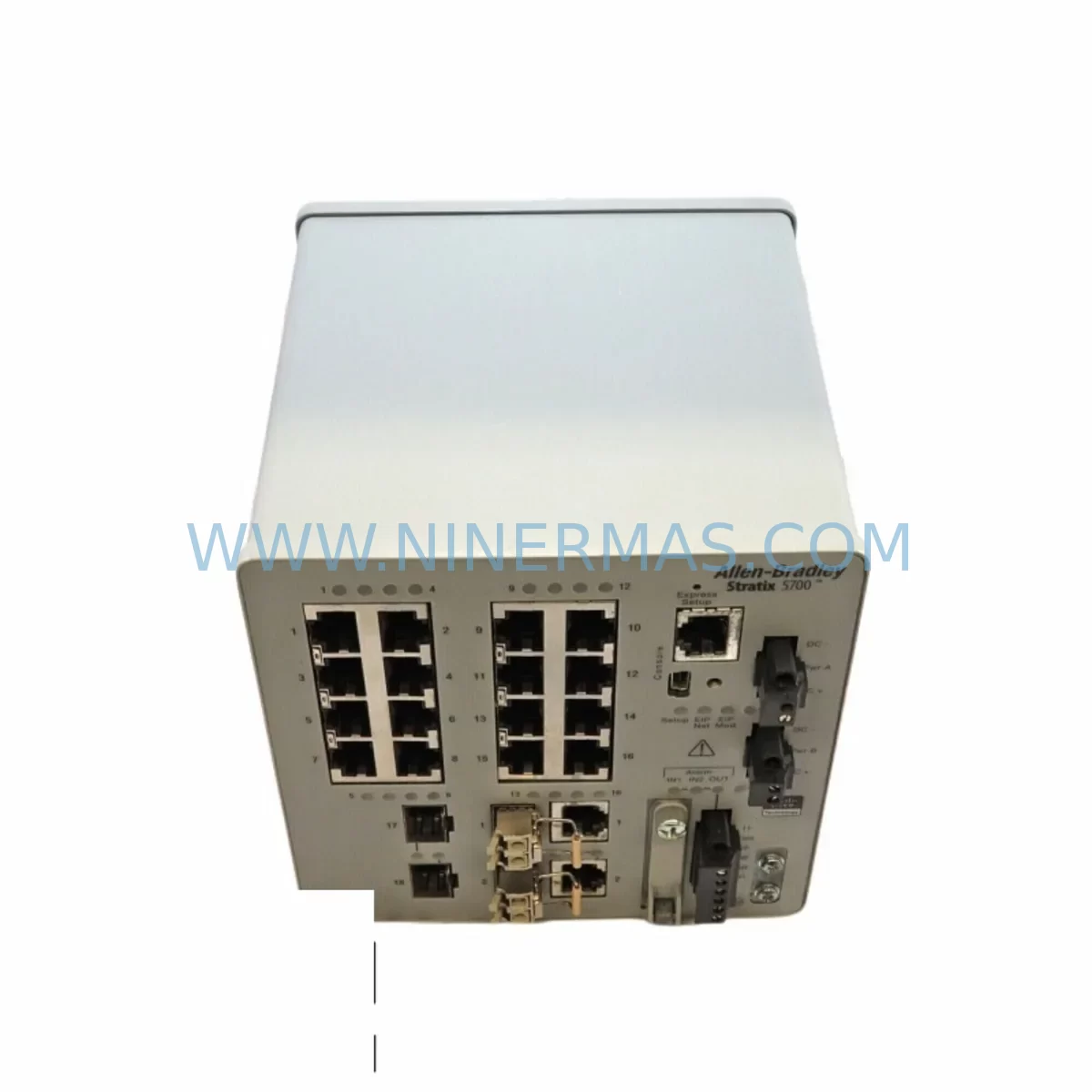
Allen-Bradley 1783-BMS20CGL Service-Ready Spare Part
Verify the part, confirm the platform family, and move straight into quotation with the right commercial details.
RFQ Ready
- SKU1783-BMS20CGL
- CategoryPLC & Industrial Automation Modules
- BrandAllen-Bradley
- SupportAvailability, lead time, condition, and shipping coordination
How Buyers Usually Use This Page
- Confirm the exact part number and platform family before sending the quote request.
- Use direct email when quantity, condition, and destination are already defined internally.
- Switch to the broader brand or category archive when you need alternates nearby.
Series Navigation
Move through the most common platform families behind this part.
Product RFQ
Send this part directly for quotation.
Include quantity, required condition, destination country, and target delivery timing. Current reference: Allen-Bradley 1783-BMS20CGL Service-Ready Spare Part with SKU 1783-BMS20CGL.
Allen-Bradley 1783-BMS20CGL Service-Ready Spare Part for Industrial Maintenance
The Allen-Bradley 1783-BMS20CGL is a factory-original spare part from the Rockwell Automation Stratix 5700 series — a fully managed EtherNet/IP industrial switch engineered for demanding automation environments. Whether you are responding to an unplanned network fault on a production line, executing a scheduled annual overhaul, or building a proactive spare parts inventory for your control cabinet, the 1783-BMS20CGL delivers the compatibility, reliability, and traceability that maintenance and procurement engineers require.
Sourced directly from authorized supply channels and tested prior to dispatch, every unit shipped by NINERMAS undergoes functional verification to confirm port integrity, firmware baseline, and physical condition. A 12-month warranty is included with every order, providing long-term supply assurance for facilities operating legacy Stratix 5700 infrastructure.
Spare Maintenance Table
| Parameter | Specification |
|---|---|
| Part Number | 1783-BMS20CGL |
| Brand / Manufacturer | Allen-Bradley / Rockwell Automation |
| Series | Stratix 5700 |
| Product Type | Managed EtherNet/IP Industrial Switch |
| Total Ports | 20 (16 × 10/100 copper + 4 × SFP combo uplink) |
| Protocol Support | EtherNet/IP, DLR (Device Level Ring), IGMP Snooping, QoS |
| Power Input | 24 VDC nominal (18–32 VDC range), dual redundant input |
| Operating Temperature | 0 °C to +60 °C (32 °F to 140 °F) |
| Mounting | DIN rail |
| Enclosure Rating | IP30 |
| Compatibility | Stratix 5700 family; ControlLogix, CompactLogix, GuardLogix PLC platforms; Studio 5000 / RSLogix 5000 integration |
| Firmware | Compatible with Cisco IOS-based Stratix firmware; configurable via RSLinx Classic and Studio 5000 |
| Origin | United States |
| Condition | Original / New Surplus / Tested Refurbished (as specified at order) |
| Warranty | 12 Months — covers manufacturing defects and functional failure under normal operating conditions |
| Lead Time | In-stock units ship within 1–3 business days; DHL / FedEx international express available |
Maintenance Planning for Continuous Operation
When a 1783-BMS20CGL switch fails or is flagged during a control cabinet inspection, the network fault rarely exists in isolation. Experienced maintenance engineers know that a managed switch replacement is the starting point of a broader diagnostic sweep — not the end of it.
Begin by verifying the 24 VDC power supply feeding the switch. Units such as the 1606-XLP95E or 1606-XLS240E Allen-Bradley power supplies are commonly paired with Stratix 5700 switches in the same panel. A degraded or undersized power supply can cause intermittent switch resets that mimic hardware failure. Confirm input voltage stability and check for ripple before condemning the switch itself.
Next, inspect the SFP fiber uplink modules installed in the combo ports. The 1783-SFP1GSX and 1783-SFP1GLX are standard SFP transceivers used in Stratix 5700 deployments for backbone ring connections. Dirty or damaged SFP modules can cause link-loss events that appear as switch failures in diagnostic logs. Clean or replace suspect SFPs as part of the same maintenance window.
For facilities running Device Level Ring (DLR) topologies, also verify the ring supervisor configuration on the replacement switch and confirm that adjacent 1783-BMS10CA or 1783-BMS10CGN nodes are operating correctly. A misconfigured ring supervisor on a replacement unit can cause a full ring collapse affecting all connected I/O devices.
At the PLC level, confirm that the ControlLogix 1756-EN2T or 1756-EN2TR EtherNet/IP communication modules are still establishing connections to the replacement switch. Check the module’s connection status in Studio 5000 and verify that IP addressing and VLAN assignments match the outgoing unit’s configuration. If the facility uses 1756-L8x series ControlLogix controllers, confirm that the controller’s I/O tree shows all devices online after the switch replacement.
Do not overlook the terminal blocks and field wiring connected to I/O modules in the same cabinet. Vibration-induced loosening of 1492-series terminal blocks is a common co-occurring fault during network events. A quick torque check on all terminal connections during the switch replacement window adds minimal time but prevents a secondary fault call within days of the repair.
For sites with PanelView Plus HMI terminals — such as the 2711P-T10C21D8S or 2711P-T12W21D8S — verify that the HMI can re-establish its EtherNet/IP connection to the PLC after the switch is replaced. HMI communication loss is a common post-replacement complaint that is resolved by confirming the switch port VLAN and speed/duplex settings match the original configuration.
Finally, if the facility uses 1783-NATR NAT routers or 1783-ETAP EtherNet/IP taps for device-level diagnostics, verify these components are still communicating correctly after the switch replacement. These devices are often overlooked during post-replacement verification but are critical for remote monitoring and predictive maintenance programs.
Site Replacement Workflow
Step 1 — Pre-Replacement Documentation: Before removing the faulty 1783-BMS20CGL, export the switch configuration using Cisco IOS CLI or the Stratix Device Manager web interface. Save the running configuration to a USB drive or engineering workstation. This file will be used to restore port assignments, VLANs, QoS policies, and DLR ring supervisor settings on the replacement unit.
Step 2 — Power Isolation: De-energize the switch using the panel’s 24 VDC branch circuit breaker. Do not rely on unplugging the power connector alone — confirm zero voltage at the switch terminals with a calibrated multimeter before proceeding.
Step 3 — Cable Labeling and Removal: Label all Ethernet patch cables by port number before disconnecting. Use a cable labeler or adhesive tags. Photograph the front panel before removal. This step is critical in dense 20-port installations where port-to-device mapping is not always documented in current as-built drawings.
Step 4 — DIN Rail Removal and Replacement: Release the DIN rail locking tab and slide the faulty unit out. Mount the replacement 1783-BMS20CGL on the DIN rail and secure the locking tab. Reconnect the 24 VDC power wiring — observe polarity markings on the terminal block.
Step 5 — Configuration Restore: Apply power and connect a laptop to the management port. Load the saved configuration file via CLI or Stratix Device Manager. Verify that all VLANs, port assignments, and DLR ring supervisor settings are correctly applied before reconnecting field cables.
Step 6 — Cable Reconnection and Verification: Reconnect all labeled Ethernet cables to their documented ports. Power up the ring and verify DLR ring status in Studio 5000. Confirm all I/O devices, HMI terminals, and PLC communication modules show online status. Document the replacement in the site maintenance log with the new unit’s serial number and firmware version.
This structured workflow minimizes downtime, eliminates configuration errors, and ensures full system compatibility — reducing mean time to restore (MTTR) for Stratix 5700 network faults to under two hours in most panel configurations.
Spare Parts Support FAQ
Q1: Is the 1783-BMS20CGL still available as a new original part, or only as refurbished?
Both new original and tested refurbished units are available from NINERMAS stock. New original units are sourced from authorized distribution channels and carry full factory traceability. Tested refurbished units undergo functional verification including port-by-port link testing, power-on self-test, and firmware confirmation before shipment. Both conditions are covered by the 12-month warranty. Specify your preferred condition at the time of inquiry.
Q2: How do I confirm compatibility with my existing Stratix 5700 installation before ordering?
Provide your existing switch’s catalog number, firmware version, and the Rockwell Automation software version (Studio 5000 / RSLogix 5000) in use at your site. NINERMAS technical support will confirm compatibility and advise on any firmware alignment steps required before installation. For DLR ring topologies, also provide the ring supervisor assignment of the outgoing unit so the replacement can be pre-configured before shipment if required.
Q3: What does the 12-month warranty cover, and what is the claim process?
The 12-month warranty covers manufacturing defects and functional failure under normal operating conditions from the date of shipment. It does not cover damage caused by incorrect installation, overvoltage, physical impact, or unauthorized modification. To initiate a warranty claim, contact NINERMAS at sale@ninermas.com with your order number, a description of the fault, and photographic evidence of the unit and installation. Replacement or repair will be arranged within 5 business days of claim confirmation.
Q4: Can NINERMAS support long-term supply agreements for 1783-BMS20CGL and related Stratix 5700 components?
Yes. NINERMAS offers long-term supply agreements for facilities requiring guaranteed stock availability of critical spare parts. This is particularly valuable for sites operating legacy Stratix 5700 infrastructure where Rockwell Automation has announced end-of-life timelines for specific catalog numbers. Contact our sales team to discuss annual volume commitments, reserved stock arrangements, and priority dispatch agreements that align with your planned maintenance schedule.
| Product Series | Stratix |
|---|---|
| Country of Origin | US |
Catalog Continuation
More Allen-Bradley modules in the catalog.
Use the brand lane to compare nearby part numbers, platform-adjacent modules, and other inquiry-ready listings before sending your final RFQ.




Catalog Continuation
Alternative parts within PLC & Industrial Automation Modules.
Stay inside the same system family when you need substitutes, adjacent modules, or a broader shortlist for procurement review.


SKU: 00-176-037 00-176-037 00-262-652 00-262-652 00-178-888 00-178-888
KUKA 00-176-037 Retrofit Reducer Module for Legacy Systems

SKU: 6SE7027-2TD84-6HF3
SIEMENS 6SE7027-2TD84-6HF3 Service-Ready Spare Part