
Original Industrial Spare Part
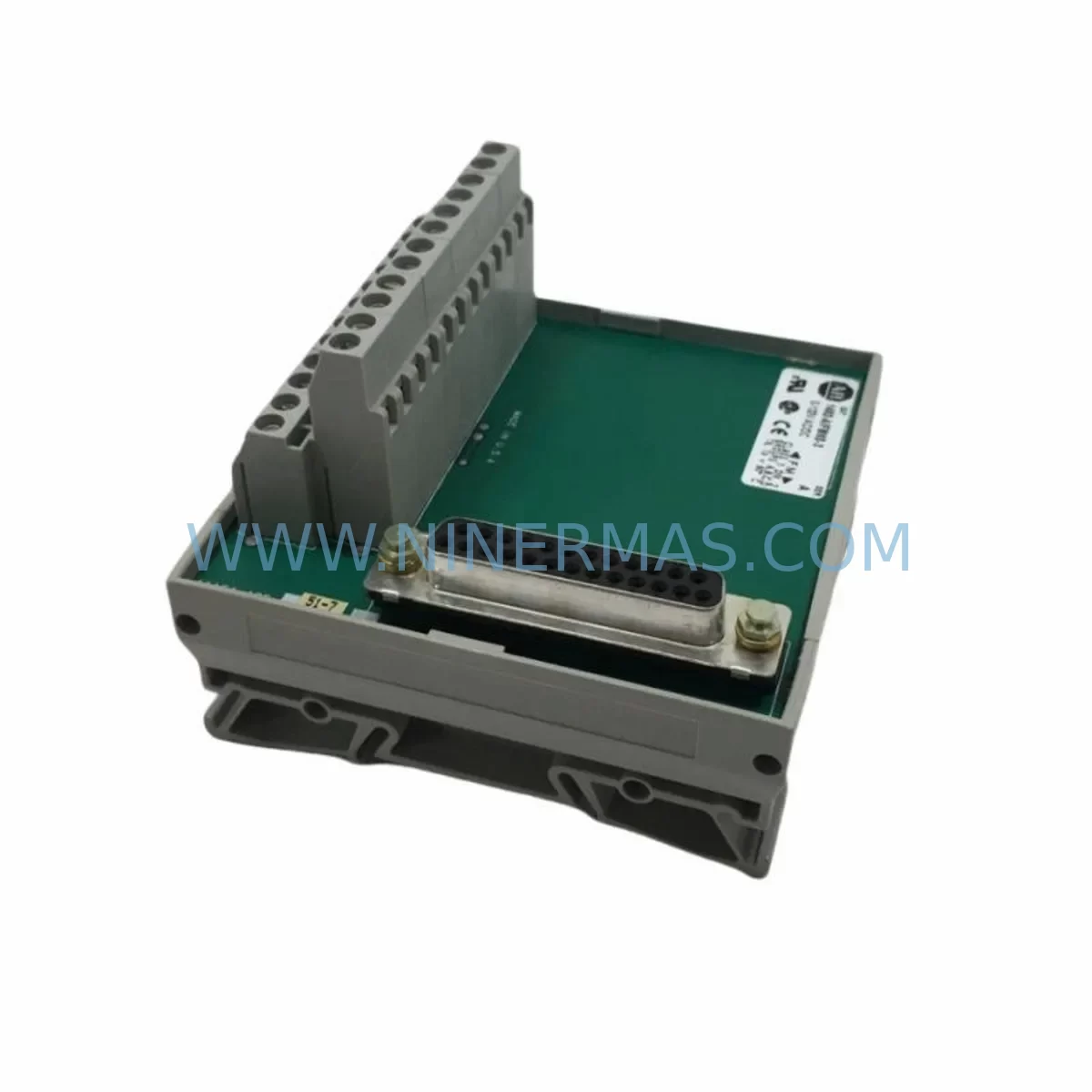
Allen-Bradley 1492-IFM40F-FS-2 Service-Ready Spare Part
Verify the part, confirm the platform family, and move straight into quotation with the right commercial details.
RFQ Ready
- SKU1492-IFM40F-FS-2
- CategoryPLC & Industrial Automation Modules
- BrandAllen-Bradley
- SupportAvailability, lead time, condition, and shipping coordination
How Buyers Usually Use This Page
- Confirm the exact part number and platform family before sending the quote request.
- Use direct email when quantity, condition, and destination are already defined internally.
- Switch to the broader brand or category archive when you need alternates nearby.
Series Navigation
Move through the most common platform families behind this part.
Product RFQ
Send this part directly for quotation.
Include quantity, required condition, destination country, and target delivery timing. Current reference: Allen-Bradley 1492-IFM40F-FS-2 Service-Ready Spare Part with SKU 1492-IFM40F-FS-2.
Allen-Bradley 1492-IFM40F-FS-2 Service-Ready Spare Part for Industrial Maintenance
The Allen-Bradley 1492-IFM40F-FS-2 is a 40-pin interface module from Rockwell Automation’s 1492 Series, engineered to provide reliable wiring interface connections between PLC I/O modules and field devices in industrial control cabinets. As a service-ready spare part sourced and tested by NINERMAS, this unit is prepared for immediate deployment in maintenance, emergency replacement, and planned shutdown scenarios across manufacturing, process control, and discrete automation environments.
Unplanned downtime caused by a failed or degraded interface module can cascade across an entire I/O rack, disrupting production lines and triggering costly emergency procurement. Stocking the 1492-IFM40F-FS-2 as a critical spare eliminates this risk, enabling maintenance engineers to restore system operation within minutes rather than days.
Spare Maintenance Table
| Parameter | Specification |
|---|---|
| Part Number / SKU | 1492-IFM40F-FS-2 |
| Brand | Allen-Bradley / Rockwell Automation |
| Series | 1492 Series Interface Module |
| Product Type | 40-Pin Fixed Interface Module with Fused Outputs |
| Compatible Systems | SLC 500, MicroLogix 1500, CompactLogix, ControlLogix I/O Racks |
| Pin Count | 40-pin |
| Output Protection | Fused (FS) — individual fuse protection per output circuit |
| Wiring Style | Fixed screw-terminal wiring interface |
| Mounting | DIN rail compatible, panel-mount ready |
| Operating Temperature | 0°C to 60°C (standard industrial cabinet environment) |
| Application Environment | Industrial control panels, PLC I/O expansion racks, MCC cabinets |
| Origin | United States (Rockwell Automation OEM) |
| Condition | Original, new or service-ready tested unit |
| Pre-shipment Testing | Functional continuity and insulation verified before dispatch |
| Warranty | 12 Months — NINERMAS Quality Guarantee |
| Lead Time | In-stock units ship within 1–3 business days |
Maintenance Planning for Continuous Operation
When a maintenance or procurement engineer identifies the 1492-IFM40F-FS-2 as a replacement requirement, the replacement event rarely occurs in isolation. A thorough control cabinet inspection during the same maintenance window significantly reduces the risk of secondary failures and repeat downtime. The following components should be evaluated concurrently:
Begin with the 1746-IB16 or 1746-OB16 SLC 500 I/O modules that interface directly with the 1492-IFM40F-FS-2. Verify that the I/O module’s terminal block connections are secure and that no channel has experienced overcurrent damage. If the interface module’s fuses have blown, the corresponding I/O channel on the 1746 Series digital output module should be tested for output transistor integrity before reconnecting field loads.
Inspect the 1492-CABLE series pre-wired cables that connect the I/O module to the interface module. Cable insulation degradation, connector pin corrosion, or mechanical stress fractures are common root causes of intermittent I/O faults that are often misdiagnosed as module failures. Replacing the interface module without inspecting the cable assembly may result in repeat failures within weeks.
Check the 24VDC power supply feeding the output circuits — typically a 1606-XLP or 1606-XLS Series Rockwell power supply or equivalent third-party DIN rail PSU. Measure output voltage under load; a sagging supply rail can cause fuse trips in the 1492-IFM40F-FS-2 without any actual field fault. Confirm that the power supply’s output capacitors are within specification, particularly in systems that have been in service for more than five years.
Review the terminal block assemblies adjacent to the interface module — 1492-W3 or 1492-W4 Series feed-through terminal blocks are commonly used in the same wiring duct. Loose terminations or oxidized contacts at these points introduce resistance that can cause erratic I/O behavior. Torque all terminals to specification during the replacement procedure.
If the control system includes a 1747-SN Remote I/O Scanner or 1756-DNB DeviceNet Bridge for distributed I/O communication, verify that the communication module’s diagnostic LEDs show no fault conditions after the interface module is replaced and the rack is powered. Communication faults that appear post-replacement are often pre-existing conditions masked by the original module failure.
For systems using 1492-AIFM Series analog interface modules in adjacent slots, confirm that signal isolation is intact and that no ground loop has been introduced through shared wiring infrastructure. Signal isolators such as the 1492-AIFM8-F-5 should be inspected for proper channel-to-channel isolation resistance.
Finally, review the 1747-L553 or 1769-L33ER processor fault log via RSLogix 500 or Studio 5000 to confirm that no persistent I/O fault codes remain after the replacement. Clear the fault log, perform a controlled I/O force test on the replaced channels, and document the restoration in the site maintenance record before returning the system to production.
Site Replacement Workflow
Step 1 — Isolation: De-energize the I/O rack section containing the interface module. Follow site LOTO (Lockout/Tagout) procedures. Confirm zero-energy state with a calibrated voltage tester before touching any terminal.
Step 2 — Documentation: Photograph the existing wiring layout and label all field cables before disconnection. The 1492-IFM40F-FS-2 uses a fixed-terminal design; field wires must be reconnected to the same terminal positions on the replacement unit.
Step 3 — Fuse Inspection: Remove and inspect all fuses in the outgoing unit. A pattern of blown fuses on specific output channels indicates a field-side short or overload condition that must be resolved before the new module is energized. Replace only with fuses of the correct rating as specified in the 1492-IFM40F-FS-2 installation manual.
Step 4 — Module Swap: Disconnect the pre-wired cable assembly from the I/O module side. Remove the failed 1492-IFM40F-FS-2 from the DIN rail. Install the service-ready replacement unit, reconnect the cable assembly, and re-terminate all field wiring per the documented layout.
Step 5 — Energization and Verification: Re-energize the rack section. Monitor the processor’s I/O status display for all channels. Perform a channel-by-channel output force test to confirm field device response. Verify fuse integrity under load before releasing the system to production.
This workflow is compatible with direct replacement of legacy 1492-IFM40 (non-fused) units where a fused upgrade is being implemented for improved circuit protection. No PLC program changes are required for a like-for-like replacement.
Spare Parts Support FAQ
Q1: Is the 1492-IFM40F-FS-2 still available as a new original part?
A: Yes. NINERMAS maintains stock of original Allen-Bradley 1492-IFM40F-FS-2 units sourced through authorized industrial distribution channels. Each unit is verified for authenticity and tested for functional continuity prior to shipment. For long-lead or obsolescence-risk scenarios, we recommend procuring a minimum of two units per control cabinet to support a 12–24 month maintenance cycle.
Q2: What is the compatibility scope of the 1492-IFM40F-FS-2?
A: The 1492-IFM40F-FS-2 is designed for use with Allen-Bradley 40-pin I/O modules across the SLC 500, MicroLogix 1500, and CompactLogix platforms. Compatibility is determined by the I/O module’s connector type and pin count. Always cross-reference the I/O module catalog number against the 1492 Series selection guide before ordering to confirm cable and interface module compatibility.
Q3: How does NINERMAS verify units before shipment?
A: All units undergo a pre-shipment inspection protocol that includes visual inspection for physical damage, terminal integrity check, fuse continuity verification, and insulation resistance testing. Units that do not pass inspection are quarantined and not dispatched. A test report is available upon request for critical infrastructure procurement.
Q4: What warranty and long-term supply support does NINERMAS provide?
A: Every 1492-IFM40F-FS-2 unit supplied by NINERMAS carries a 12-month warranty covering manufacturing defects and functional failures under normal operating conditions. For customers managing aging SLC 500 or MicroLogix systems, NINERMAS offers long-term supply agreements to ensure continued availability of critical spare parts beyond standard market lead times. Contact our technical sales team to discuss inventory reservation and scheduled delivery programs.
| Product Series | CompactLogix |
|---|---|
| Country of Origin | US |
Catalog Continuation
More Allen-Bradley modules in the catalog.
Use the brand lane to compare nearby part numbers, platform-adjacent modules, and other inquiry-ready listings before sending your final RFQ.




Catalog Continuation
Alternative parts within PLC & Industrial Automation Modules.
Stay inside the same system family when you need substitutes, adjacent modules, or a broader shortlist for procurement review.



SKU: HDD02.2-W040N-HS12-01-FW FWA-DIAX04-ELS-05VRS-MS
Rexroth HDD02.2-W040N-HS12-01-FW Service-Ready Spare Part

SKU: I5DAE375F10010000S
Lenze I5DAE375F10010000S Service-Ready Spare Part for Industrial Maintenance



