Original Industrial Spare Part
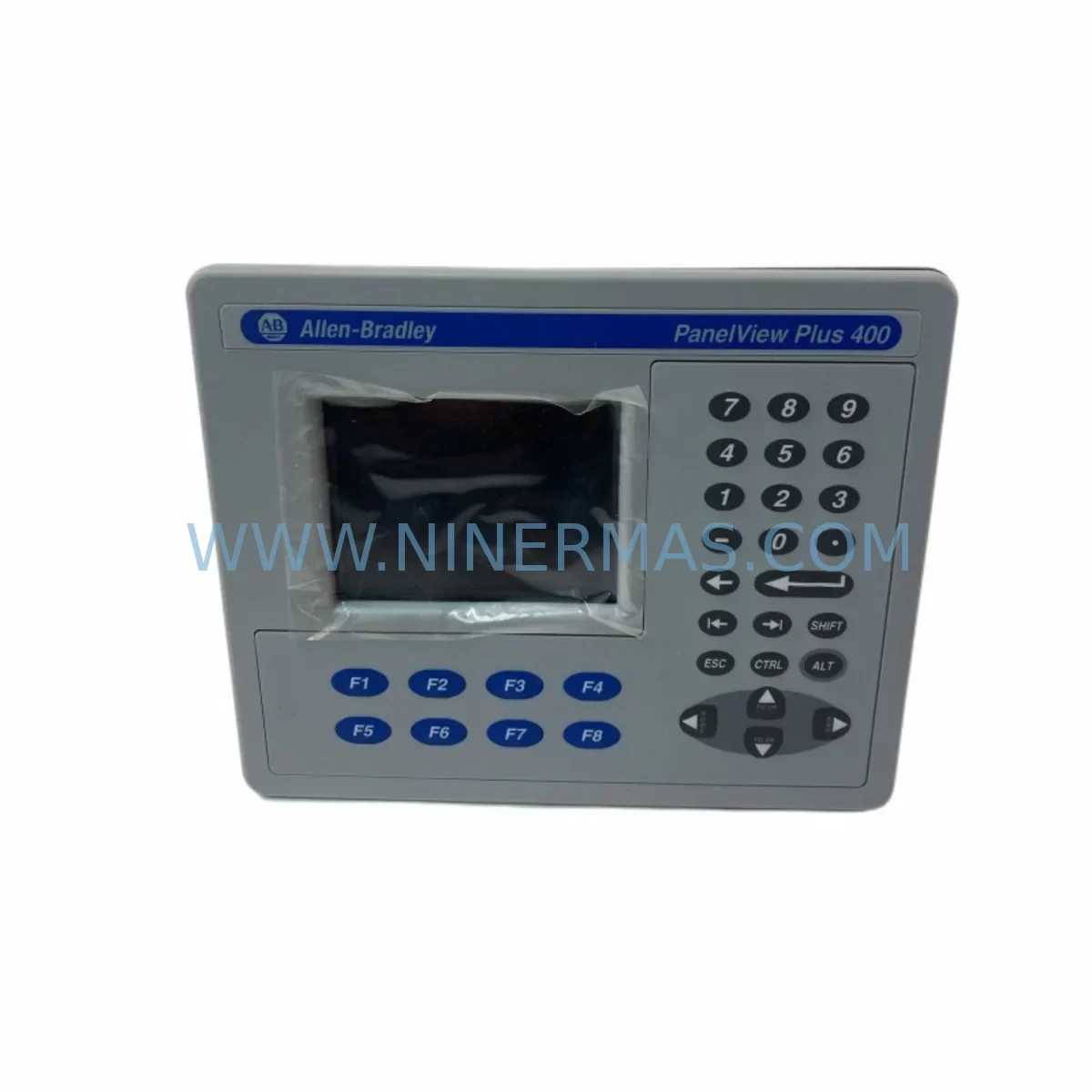
Allen-Bradley 2711P-K4M5D Service-Ready Spare Part for Industrial Maintenance
Verify the part, confirm the platform family, and move straight into quotation with the right commercial details.
RFQ Ready
- SKU2711P-K4M5D
- CategoryPLC & Industrial Automation Modules
- BrandAllen-Bradley
- SupportAvailability, lead time, condition, and shipping coordination
How Buyers Usually Use This Page
- Confirm the exact part number and platform family before sending the quote request.
- Use direct email when quantity, condition, and destination are already defined internally.
- Switch to the broader brand or category archive when you need alternates nearby.
Series Navigation
Move through the most common platform families behind this part.
Product RFQ
Send this part directly for quotation.
Include quantity, required condition, destination country, and target delivery timing. Current reference: Allen-Bradley 2711P-K4M5D Service-Ready Spare Part for Industrial Maintenance with SKU 2711P-K4M5D.
Allen-Bradley 2711P-K4M5D Service-Ready Spare Part for Industrial Maintenance
The Allen-Bradley 2711P-K4M5D is a compact PanelView Plus 400 operator terminal designed for demanding industrial environments. As a critical human-machine interface (HMI) component within Rockwell Automation control architectures, this unit serves as the primary operator touchpoint for process visualization, alarm acknowledgment, and real-time status monitoring across manufacturing, packaging, material handling, and process control applications. When this terminal fails or degrades, production lines halt — making a verified, service-ready spare unit an essential element of any proactive maintenance strategy.
At NINERMAS, we supply the 2711P-K4M5D as a tested, original spare part backed by a 12-month warranty. Each unit undergoes pre-shipment functional verification to ensure it meets OEM specifications before leaving our facility. Whether you are responding to an unplanned breakdown or building out your annual spare parts inventory, our stock is available for rapid dispatch to minimize your downtime exposure.
Spare Maintenance Table
| Parameter | Specification |
|---|---|
| Part Number | 2711P-K4M5D |
| Brand | Allen-Bradley (Rockwell Automation) |
| Series | PanelView Plus 400 |
| Display Size | 4-inch monochrome keypad display |
| Interface Type | Keypad operator terminal (non-touch) |
| Communication | DH-485 / RS-232 (DF1) |
| Power Supply | 24V DC nominal |
| Operating Temperature | 0°C to 55°C (32°F to 131°F) |
| Protection Rating | NEMA 4/4X, 12, 13 (front panel) |
| Compatibility | PanelView Plus 400 series; replaces legacy PanelView 300/550 in many retrofit scenarios |
| Mounting | Panel cutout mount |
| Application Environment | Industrial control cabinets, OEM machinery, process panels |
| Maintenance Recommendation | Inspect keypad membrane, display contrast, and communication cable integrity at each scheduled PM cycle |
| Warranty | 12 months from date of shipment (NINERMAS) |
Maintenance Planning for Continuous Operation
Replacing the 2711P-K4M5D in the field is rarely an isolated task. Maintenance engineers and procurement teams who have managed PanelView Plus installations know that the HMI terminal sits at the intersection of multiple electrical and communication subsystems. A thorough replacement workflow should account for the full control cabinet ecosystem to prevent repeat failures and ensure stable operation after the swap.
Begin by inspecting the 24V DC power supply feeding the terminal — units such as the Allen-Bradley 1606-XLP series or equivalent industrial DIN-rail power supplies are common in these cabinets and should be verified for output voltage stability and ripple before commissioning the replacement HMI. A marginal power supply is a frequent root cause of premature HMI failure and is often overlooked during emergency replacements.
Next, examine the communication wiring. The 2711P-K4M5D typically communicates via DH-485 or RS-232 DF1 protocol to a connected PLC — commonly a MicroLogix 1000, MicroLogix 1100, or MicroLogix 1400 series controller. Inspect the 1761-CBL-PM02 or equivalent programming/communication cable for continuity, connector wear, and shielding integrity. Degraded cables are a leading cause of intermittent communication faults that can be misdiagnosed as HMI hardware failure.
While the control cabinet is open, conduct a broader inspection of adjacent components. Check the terminal blocks and wiring ferrules on the I/O side of the associated PLC — loose connections on SLC 500 or MicroLogix I/O modules can introduce noise that affects HMI display stability. If the system includes a 1769-SDN DeviceNet scanner or similar communication module, verify its status indicators and connection integrity as part of the same service event.
For cabinets that include relay output modules such as the 1762-OW8 or similar, inspect relay contact condition and coil voltage. Relay chatter or contact degradation can introduce electrical noise that shortens the service life of sensitive HMI electronics. Similarly, check any installed surge protection devices and fuse blocks — a blown fuse on the HMI power circuit is a simple fault that can be mistaken for terminal failure.
If the installation includes a 2711P-RN15S or similar remote I/O communication card, or if the HMI is networked via an Ethernet/IP adapter, verify network switch port status and cable termination quality. Signal integrity issues at the network layer can cause application loading failures or screen freezing that mimic hardware faults in the 2711P-K4M5D itself.
For sites running older control architectures, this replacement event is also an opportunity to assess whether adjacent legacy components — such as aging SLC 500 processor modules or 1747-L553 CPUs — are approaching end-of-life. Proactive identification of at-risk components during a planned HMI replacement reduces the likelihood of a secondary unplanned outage in the weeks following the repair.
Site Replacement Workflow
When the 2711P-K4M5D arrives on site, follow a structured replacement workflow to minimize downtime and ensure compatibility. Begin with a pre-installation review: confirm the replacement unit’s catalog number matches the installed unit exactly, and verify that the application program (.mer file) stored on the existing terminal or on a backup CompactFlash card is accessible and current.
Power down the control cabinet following your site’s lockout/tagout (LOTO) procedure. Disconnect the communication cable and 24V DC power connector from the existing terminal. Remove the panel mounting hardware and extract the old unit. Before installing the replacement 2711P-K4M5D, inspect the panel cutout gasket for compression set or damage — a compromised gasket will defeat the NEMA 4 sealing rating of the new terminal.
Install the replacement unit, reconnect power and communication cables, and restore power. Use RSView ME Station or FactoryTalk View ME software to load or verify the application program. Confirm all screen navigation, alarm pages, and data entry functions operate correctly before returning the system to production. Document the replacement in your maintenance management system (CMMS) with the new unit’s serial number and installation date to support warranty tracking and future PM scheduling.
For sites transitioning away from discontinued legacy HMI models, the 2711P-K4M5D is a viable upgrade path from older PanelView 300 and PanelView 550 terminals in many applications, subject to program conversion using FactoryTalk View ME tools. This upgrade path extends system life without requiring a full PLC or control system replacement, delivering significant cost savings compared to a complete panel redesign.
Spare Parts Support FAQ
Q1: Is the 2711P-K4M5D still available as a new original spare, or only as a refurbished unit?
NINERMAS supplies the 2711P-K4M5D as an original spare part. Each unit is sourced through verified industrial supply channels and undergoes pre-shipment functional testing. We do not represent refurbished or remanufactured units as new. If original new stock is unavailable for a specific order, we will advise you clearly before shipment.
Q2: What is the warranty coverage, and what does it include?
All 2711P-K4M5D units supplied by NINERMAS carry a 12-month warranty from the date of shipment. The warranty covers manufacturing defects and functional failures under normal operating conditions. It does not cover damage resulting from incorrect installation, overvoltage, or physical impact. Our technical team can assist with failure analysis documentation if a warranty claim is required.
Q3: How do I confirm compatibility before ordering, especially for a retrofit or upgrade application?
Provide us with your existing terminal’s catalog number, the connected PLC model, and your communication protocol (DH-485 or RS-232 DF1). Our engineering support team will confirm compatibility and advise on any program conversion requirements. For retrofit applications replacing older PanelView 300 or 550 units, we can also advise on panel cutout dimensions and mounting adapter requirements.
Q4: Can NINERMAS support long-term or blanket purchase orders for ongoing spare parts inventory programs?
Yes. We support long-term supply agreements for maintenance teams and procurement engineers who require guaranteed stock availability for critical spare parts. Contact our sales team to discuss volume pricing, reserved inventory arrangements, and scheduled delivery programs tailored to your annual maintenance budget cycle.
| Product Series | 2711 |
|---|---|
| Country of Origin | US |
Catalog Continuation
More Allen-Bradley modules in the catalog.
Use the brand lane to compare nearby part numbers, platform-adjacent modules, and other inquiry-ready listings before sending your final RFQ.




Catalog Continuation
Alternative parts within PLC & Industrial Automation Modules.
Stay inside the same system family when you need substitutes, adjacent modules, or a broader shortlist for procurement review.



SKU: HDD02.2-W040N-HS12-01-FW FWA-DIAX04-ELS-05VRS-MS
Rexroth HDD02.2-W040N-HS12-01-FW Service-Ready Spare Part

SKU: I5DAE375F10010000S
Lenze I5DAE375F10010000S Service-Ready Spare Part for Industrial Maintenance