Original Industrial Spare Part
Allen-Bradley 1762-OF4 Retrofit-Compatible Analog Output Module
Verify the part, confirm the platform family, and move straight into quotation with the right commercial details.
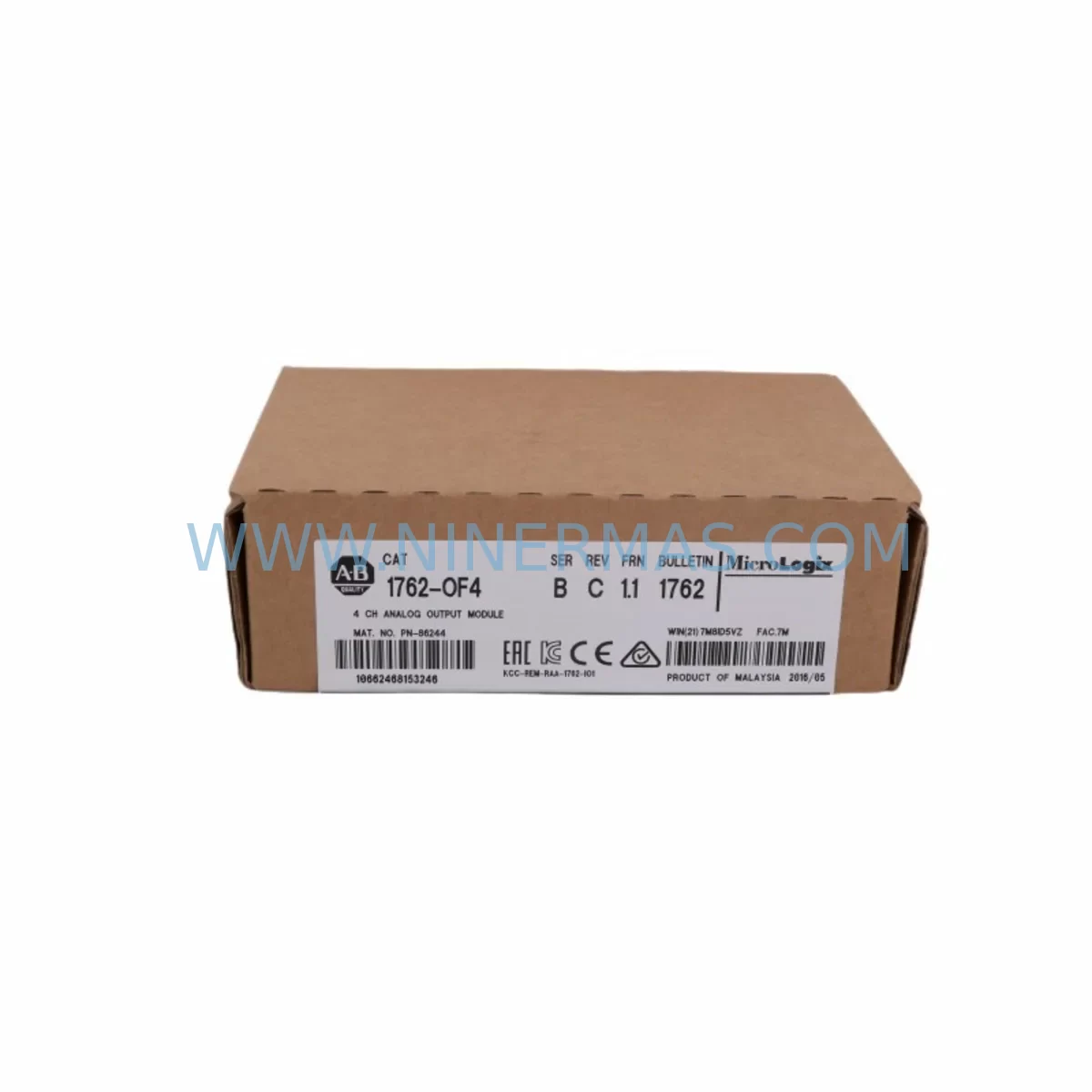
RFQ Ready
- SKU1762-OF4
- CategoryPLC & Industrial Automation Modules
- BrandAllen-Bradley
- SupportAvailability, lead time, condition, and shipping coordination
How Buyers Usually Use This Page
- Confirm the exact part number and platform family before sending the quote request.
- Use direct email when quantity, condition, and destination are already defined internally.
- Switch to the broader brand or category archive when you need alternates nearby.
Series Navigation
Move through the most common platform families behind this part.
Product RFQ
Send this part directly for quotation.
Include quantity, required condition, destination country, and target delivery timing. Current reference: Allen-Bradley 1762-OF4 Retrofit-Compatible Analog Output Module with SKU 1762-OF4.
Allen-Bradley 1762-OF4 Retrofit-Compatible Analog Output Module for Legacy Systems
The Allen-Bradley 1762-OF4 is a 4-channel analog output module designed for the MicroLogix 1200 and MicroLogix 1500 control platforms. As legacy automation systems face increasing pressure from aging hardware, discontinued spare parts, and evolving process requirements, the 1762-OF4 serves as a critical retrofit component — enabling engineers to restore, upgrade, or migrate analog output functionality without replacing the entire control architecture. NINERMAS maintains verified stock of the 1762-OF4, fully tested prior to shipment and backed by a 12-month warranty.
Whether you are replacing a failed output module on a running production line, upgrading an aging MicroLogix-based control cabinet, or migrating from an older analog signal architecture, the 1762-OF4 provides a reliable, drop-in-compatible solution that minimizes engineering rework and reduces unplanned downtime.
Upgrade Compatibility Table
| Parameter | Specification / Retrofit Note |
|---|---|
| SKU / Part Number | 1762-OF4 |
| Brand / Series | Allen-Bradley / MicroLogix 1762 Series |
| Output Channels | 4 Analog Output Channels |
| Output Signal Range | 0–20 mA, 4–20 mA, 0–10 VDC, ±10 VDC |
| Resolution | 12-bit (0–4095 counts) |
| Compatible Controllers | MicroLogix 1200 (1762-Lxx), MicroLogix 1500 (1764-Lxx) |
| Backplane Interface | MicroLogix 1762 expansion bus — direct plug-in, no adapter required |
| Installation Requirement | Verify available expansion slot count; max 8 expansion modules per MicroLogix 1200 system |
| Wiring Compatibility | Screw-terminal block; confirm field wiring gauge and terminal torque spec before reconnection |
| Communication Protocol | Local I/O bus (no separate network configuration required) |
| Replacement Recommendation | Direct replacement for failed or end-of-life 1762-OF4 units; verify firmware revision of host controller |
| Commissioning Focus | Confirm module address, output scaling in RSLogix 500, and field device calibration after swap |
| Operating Temperature | 0°C to 60°C (32°F to 140°F) |
| Protection Rating | IP20 (panel-mount installation required) |
| Warranty | 12-Month Warranty — all units tested before shipment |
Retrofit Planning for Existing Automation Systems
Successful retrofit of the 1762-OF4 into an existing MicroLogix control system requires careful pre-installation planning across several dimensions. Before removing the failed module, engineers should document the current output channel configuration — including signal type (current or voltage), scaling parameters, and any fault-state output values defined in the RSLogix 500 program. This data is essential for restoring identical behavior after the module swap.
The 1762-OF4 connects directly to the MicroLogix 1762 expansion bus. When planning the retrofit, confirm the physical slot position in the expansion rack and verify that the 1762-L24AWA or 1762-L40AWA host controller has sufficient I/O capacity and firmware compatibility. If the existing system also uses a 1762-IQ16 digital input module or a 1762-OW16 relay output module in adjacent slots, ensure that the total expansion module count does not exceed the platform limit.
For systems that include a 1762-IF4 analog input module handling process feedback signals, the 1762-OF4 analog outputs typically form the control loop output side — driving control valves, variable frequency drives, or current-to-pneumatic transducers. Replacing the output module without verifying the input module’s calibration status can introduce loop offset errors, so both modules should be checked during the same maintenance window.
In control cabinets where a 1762-IQ8OW6 combination I/O module is also installed, wiring terminal labeling must be carefully reviewed before disconnecting field cables. Terminal block layouts differ between module types, and mislabeling during a rushed swap is a common source of commissioning errors. Use the original panel drawings and update them to reflect any wiring changes made during the retrofit.
If the system communicates upstream via a 1761-NET-ENI Ethernet interface or a 1761-NET-DNI DeviceNet interface, these communication modules are unaffected by the analog output module swap — but the host controller should be placed in program mode and communication verified before returning the system to automatic operation. For systems using a 1747-PIC or 1761-CBL-PM02 programming cable for RSLogix 500 access, ensure the laptop connection is established before the swap to allow immediate program verification post-installation.
Where the control cabinet includes a 2711P-T7C22D9P PanelView Plus HMI displaying analog output values, confirm that the HMI tag database references the correct module slot address after the replacement. Slot address mismatches between the HMI and the PLC program are a frequent cause of post-retrofit display anomalies that can be mistaken for hardware faults.
All 1762-OF4 units supplied by NINERMAS are sourced from verified supply channels, inspected upon receipt, and functionally tested prior to shipment. Stock is maintained to support both emergency replacement orders and planned retrofit projects, with lead times confirmed at the time of inquiry.
Downtime Control During System Migration
Minimizing production downtime during a MicroLogix analog output module replacement requires a structured approach. The recommended sequence is: (1) back up the RSLogix 500 program from the host controller before any hardware change; (2) document all field wiring terminal connections with photographs and written records; (3) place the controller in program mode and de-energize the output module’s field power supply before removal; (4) install the replacement 1762-OF4 in the same slot position; (5) restore field wiring according to the documented terminal layout; (6) power up the module and verify that RSLogix 500 recognizes it at the correct slot address; (7) download the backed-up program if required; (8) perform output channel verification by commanding each channel to a known value and confirming the field device response before returning to automatic mode.
For continuous process applications — such as chemical dosing, boiler feedwater control, or HVAC valve positioning — where even brief output interruptions are unacceptable, consider pre-staging the replacement module and completing all documentation steps during a planned maintenance window rather than during an emergency breakdown. NINERMAS can support urgent replacement requirements with priority dispatch for verified stock items.
Protecting the original program logic is non-negotiable. Never overwrite the controller program during a module swap unless the backup has been verified. If the controller’s battery-backed RAM has been compromised by a power event, restore from the most recent verified backup before commissioning the new module. This discipline ensures that the control logic governing interlocks, alarm setpoints, and output scaling remains intact throughout the migration.
Retrofit Support FAQ
Q1: Is the 1762-OF4 a direct drop-in replacement for a failed unit in my existing MicroLogix 1200 system?
Yes. The 1762-OF4 is a direct replacement for any existing 1762-OF4 installed in a MicroLogix 1200 or MicroLogix 1500 expansion rack. No hardware adapter or wiring modification is required, provided the replacement unit is installed in the same slot position. Confirm the module firmware revision is compatible with your host controller firmware version using the Rockwell Automation Product Compatibility and Download Center (PCDC) before installation.
Q2: What pre-shipment testing does NINERMAS perform on the 1762-OF4?
Every 1762-OF4 unit shipped by NINERMAS undergoes functional verification prior to dispatch. Testing confirms that all four output channels respond correctly across the configured signal range, that the backplane interface communicates correctly, and that no physical damage or connector wear is present. A 12-month warranty is provided on all units from the date of shipment.
Q3: Can the 1762-OF4 be used in a system that is being migrated from MicroLogix to a CompactLogix platform?
The 1762-OF4 is a MicroLogix 1762-series expansion module and is not directly compatible with CompactLogix 5370 or 5380 platforms, which use 1769 Compact I/O modules. If you are planning a full platform migration to CompactLogix, the equivalent analog output module in the 1769 series is the 1769-OF4. NINERMAS can advise on both MicroLogix spare parts and CompactLogix migration components depending on your project scope.
Q4: What is NINERMAS’s lead time and long-term supply commitment for the 1762-OF4?
NINERMAS maintains active inventory of the 1762-OF4 to support both emergency breakdown replacements and planned retrofit projects. Lead time is confirmed at the time of order based on current stock levels. For projects requiring multiple units or phased delivery, contact our sales team to arrange a supply agreement. All units are covered by a 12-month warranty and are available for international shipment.
| Product Series | MicroLogix |
|---|---|
| Country of Origin | US |
Catalog Continuation
More Allen-Bradley modules in the catalog.
Use the brand lane to compare nearby part numbers, platform-adjacent modules, and other inquiry-ready listings before sending your final RFQ.


Catalog Continuation
Alternative parts within PLC & Industrial Automation Modules.
Stay inside the same system family when you need substitutes, adjacent modules, or a broader shortlist for procurement review.
SKU: 6SL3224-0BE33-7UA0
Siemens 6SL3224-0BE33-7UA0 Service-Ready Spare Part
SKU: HENF331395R0001 P4LDA
ABB HENF331395R0001 Service-Ready Industrial Spare Part