
Original Industrial Spare Part
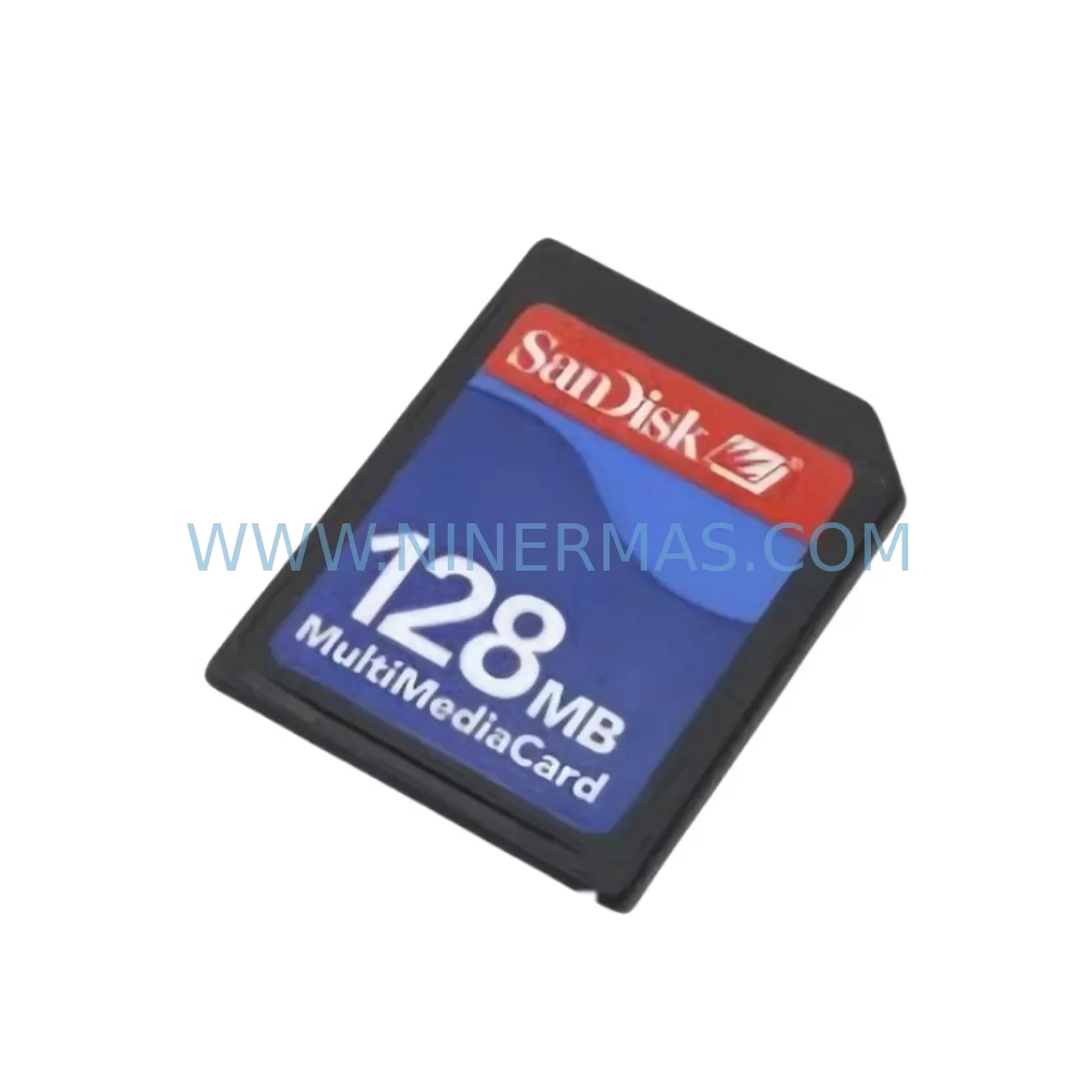
SanDisk 128MB Retrofit-Compatible Industrial Flash for Legacy Systems
Verify the part, confirm the platform family, and move straight into quotation with the right commercial details.
RFQ Ready
- SKU128MB
- CategoryPLC & Industrial Automation Modules
- BrandSanDisk
- SupportAvailability, lead time, condition, and shipping coordination
How Buyers Usually Use This Page
- Confirm the exact part number and platform family before sending the quote request.
- Use direct email when quantity, condition, and destination are already defined internally.
- Switch to the broader brand or category archive when you need alternates nearby.
Series Navigation
Move through the most common platform families behind this part.
Product RFQ
Send this part directly for quotation.
Include quantity, required condition, destination country, and target delivery timing. Current reference: SanDisk 128MB Retrofit-Compatible Industrial Flash for Legacy Systems with SKU 128MB.
SanDisk 128MB Retrofit-Compatible Industrial Flash for Legacy Systems
The SanDisk 128MB Industrial Flash Memory Card is a proven retrofit solution for engineers and maintenance teams managing aging automation infrastructure. Designed for compatibility with legacy PLC racks, HMI panels, and distributed control systems, this compact storage module enables smooth program migration, parameter backup, and firmware retention without requiring a full controller replacement. Whether you are restoring a discontinued production line or extending the service life of an existing control cabinet, this card delivers the reliable read/write performance that industrial environments demand.
In legacy system modernization projects, storage media is often the first component to fail — yet it carries the most critical data: ladder logic programs, recipe tables, motion profiles, and communication configuration files. The SanDisk 128MB card is engineered to withstand the vibration, temperature cycling, and electromagnetic interference common in factory floors, making it a dependable choice for both emergency replacement and planned upgrade scenarios.
When integrating this card into an existing control architecture, engineers should verify the host controller’s memory interface standard — whether CompactFlash Type I/II, PCMCIA, or proprietary slot — before installation. Many older Siemens S5 and S7-300 series CPUs, as well as Mitsubishi Q-series and A-series controllers, rely on external flash cards for program storage and data logging. The SanDisk 128MB card is compatible with a wide range of these platforms, provided the host system’s firmware supports the card’s capacity and FAT formatting.
Upgrade Compatibility Table
| Parameter | Details |
|---|---|
| SKU | 128MB |
| Brand / Series | SanDisk Industrial Flash |
| Capacity | 128 MB |
| Interface Compatibility | CompactFlash Type I/II; PCMCIA adapter supported |
| Typical Host Systems | Siemens S7-300/400 CPU, Mitsubishi Q/A-series, GE Fanuc Series 90, Allen-Bradley SLC 500 |
| Installation Requirement | Power-off insertion recommended; confirm slot clearance in control cabinet |
| Communication Compatibility | No protocol dependency; passive storage device |
| Replacement Recommendation | Direct drop-in for same-capacity legacy cards; backup program before swap |
| Commissioning Notes | Format to FAT16 if required by host CPU; restore program via programming cable (e.g., MPI, USB-PPI, or RS-232 adapter) |
| Warranty | 12-Month Warranty — covers manufacturing defects under normal industrial use |
Retrofit Planning for Existing Automation Systems
A successful retrofit begins well before the card is physically installed. The first step is a full audit of the existing control cabinet: identify the CPU module (such as a Siemens 6ES7 315-2AG10-0AB0 or equivalent), confirm the backplane slot configuration, and document the current program version stored on the outgoing memory card. If the legacy card is still readable, use a Siemens STEP 7 programming cable or a Mitsubishi GX Works2-compatible USB adapter to extract and archive the program before proceeding.
Next, assess the power supply module feeding the CPU rack. Older 24VDC rail-mount power supplies may have degraded output regulation, which can cause intermittent write errors on flash media. It is advisable to test supply voltage under load before commissioning the new card. Similarly, inspect the backplane bus connector for oxidation or mechanical wear — a poor backplane connection is a common root cause of memory card read failures in systems that have been in service for more than a decade.
For systems using Profibus DP or MPI communication networks, the memory card swap does not affect the communication module configuration directly. However, if the CPU program references specific Profibus slave addresses or GSD file parameters, these must be verified in the restored program after the card is installed. In installations where a CP 343-1 Ethernet communication module or a CP 341 serial communication module is present, confirm that the module parameters stored in the CPU program match the physical hardware configuration before going live.
I/O expansion modules — including digital input modules (SM 321), digital output modules (SM 322), and analog input/output modules (SM 331/332) — do not require reconfiguration when only the memory card is replaced, provided the hardware configuration stored on the new card matches the physical rack layout. If the rack has been modified since the original program was written, update the hardware configuration in STEP 7 or GX Works before downloading to the new card.
HMI panels connected to the controller via MPI or Profibus — such as Siemens TP 177B or MP 277 series — will continue to operate normally during a memory card swap, as long as the CPU remains in RUN mode or is restarted promptly after the card is seated. Verify that HMI screen tags reference the correct DB (data block) addresses after program restoration, particularly if the program version on the new card differs from the version the HMI was originally commissioned against.
Signal isolators and intrinsic safety barriers installed between field instruments and I/O modules are unaffected by the memory card replacement. However, this is an opportune moment to inspect terminal block wiring, verify shielding continuity on analog signal cables, and confirm that all field device addresses are correctly mapped in the restored program. Proper documentation of terminal assignments before and after the retrofit significantly reduces commissioning time and the risk of wiring errors.
Downtime Control During System Migration
Minimizing unplanned downtime is the primary concern in any memory card replacement on a live production system. The recommended approach is to prepare the replacement card fully offline before the maintenance window begins. This means formatting the card, restoring the archived program, and verifying the program checksum using the programming software — all before the production line is stopped.
During the maintenance window, follow a structured sequence: place the CPU in STOP mode, remove the old card, insert the new SanDisk 128MB card, and perform a CPU memory reset (MRES) if required by the host system’s startup behavior. After the card is seated, power-cycle the rack and monitor the CPU diagnostic buffer for any startup errors. In most Siemens S7-300 installations, the CPU will automatically load the program from the memory card on power-up, returning to RUN mode within seconds.
For systems where the original program logic cannot be fully verified before the swap — for example, where the outgoing card is unreadable — it is essential to have a backup copy of the program stored in the engineering workstation or on a secondary storage device. NINERMAS supplies pre-tested cards with customer-provided programs loaded on request, which can reduce on-site commissioning time to under 30 minutes in straightforward replacement scenarios.
Protecting the original control logic is non-negotiable. Never overwrite a program on a functioning card without first creating a verified backup. In multi-rack systems with redundant CPUs, coordinate the card swap with the redundancy switchover procedure to maintain continuous process control throughout the migration.
Retrofit Support FAQ
Q1: Is the SanDisk 128MB card a direct replacement for the original card in my legacy PLC?
In most cases, yes — provided the host CPU supports CompactFlash Type I/II media and the card capacity does not exceed the CPU’s addressable memory range. For systems with strict OEM card requirements (such as certain Siemens MMC cards), confirm compatibility with your CPU’s firmware version before ordering. NINERMAS can assist with compatibility verification based on your CPU model and firmware revision.
Q2: How do I commission the card after installation?
After seating the card with the CPU powered off, restore power and allow the CPU to complete its startup sequence. If the CPU does not automatically load the program, connect your programming cable (MPI adapter, USB-PPI cable, or Ethernet programming interface) and download the program from your engineering workstation. Verify I/O status, communication link integrity, and HMI tag mapping before returning the system to automatic mode.
Q3: What are the wiring and installation space requirements?
The SanDisk 128MB card installs directly into the CPU’s memory card slot — no additional wiring is required. Confirm that the slot is accessible within the control cabinet without removing adjacent modules. In densely packed racks, a card extraction tool may be needed. The card’s compact form factor (standard CompactFlash dimensions) ensures compatibility with all standard CPU slot configurations.
Q4: What does the 12-month warranty cover, and what is your stock availability?
The 12-month warranty covers manufacturing defects and premature failure under normal industrial operating conditions. It does not cover physical damage, incorrect installation, or use outside the card’s rated temperature and humidity range. NINERMAS maintains in-stock inventory of the SanDisk 128MB industrial flash card to support urgent replacement requirements. All cards are tested prior to shipment. For stock confirmation and lead time, contact our sales team directly.
| Product Series | Legacy |
|---|
Catalog Continuation
More SanDisk modules in the catalog.
Use the brand lane to compare nearby part numbers, platform-adjacent modules, and other inquiry-ready listings before sending your final RFQ.
Catalog Continuation
Alternative parts within PLC & Industrial Automation Modules.
Stay inside the same system family when you need substitutes, adjacent modules, or a broader shortlist for procurement review.
SKU: 14L41-RS0B0-B24R-ST5S00N-R0SU
LENZE 14L41-RS0B0-B24R-ST5S00N-R0SU Retrofit for Legacy Systems
SKU: CI540 3BSE001077R1
ABB CI540 3BSE001077R1 Spare Part for Industrial Maintenance

SKU: ZINT-541 3AUA00000658960
ABB ZINT-541 3AUA00000658960 Retrofit-Compatible Inverter Power Module



