
Original Industrial Spare Part
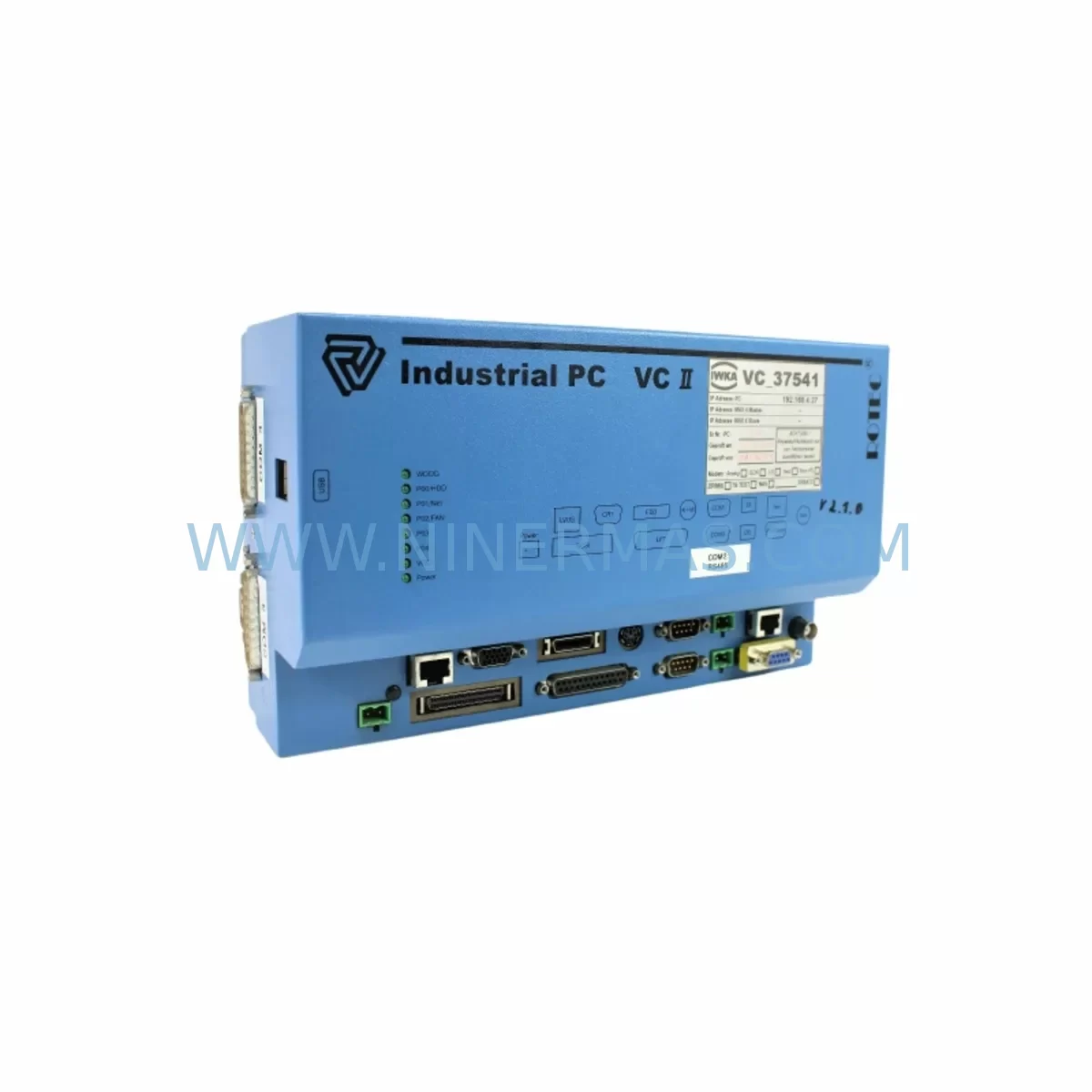
Rotec VC200-BDABBA Spare Part for Industrial Maintenance
Verify the part, confirm the platform family, and move straight into quotation with the right commercial details.
RFQ Ready
- SKUVC200-BDABBA
- CategoryPLC & Industrial Automation Modules
- BrandRotec
- SupportAvailability, lead time, condition, and shipping coordination
How Buyers Usually Use This Page
- Confirm the exact part number and platform family before sending the quote request.
- Use direct email when quantity, condition, and destination are already defined internally.
- Switch to the broader brand or category archive when you need alternates nearby.
Series Navigation
Move through the most common platform families behind this part.
Product RFQ
Send this part directly for quotation.
Include quantity, required condition, destination country, and target delivery timing. Current reference: Rotec VC200-BDABBA Spare Part for Industrial Maintenance with SKU VC200-BDABBA.
Rotec VC200-BDABBA Spare Part for Industrial Maintenance
The Rotec VC200-BDABBA is a service-ready spare part designed for the VC200 series variable frequency drive platform — one of Rotec’s established drive families widely deployed in industrial automation, process control, and motion systems. For maintenance engineers managing aging control infrastructure, sourcing a verified VC200-BDABBA replacement is a critical step in reducing unplanned downtime and restoring production continuity without requiring a full drive replacement.
This component is stocked and dispatched after pre-shipment functional testing, ensuring that the unit arriving on-site is operationally verified before installation. Each unit is backed by a 12-month warranty, providing procurement teams with the assurance needed for long-term spare parts planning and capital expenditure justification.
Whether you are responding to an emergency fault condition, executing a scheduled annual overhaul, or building a preventive maintenance spare inventory for a multi-drive control cabinet, the VC200-BDABBA is a direct-fit replacement that preserves system compatibility and avoids the cost and lead time of full drive procurement.
Spare Maintenance Table
| Parameter | Specification / Detail |
|---|---|
| Part Number | VC200-BDABBA |
| Brand | Rotec |
| Series | VC200 |
| Component Type | Drive Control Board / Spare Part |
| Compatibility | Rotec VC200 series variable frequency drives |
| Application | Industrial automation, process control, motion systems |
| Origin | China (CN) |
| Installation | Direct board-level replacement; refer to VC200 service manual for slot and connector alignment |
| Operating Environment | Industrial control cabinet; standard IEC 60721-3-3 Class 3C2 / 3S2 conditions |
| Pre-Shipment Testing | Functional verification performed before dispatch |
| Warranty | 12 months from date of shipment |
| Maintenance Recommendation | Replace alongside power supply board and I/O interface modules during major overhaul cycles |
Maintenance Planning for Continuous Operation
When a VC200-BDABBA fault is identified — whether through drive fault codes, communication loss, or abnormal output behavior — experienced maintenance engineers know that the control board is rarely the only component under stress. A thorough site inspection and coordinated replacement strategy will significantly reduce the risk of repeat failures and secondary downtime events.
During the same maintenance window, engineers should inspect and consider replacing or testing the following associated components within the same drive cabinet or electrical circuit:
- VC200 series power supply board — voltage irregularities that damage the control board often originate from a degraded internal SMPS; inspect DC bus voltage stability and ripple before commissioning the replacement board.
- VC200 gate driver board — if the drive experienced an IGBT overcurrent or short-circuit fault prior to the control board failure, the gate driver should be tested independently before powering up the new VC200-BDABBA.
- I/O expansion module — verify that all digital and analog I/O signals are within specification; a shorted field device connected to the I/O terminals can cause repeat control board damage.
- 24VDC control power supply — many VC200 installations use a dedicated 24V rail for logic and communication circuits; confirm output voltage and load capacity before energizing the replacement board.
- Communication module (RS-485 / PROFIBUS / CANopen) — if the drive is integrated into a PLC or DCS network, verify that the fieldbus communication module is intact and that termination resistors are correctly configured.
- Terminal block and wiring harness — inspect all control wiring for insulation damage, loose crimps, or corrosion, particularly on analog reference inputs and encoder feedback lines.
- Signal isolator / analog isolator — where 4–20 mA or 0–10V reference signals are used, a failed signal isolator can introduce noise or offset errors that mimic control board faults.
- Input fuses and circuit breakers — confirm that upstream protection devices have not been weakened by the fault event; replace any fuse that shows signs of thermal stress.
- HMI keypad or operator panel — if the VC200 uses a detachable HMI panel, verify that the panel communication port and cable are undamaged, as a faulty panel can prevent parameter upload and commissioning.
- Braking resistor and braking unit — for applications with regenerative loads, inspect the braking circuit for open-circuit or thermal damage that may have contributed to the original fault condition.
Coordinating these checks within a single planned maintenance window — rather than responding reactively to each failure — is the most effective way to extend drive service life and protect production uptime.
Site Replacement Workflow
Replacing the VC200-BDABBA on-site follows a structured procedure that minimizes risk and ensures system compatibility is maintained throughout the process:
- Isolate and de-energize: Follow LOTO (Lockout/Tagout) procedures. Allow the DC bus capacitors to fully discharge before opening the drive enclosure — typically 5–10 minutes after power removal, confirmed by a DC bus voltage measurement below 30V.
- Document existing configuration: If the original control board is still partially functional, upload and save all drive parameters to the HMI keypad or a PC-based commissioning tool before removal. This preserves motor tuning data, ramp settings, and PID configurations.
- Remove the faulty board: Disconnect all ribbon cables, control wiring connectors, and communication cables in sequence. Label each connector if not already marked. Remove the board from its mounting standoffs or guide rails.
- Inspect the enclosure: Before installing the VC200-BDABBA replacement, visually inspect the drive enclosure for signs of arc damage, contamination, or moisture ingress. Clean with dry compressed air if required.
- Install the replacement board: Seat the VC200-BDABBA into the correct slot, reconnect all cables in reverse order, and verify that all connectors are fully engaged and locked.
- Restore parameters: Upload the saved parameter set to the new board. Verify motor nameplate data, control mode, and communication address settings before enabling the drive.
- Functional test: Run the drive at low speed under no-load conditions first, then progressively load the motor while monitoring output current, voltage, and temperature. Confirm that all fault codes are cleared and that the drive communicates correctly with the PLC or DCS.
- Return to service: Document the replacement in the site maintenance log, update the spare parts inventory, and initiate a reorder for the next VC200-BDABBA unit to maintain buffer stock.
This workflow is applicable whether the VC200-BDABBA is being installed as an emergency replacement or as part of a scheduled overhaul. The pre-shipment testing performed on every unit shipped from our facility means that board-level defects are identified before the part reaches your site, reducing the risk of a failed replacement compounding an already critical downtime situation.
Spare Parts Support FAQ
Q1: Is the VC200-BDABBA a direct replacement for the original Rotec board, and will it retain existing drive parameters?
The VC200-BDABBA is designed as a direct-fit replacement for the VC200 series control board position. Drive parameters are stored in non-volatile memory on the control board, so a parameter backup should always be performed before removal if the original board retains any functionality. After installing the replacement, parameters can be restored via the HMI keypad or PC tool. If the original board is completely non-functional, default parameters will need to be re-entered based on the motor nameplate and application requirements.
Q2: What pre-shipment testing is performed, and how does this reduce on-site installation risk?
Every VC200-BDABBA unit undergoes functional verification before dispatch. This process confirms that the board powers up correctly, communication interfaces are active, and no manufacturing or storage defects are present. This testing step is particularly important for spare parts that may have been in storage for extended periods, as it provides confidence that the unit will perform correctly upon installation — reducing the risk of a second downtime event caused by a defective replacement part.
Q3: What is the recommended spare inventory strategy for sites operating multiple VC200 series drives?
For sites with three or more VC200 drives in continuous operation, maintaining at least one VC200-BDABBA in on-site buffer stock is strongly recommended. The control board is a high-impact single point of failure — a fault will take the entire drive offline immediately. Procurement lead times for industrial spare parts can range from days to weeks depending on regional availability, making on-site stock the most reliable way to achieve same-shift recovery from a control board fault. Annual inventory reviews should align spare holdings with the age and criticality of each drive in the fleet.
Q4: What does the 12-month warranty cover, and what is the process for a warranty claim?
The 12-month warranty covers manufacturing defects and functional failures under normal operating conditions from the date of shipment. It does not cover damage resulting from incorrect installation, overvoltage events, physical impact, or operation outside the specified environmental conditions. To initiate a warranty claim, contact our support team with the order reference, installation date, and a description of the fault symptom. Our team will advise on return procedures and, where applicable, arrange a replacement unit to minimize site downtime.
| Product Series | Other series |
|---|
Catalog Continuation
Alternative parts within PLC & Industrial Automation Modules.
Stay inside the same system family when you need substitutes, adjacent modules, or a broader shortlist for procurement review.
SKU: 14L41-RS0B0-B24R-ST5S00N-R0SU
LENZE 14L41-RS0B0-B24R-ST5S00N-R0SU Retrofit for Legacy Systems
SKU: CI540 3BSE001077R1
ABB CI540 3BSE001077R1 Spare Part for Industrial Maintenance

SKU: ZINT-541 3AUA00000658960
ABB ZINT-541 3AUA00000658960 Retrofit-Compatible Inverter Power Module



