
Original Industrial Spare Part
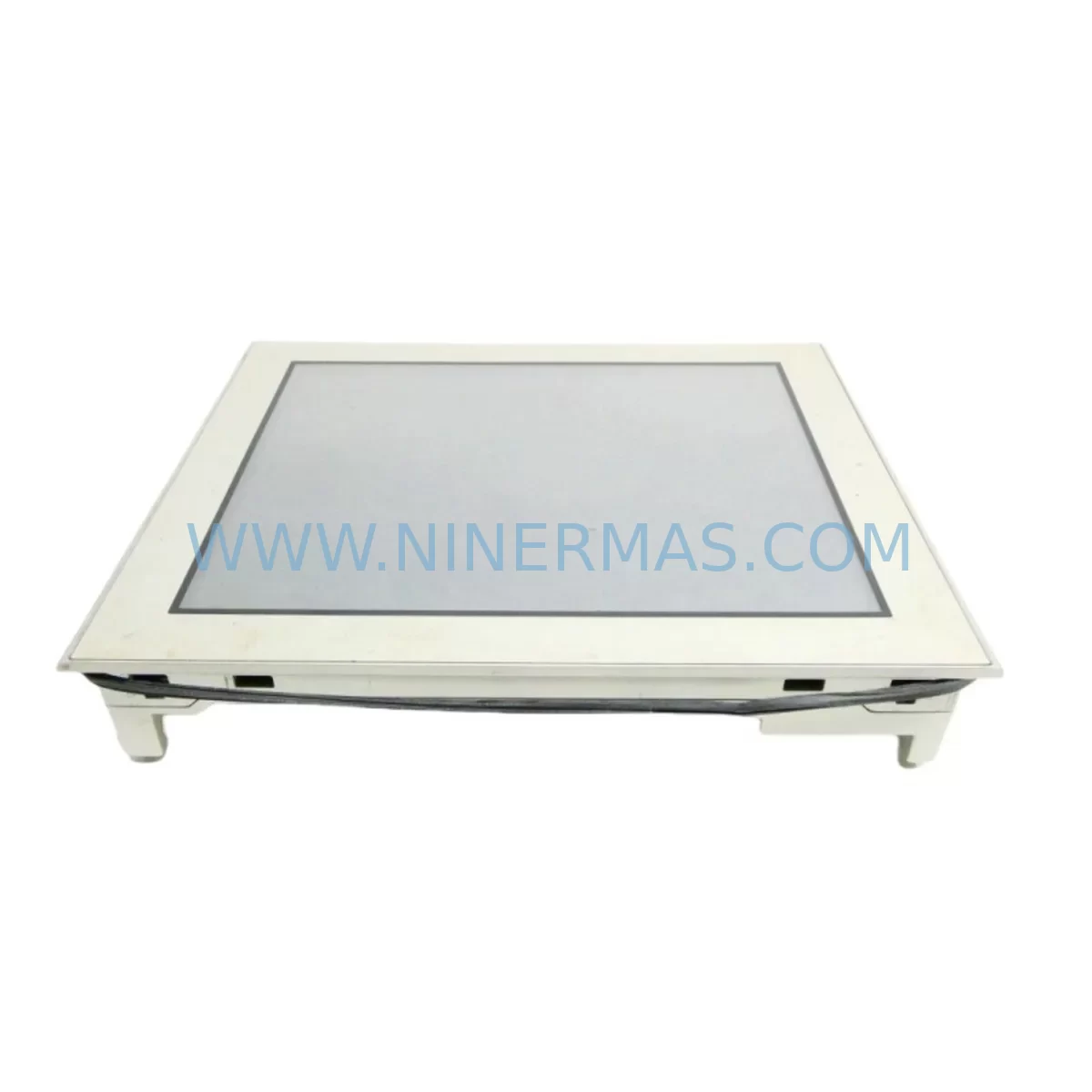
PROFACE AGP3600-T1-D24 Retrofit-Compatible HMI for Legacy Systems
Verify the part, confirm the platform family, and move straight into quotation with the right commercial details.
RFQ Ready
- SKUAGP3600-T1-D24
- CategoryPLC & Industrial Automation Modules
- BrandProface
- SupportAvailability, lead time, condition, and shipping coordination
How Buyers Usually Use This Page
- Confirm the exact part number and platform family before sending the quote request.
- Use direct email when quantity, condition, and destination are already defined internally.
- Switch to the broader brand or category archive when you need alternates nearby.
Series Navigation
Move through the most common platform families behind this part.
Product RFQ
Send this part directly for quotation.
Include quantity, required condition, destination country, and target delivery timing. Current reference: PROFACE AGP3600-T1-D24 Retrofit-Compatible HMI for Legacy Systems with SKU AGP3600-T1-D24.
PROFACE AGP3600-T1-D24 Retrofit-Compatible HMI for Legacy Systems
The PROFACE AGP3600-T1-D24 is a 24VDC-powered touch panel HMI designed for seamless integration into existing automation architectures. As legacy PROFACE AGP3600 series panels approach end-of-life or become increasingly difficult to source, the AGP3600-T1-D24 serves as the primary retrofit-compatible replacement, enabling plant engineers and system integrators to restore full HMI functionality without redesigning the control cabinet or rewriting PLC logic from scratch. NINERMAS maintains verified in-stock inventory of this unit, backed by a 12-month warranty and pre-shipment functional testing on every unit dispatched.
Whether you are managing a scheduled control system upgrade, responding to an unplanned panel failure, or executing a phased migration away from discontinued PROFACE hardware, the AGP3600-T1-D24 provides a reliable, field-proven path forward. Its compatibility with the GP-PRO/PBIII and GP-Pro EX programming environments means that existing screen projects can often be transferred or adapted with minimal rework, significantly reducing engineering hours and project risk.
Upgrade Compatibility Table
| Parameter | AGP3600-T1-D24 (This Unit) | Retrofit Notes |
|---|---|---|
| Power Supply | 24VDC | Verify existing PSU output; compatible with standard 24VDC rail supplies used in AGP3600 series cabinets |
| Display / Touch | TFT Color Touch Panel | Same panel cutout dimensions as AGP3600 series; no cabinet modification required in most installations |
| Communication Ports | RS-232C / RS-422/485, Ethernet (model-dependent) | Confirm COM port assignments match existing PLC wiring; re-pin if migrating from RS-232 to RS-485 topology |
| Programming Software | GP-Pro EX / GP-PRO/PBIII | Existing screen projects (.prx / .gpd) can be imported; validate tag mappings and alarm lists post-import |
| Mounting / Installation | Panel-mount, standard AGP3600 cutout | Check gasket condition and torque spec on mounting clamps; replace gasket if original is degraded |
| PLC Compatibility | Multi-vendor via serial / Ethernet drivers | Supports Mitsubishi MELSEC, Omron SYSMAC, Siemens S7, Allen-Bradley and others via GP-Pro EX driver library |
| Commissioning Focus | Screen transfer, COM settings, IP address | Set baud rate, data bits, and station number to match legacy configuration before first power-on |
| Warranty | 12-Month Warranty — all units ship after functional power-on and display verification test | |
Retrofit Planning for Existing Automation Systems
A successful AGP3600-T1-D24 retrofit begins well before the unit arrives on site. The first step is a thorough audit of the existing control cabinet: document the 24VDC power supply capacity and confirm it can support the replacement panel’s inrush and steady-state current draw alongside other loads such as the PROFACE CA3-ADPUSB-01 USB programming adapter or any connected GP070-MDCB11 multi-drop communication cable assemblies. If the cabinet also houses a Mitsubishi Q-series or FX5U CPU module communicating with the original HMI over RS-422, verify that the existing shielded twisted-pair wiring meets the impedance and termination requirements for the new panel’s serial driver.
Terminal block wiring is one of the most common sources of commissioning delay during HMI replacement projects. The AGP3600-T1-D24 uses the same power connector pinout as its predecessors, but always cross-reference the wiring diagram against the original panel’s terminal layout before energizing. If the installation includes a PROFACE GP077-ESVM0-MS expansion memory card or a CA3-CFCALL01 CF card adapter for recipe and data logging, confirm that the replacement unit’s CF slot or USB port is configured to recognize the same file structure used by the legacy system.
For plants running distributed I/O over DeviceNet or PROFIBUS, the HMI retrofit is often paired with a broader communication protocol migration. In these scenarios, the AGP3600-T1-D24 is frequently deployed alongside updated Anybus X-gateway protocol converters or Moxa NPort serial device servers to bridge legacy serial PLCs onto modern Ethernet backbones. The GP-Pro EX Ethernet driver library supports Modbus TCP natively, which simplifies integration when the downstream PLC or remote I/O rack — such as a Mitsubishi MELSEC-Q QJ71E71-100 Ethernet module — has already been upgraded. Ensure that IP address assignments, subnet masks, and port numbers are documented and reserved in the plant network before the panel is installed.
Screen project migration deserves dedicated engineering time. Open the existing .prx or .gpd project file in GP-Pro EX and run the conversion wizard; review every alarm message, recipe screen, and trend display for tag name mismatches. Pay particular attention to any screens that reference internal device addresses (e.g., LS area or #memory) that may have been remapped during a prior PLC upgrade. If the original system used a PROFACE GP2000 series panel with a proprietary backlight inverter board, note that the AGP3600-T1-D24 uses an LED backlight — this eliminates the backlight replacement cycle but means that any screen brightness calibration scripts referencing inverter control registers will need to be removed or rewritten.
Downtime Control During System Migration
Minimizing unplanned downtime is the primary concern for any production facility undertaking an HMI replacement. The recommended approach for AGP3600-T1-D24 retrofits is a parallel preparation strategy: configure and test the replacement panel on a bench setup — using a laptop running GP-Pro EX and a CA3-ADPUSB-01 programming cable — before the scheduled maintenance window begins. Load the converted screen project, verify all PLC communication drivers, and simulate alarm acknowledgment sequences so that the on-site swap is reduced to a physical installation and final communications check.
During the cutover window, follow a structured sequence: isolate the control cabinet from the production line using the appropriate lockout/tagout procedure, remove the legacy panel, install the AGP3600-T1-D24 into the existing cutout, reconnect the 24VDC power terminals and serial or Ethernet communication cables, and restore power. The panel should boot to the transferred screen project within 30–60 seconds. Immediately verify PLC communication status on the HMI’s system menu, confirm that all I/O status displays are reading correctly, and run a short functional test of any critical alarm or interlock screens before releasing the line back to production.
If the original panel failed unexpectedly and no pre-configured replacement is available, NINERMAS can ship a tested AGP3600-T1-D24 unit with a blank project loaded, allowing your engineering team to transfer the screen project on arrival. For customers who have lost the original project file, GP-Pro EX’s upload function can recover the project directly from a functioning panel — if a second identical unit is still operational elsewhere in the plant, use it as the source before decommissioning. Keeping a documented backup of all HMI screen projects, PLC programs, and communication parameter sheets is the single most effective measure for reducing recovery time after an unplanned panel failure.
Retrofit Support FAQ
Q1: Is the AGP3600-T1-D24 a direct drop-in replacement for other AGP3600 series models?
The AGP3600-T1-D24 shares the same panel cutout dimensions and 24VDC power input as other AGP3600 series variants. However, communication port configurations and display resolutions may differ between sub-models. Always compare the full specification sheet of the original unit against the AGP3600-T1-D24 datasheet before ordering, and confirm that your existing GP-Pro EX driver supports the PLC protocol in use.
Q2: What pre-shipment testing does NINERMAS perform on each unit?
Every AGP3600-T1-D24 dispatched by NINERMAS undergoes a functional power-on test, display verification, and touch calibration check before packaging. Units are shipped with a test report and are covered by a 12-month warranty from the date of delivery. If a unit exhibits any defect within the warranty period, NINERMAS will arrange replacement or repair at no additional cost.
Q3: Can I reuse my existing wiring and terminal connections?
In most cases, yes. The AGP3600-T1-D24 uses the same power connector pinout as the original AGP3600 series panels. Serial communication wiring (RS-232C or RS-422/485) is typically reusable provided the cable is in good condition and the connector type matches. Always verify pin assignments against the replacement unit’s wiring diagram before energizing, and inspect cable shielding and termination resistors as part of the pre-commissioning checklist.
Q4: What is the typical lead time and stock availability?
NINERMAS maintains ready stock of the AGP3600-T1-D24 to support urgent replacement and planned retrofit projects. Standard orders are processed and dispatched within 1–3 business days. For large-quantity orders or projects requiring multiple units across a phased rollout, contact our sales team at sale@ninermas.com to confirm availability and arrange priority allocation.
| Product Series | Legacy |
|---|
Catalog Continuation
More Proface modules in the catalog.
Use the brand lane to compare nearby part numbers, platform-adjacent modules, and other inquiry-ready listings before sending your final RFQ.
SKU: AGP3550-DISP D05044A
Proface AGP3550-DISP D05044A HMI Display Spare Part
SKU: AGP3550-BASE D05045B
Proface AGP3550-BASE D05045B Retrofit-Compatible HMI Base
SKU: 5302-MBP-MCM4
Proface 5302-MBP-MCM4 Safety-Reliable Modbus Plus Gateway
Catalog Continuation
Alternative parts within PLC & Industrial Automation Modules.
Stay inside the same system family when you need substitutes, adjacent modules, or a broader shortlist for procurement review.
SKU: SC34.0300.0011.0000.0-JW1 SC34.0300.0011.0000.0
LUST SC34.0300.0011.0000.0-JW1 Service-Ready Spare Part
SKU: LSC-096-2-30-560-P5B0H2MM0
LTi Motion LSC-096-2-30-560-P5B0H2MM0 Retrofit Servo Drive
SKU: DS200SHVMG1AFE
GE DS200SHVMG1AFE Retrofit-Compatible Interface Module



