
Original Industrial Spare Part
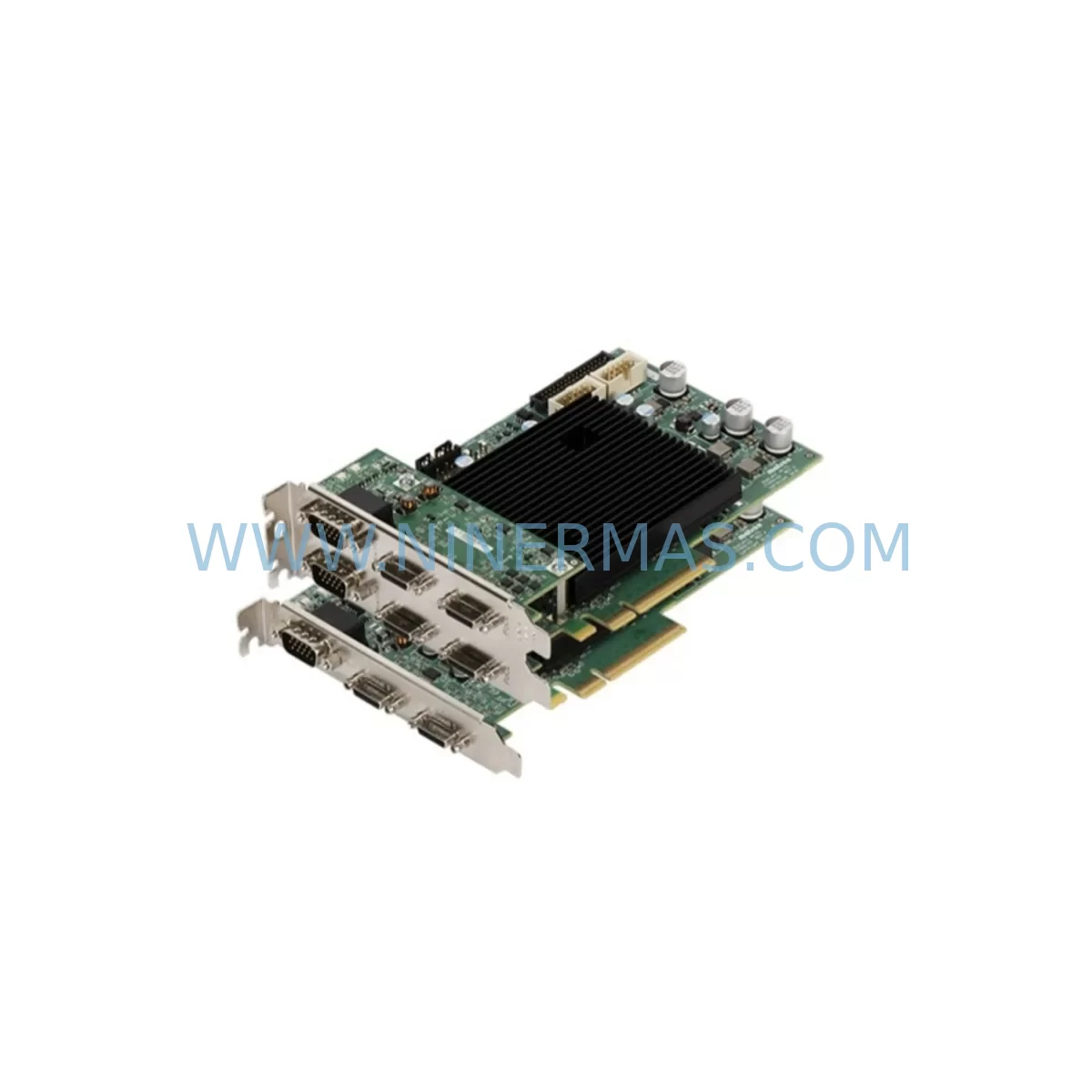
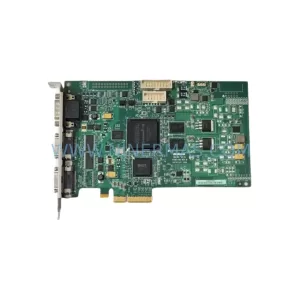
Matrox RADEV5MCLSF Service-Ready Spare Part
Verify the part, confirm the platform family, and move straight into quotation with the right commercial details.
RFQ Ready
- SKURADEV5MCLSF
- CategoryPLC & Industrial Automation Modules
- BrandMatrox
- SupportAvailability, lead time, condition, and shipping coordination
How Buyers Usually Use This Page
- Confirm the exact part number and platform family before sending the quote request.
- Use direct email when quantity, condition, and destination are already defined internally.
- Switch to the broader brand or category archive when you need alternates nearby.
Series Navigation
Move through the most common platform families behind this part.
Product RFQ
Send this part directly for quotation.
Include quantity, required condition, destination country, and target delivery timing. Current reference: Matrox RADEV5MCLSF Service-Ready Spare Part with SKU RADEV5MCLSF.
Matrox RADEV5MCLSF Service-Ready Spare Part for Industrial Maintenance
The Matrox RADEV5MCLSF — part of the Matrox Radient eV5 MCL SF series — is a high-performance Camera Link frame grabber designed for demanding machine vision and industrial imaging applications. When a frame grabber fails on a production line, the consequences are immediate: vision inspection halts, quality control is bypassed, and the entire line risks unplanned downtime. Stocking a service-ready RADEV5MCLSF spare ensures your maintenance team can execute a rapid swap and restore full inspection capability within the same shift.
At NINERMAS, every Matrox RADEV5MCLSF unit is sourced as an original component, pre-shipment tested for PCIe interface integrity, Camera Link signal output, and firmware compatibility before dispatch. Backed by a 12-month warranty, this spare is procurement-ready for MRO inventory, annual overhaul kits, and emergency replacement pools.
Spare Maintenance Table
| Parameter | Specification |
|---|---|
| SKU / Part Number | RADEV5MCLSF |
| Brand / Series | Matrox / Radient eV5 MCL SF |
| Product Type | Camera Link Frame Grabber |
| Interface | PCIe x4 Gen 2 |
| Camera Link Configuration | Single Full (SF) — supports Base, Medium, Full, and 80-bit Extended Full |
| Max Pixel Clock | Up to 85 MHz per tap |
| Supported Camera Standards | Camera Link 1.0 / 2.0 |
| Operating Temperature | 0°C to 55°C |
| Origin | Canada |
| Compatibility | Matrox Imaging Library (MIL), Matrox Design Assistant; replaces legacy Radient eCL and Solios eCL series |
| Installation | PCIe slot, half-length card; standard ATX/industrial chassis compatible |
| Warranty | 12 Months — NINERMAS pre-shipment tested |
| Maintenance Recommendation | Inspect PCIe slot, Camera Link cable, and power rail annually; replace alongside camera trigger cables during scheduled overhaul |
Maintenance Planning for Continuous Operation
A frame grabber failure rarely occurs in isolation. When replacing the Matrox RADEV5MCLSF, a thorough maintenance engineer will audit the entire vision subsystem to prevent repeat failures and maximize uptime. Begin with the Camera Link cable assembly — MDR-26 or SDR-26 connectors degrade under repeated flexing and vibration; a worn cable can corrupt image data even with a new frame grabber installed. Inspect both ends and replace if shielding is compromised.
Next, verify the host PC or industrial computer’s PCIe slot integrity. Dust accumulation and oxidation on PCIe contacts are common culprits in intermittent frame grabber faults. Clean the slot and confirm the x4 lane is fully active via device manager or BIOS diagnostics. If the host system runs multiple vision cards, check that the PCIe power budget is not exceeded — an undersized industrial power supply (PSU) can cause random card resets under peak imaging load.
For systems using Matrox Radient eCL or Matrox Solios eCL frame grabbers in adjacent slots, confirm that MIL driver versions are consistent across all cards to avoid SDK conflicts during multi-camera acquisition. If your vision system integrates a Matrox Iris GTX smart camera or a Matrox 4Sight GPm vision controller, verify that the RADEV5MCLSF firmware revision is compatible with the installed MIL version.
On the camera side, inspect the industrial line scan or area scan camera trigger input — a faulty opto-isolated trigger module or a degraded encoder signal conditioner can cause frame sync errors that mimic frame grabber faults. Check the 24VDC strobe controller and lighting power supply simultaneously, as lighting flicker under load is a frequent source of false vision rejects that get misattributed to the frame grabber.
For PLC-integrated vision systems, audit the digital I/O interface between the vision PC and the PLC (e.g., Siemens S7-300/400 or Allen-Bradley ControlLogix) — confirm that trigger, ready, and result signals are correctly mapped and that the I/O terminal block connections are tight and corrosion-free. A loose terminal on the trigger line will produce intermittent missed frames that are difficult to diagnose without a scope.
Finally, review the UPS or power conditioning unit supplying the vision workstation. Voltage sags during line startup events are a leading cause of PCIe card corruption. Ensuring clean, regulated power to the vision PC protects both the RADEV5MCLSF and the host system from premature failure.
Site Replacement Workflow
Step 1 — Pre-replacement verification: Confirm the RADEV5MCLSF is the fault source by running Matrox MIL diagnostics. Check for PCIe enumeration errors in Device Manager and Camera Link signal loss in MIL’s GrabLink utility before pulling the card.
Step 2 — Safe shutdown: Power down the vision PC and industrial computer fully. Do not hot-swap PCIe cards. Ground yourself with an ESD wrist strap before handling the RADEV5MCLSF to prevent electrostatic damage to the PCIe edge connector.
Step 3 — Physical swap: Remove the faulty card, clean the PCIe slot with compressed air, and seat the new RADEV5MCLSF firmly. Reconnect the Camera Link cable — ensure the MDR/SDR connector latch clicks fully into place. A partially seated connector is the most common cause of post-replacement signal errors.
Step 4 — Driver and firmware check: Boot the system and confirm the RADEV5MCLSF is recognized. Install or update the Matrox MIL driver to the version validated for your application. If replacing a legacy Radient eCL or Solios eCL, update the MIL application configuration to reference the new card’s device ID.
Step 5 — Functional test: Run a live grab sequence at full resolution and frame rate. Verify trigger latency, image quality, and I/O handshake with the PLC. Document the replacement in your maintenance log with the card serial number and firmware version for traceability.
Step 6 — Return to production: Once functional tests pass, release the line. Store the replaced card with a fault tag for depot-level repair assessment — do not discard, as board-level repair may recover the unit for use as a secondary spare.
Spare Parts Support FAQ
Q1: Is the RADEV5MCLSF compatible with my existing Matrox MIL software version?
The RADEV5MCLSF is supported under Matrox MIL 10 and later. For legacy MIL 9.x environments, contact NINERMAS before ordering to confirm firmware compatibility. We recommend upgrading to the latest MIL release to access full Camera Link 2.0 feature support and current security patches.
Q2: How does NINERMAS verify the RADEV5MCLSF before shipment?
Every unit undergoes PCIe enumeration testing, Camera Link signal integrity verification, and firmware version confirmation prior to dispatch. A test report is available on request. All units ship with a 12-month warranty covering manufacturing defects and functional failure under normal operating conditions.
Q3: Can the RADEV5MCLSF directly replace a Matrox Radient eCL or Solios eCL frame grabber?
The RADEV5MCLSF is a functional upgrade path for legacy Radient eCL and Solios eCL installations. Physical PCIe form factor is compatible; however, MIL application code may require minor updates to reference the new device ID and leverage eV5-specific features. NINERMAS provides compatibility guidance as part of the procurement process.
Q4: What is NINERMAS’s long-term supply commitment for the RADEV5MCLSF?
NINERMAS maintains reserved inventory agreements for end-of-life and long-lead Matrox imaging components. The RADEV5MCLSF is stocked for long-term MRO supply. For production lines requiring guaranteed availability, contact our team to establish a blanket order or consignment stock arrangement with priority allocation.
| Product Series | Other series |
|---|
Catalog Continuation
More Matrox modules in the catalog.
Use the brand lane to compare nearby part numbers, platform-adjacent modules, and other inquiry-ready listings before sending your final RFQ.
Catalog Continuation
Alternative parts within PLC & Industrial Automation Modules.
Stay inside the same system family when you need substitutes, adjacent modules, or a broader shortlist for procurement review.



SKU: HDD02.2-W040N-HS12-01-FW FWA-DIAX04-ELS-05VRS-MS
Rexroth HDD02.2-W040N-HS12-01-FW Service-Ready Spare Part

SKU: I5DAE375F10010000S
Lenze I5DAE375F10010000S Service-Ready Spare Part for Industrial Maintenance



