
Original Industrial Spare Part
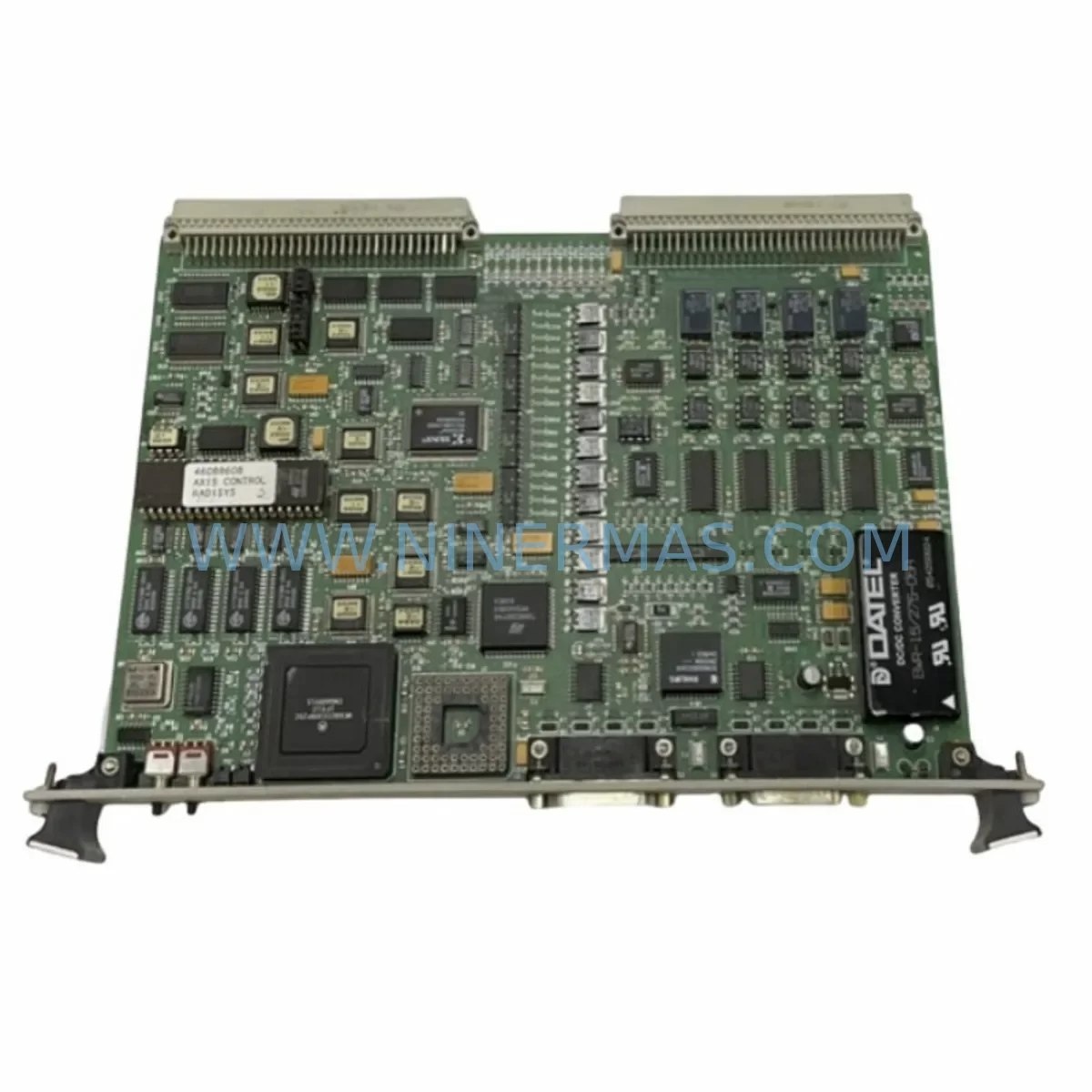
RADISYS PSBC486DX66 Service-Ready Spare Part for Industrial Maintenance
Verify the part, confirm the platform family, and move straight into quotation with the right commercial details.
RFQ Ready
- SKUPSBC486DX66
- CategoryPLC & Industrial Automation Modules
- BrandRADISYS
- SupportAvailability, lead time, condition, and shipping coordination
How Buyers Usually Use This Page
- Confirm the exact part number and platform family before sending the quote request.
- Use direct email when quantity, condition, and destination are already defined internally.
- Switch to the broader brand or category archive when you need alternates nearby.
Series Navigation
Move through the most common platform families behind this part.
Product RFQ
Send this part directly for quotation.
Include quantity, required condition, destination country, and target delivery timing. Current reference: RADISYS PSBC486DX66 Service-Ready Spare Part for Industrial Maintenance with SKU PSBC486DX66.
RADISYS PSBC486DX66 Service-Ready Spare Part for Industrial Maintenance
The RADISYS PSBC486DX66 is an original single board computer (SBC) from the RADISYS SBC486 series, engineered for demanding industrial automation environments. As a service-ready spare part, the PSBC486DX66 is a critical component for maintenance engineers managing legacy embedded control systems, VMEbus or ISA-based control cabinets, and long-lifecycle industrial platforms where downtime carries significant operational cost. Whether you are executing a planned annual overhaul, responding to an unscheduled fault, or building a strategic spare parts inventory, the PSBC486DX66 delivers the compatibility, reliability, and traceability that industrial procurement demands.
Sourced as an original RADISYS unit, the PSBC486DX66 is tested prior to shipment and backed by a 12-month warranty, giving maintenance teams and procurement engineers the confidence to stock this board as a long-term replacement asset. NINERMAS maintains supply continuity for this model to support customers operating systems where the original manufacturer has discontinued active production — a common challenge in industrial environments running equipment from the 1990s and early 2000s.
Spare Maintenance Table
| Parameter | Specification / Detail |
|---|---|
| Part Number / SKU | PSBC486DX66 |
| Brand | RADISYS |
| Series | SBC486 |
| Product Type | Single Board Computer (SBC) |
| Processor | Intel 486DX @ 66 MHz |
| Bus Architecture | ISA / PC/104 compatible |
| Operating Voltage | +5 VDC (typical industrial SBC standard) |
| Application Environment | Industrial automation, embedded control, VMEbus/ISA control cabinets |
| Compatibility | RADISYS SBC486 series systems; legacy ISA-based industrial platforms |
| Condition | Original / Service-Ready |
| Pre-Shipment Testing | Yes — functional test performed before dispatch |
| Warranty | 12 Months |
| Origin | United States (RADISYS) |
| Maintenance Recommendation | Replace as part of scheduled SBC inspection cycle; verify BIOS battery, RAM seating, and I/O connector integrity on installation |
| Long-Term Supply | Available through NINERMAS for legacy system support |
Maintenance Planning for Continuous Operation
When replacing the PSBC486DX66 in a live industrial environment, a thorough inspection of the surrounding electrical and control architecture is essential to prevent repeat failures and ensure stable system recovery. Maintenance engineers should treat the SBC replacement as an opportunity to audit the entire control cabinet, not just the failed board.
Begin by verifying the power supply module feeding the SBC backplane. An aging or under-spec industrial power supply — such as a 5V/12V dual-rail unit common in ISA-era systems — can cause intermittent resets, data corruption, or premature SBC failure. If the power supply shows ripple beyond tolerance or has accumulated significant operating hours, it should be replaced alongside the PSBC486DX66.
Next, inspect the backplane itself. SBC486-series systems typically use passive or active ISA backplanes with multiple expansion slots. Check for oxidized edge connectors, cracked PCB traces, and loose slot retention hardware. A faulty backplane can damage a new SBC within hours of installation. Similarly, review any I/O expansion cards seated in adjacent slots — digital I/O modules, analog input cards, and serial communication boards are common failure points in aging systems and should be tested or replaced as part of the maintenance cycle.
Communication integrity is another critical area. If the PSBC486DX66 is part of a fieldbus or serial communication network — such as RS-232, RS-485, or a proprietary industrial protocol — verify that the communication interface module and associated wiring are intact. Signal degradation on serial lines is a frequent cause of SBC misdiagnosis; what appears to be a failed SBC may in fact be a corrupted communication signal from a damaged cable or a failing signal isolator.
For systems interfacing with relay output modules or terminal blocks, inspect contact wear and wiring termination quality. Loose terminals and worn relay contacts introduce noise and voltage spikes that can stress the SBC’s I/O circuitry. Where applicable, check fuse holders and protection fuses on the 5V and 12V rails — a blown fuse is often the first indicator of a downstream short that may have contributed to the original SBC failure.
If the system includes an HMI panel connected to the SBC via serial or parallel interface, confirm that the HMI firmware and communication parameters are compatible with the replacement PSBC486DX66. Mismatched baud rates or protocol settings are a common source of post-replacement commissioning delays. Finally, if the control system uses a watchdog timer module or external reset controller, verify that these components are functioning correctly before returning the system to production.
Building a structured spare parts kit around the PSBC486DX66 — including a backup power supply, a spare backplane, key I/O modules, communication cables, and terminal block assemblies — is the most effective strategy for minimizing future downtime on legacy RADISYS SBC486-based systems.
Site Replacement Workflow
Step 1 — Pre-Replacement Verification: Confirm the failed board’s part number as PSBC486DX66 and document the system configuration, including BIOS settings, jumper positions, and any installed expansion cards. Photograph the cabinet layout before disassembly.
Step 2 — Power Down and Isolation: Follow your site’s lockout/tagout (LOTO) procedure. Disconnect the backplane power connector and remove the PSBC486DX66 from its slot carefully, noting the orientation of any daughter cards or memory modules.
Step 3 — Inspect and Transfer Components: Transfer any SIMM or DIMM memory modules, BIOS battery, and configuration jumpers from the old board to the replacement PSBC486DX66. Verify that the BIOS battery is functional — a dead battery will cause BIOS settings to reset on every power cycle.
Step 4 — Install and Configure: Seat the replacement board firmly into the backplane slot. Reconnect all cables and verify that I/O connectors are fully engaged. Restore BIOS settings from your documented configuration. If the system uses a software-based configuration stored on a local drive or flash module, verify data integrity before boot.
Step 5 — Power-On Test: Apply power and monitor the system through the full boot sequence. Confirm that all I/O channels, communication ports, and connected field devices respond correctly. Run a functional test cycle before returning the system to automatic operation.
Step 6 — Documentation and Spare Replenishment: Update your maintenance log with the replacement date, board serial number, and any observations. Immediately initiate a procurement request for a replacement spare PSBC486DX66 to restore your inventory buffer — a single-spare strategy leaves the system vulnerable to the next failure event.
Spare Parts Support FAQ
Q1: Is the PSBC486DX66 supplied as a new or refurbished unit, and what does the 12-month warranty cover?
The PSBC486DX66 is supplied as an original RADISYS unit in service-ready condition. Each board undergoes functional testing prior to shipment. The 12-month warranty covers manufacturing defects and functional failures under normal operating conditions. It does not cover damage resulting from incorrect installation, overvoltage events, or physical mishandling on site.
Q2: How do I confirm compatibility between the PSBC486DX66 and my existing SBC486-series backplane?
Compatibility is determined by the backplane bus standard (ISA/PC/104), slot pitch, and power rail configuration. The PSBC486DX66 is designed for RADISYS SBC486-series systems. If you are unsure whether your backplane revision is compatible, contact NINERMAS with your system model number and backplane part number before ordering. Our technical team can assist with compatibility verification at no charge.
Q3: What is the recommended inventory strategy for the PSBC486DX66 in a multi-line production facility?
For facilities operating two or more production lines dependent on RADISYS SBC486-based controllers, we recommend maintaining a minimum of two PSBC486DX66 units in on-site inventory. Given that this is a legacy component with limited market availability, procurement lead times can be unpredictable. Holding a buffer stock of two units ensures that a single failure event does not exhaust your spare inventory before a replacement can be sourced.
Q4: Can NINERMAS support long-term supply of the PSBC486DX66 for multi-year maintenance contracts?
Yes. NINERMAS specializes in long-term supply of legacy industrial spare parts, including discontinued RADISYS SBC products. We can support blanket purchase orders, scheduled delivery agreements, and multi-year supply contracts for the PSBC486DX66. Contact our sales team at sale@ninermas.com or +0086 187 5021 5667 to discuss your requirements.
| Product Series | Other series |
|---|
Catalog Continuation
More RADISYS modules in the catalog.
Use the brand lane to compare nearby part numbers, platform-adjacent modules, and other inquiry-ready listings before sending your final RFQ.
SKU: 459826-002 869-8099-003B 450MM X 190MM W/ FX-301 0020-23259
Radisys 459826-002 Retrofit-Compatible CPU Board for Legacy Systems
Catalog Continuation
Alternative parts within PLC & Industrial Automation Modules.
Stay inside the same system family when you need substitutes, adjacent modules, or a broader shortlist for procurement review.

SKU: ZINT-541 3AUA00000658960
ABB ZINT-541 3AUA00000658960 Retrofit-Compatible Inverter Power Module
SKU: DSQC633 3HAC022286-001
ABB DSQC633 3HAC022286-001 Service-Ready Spare Part

SKU: 6SL3224-0BE33-7UA0
Siemens 6SL3224-0BE33-7UA0 Service-Ready Spare Part



