
Original Industrial Spare Part
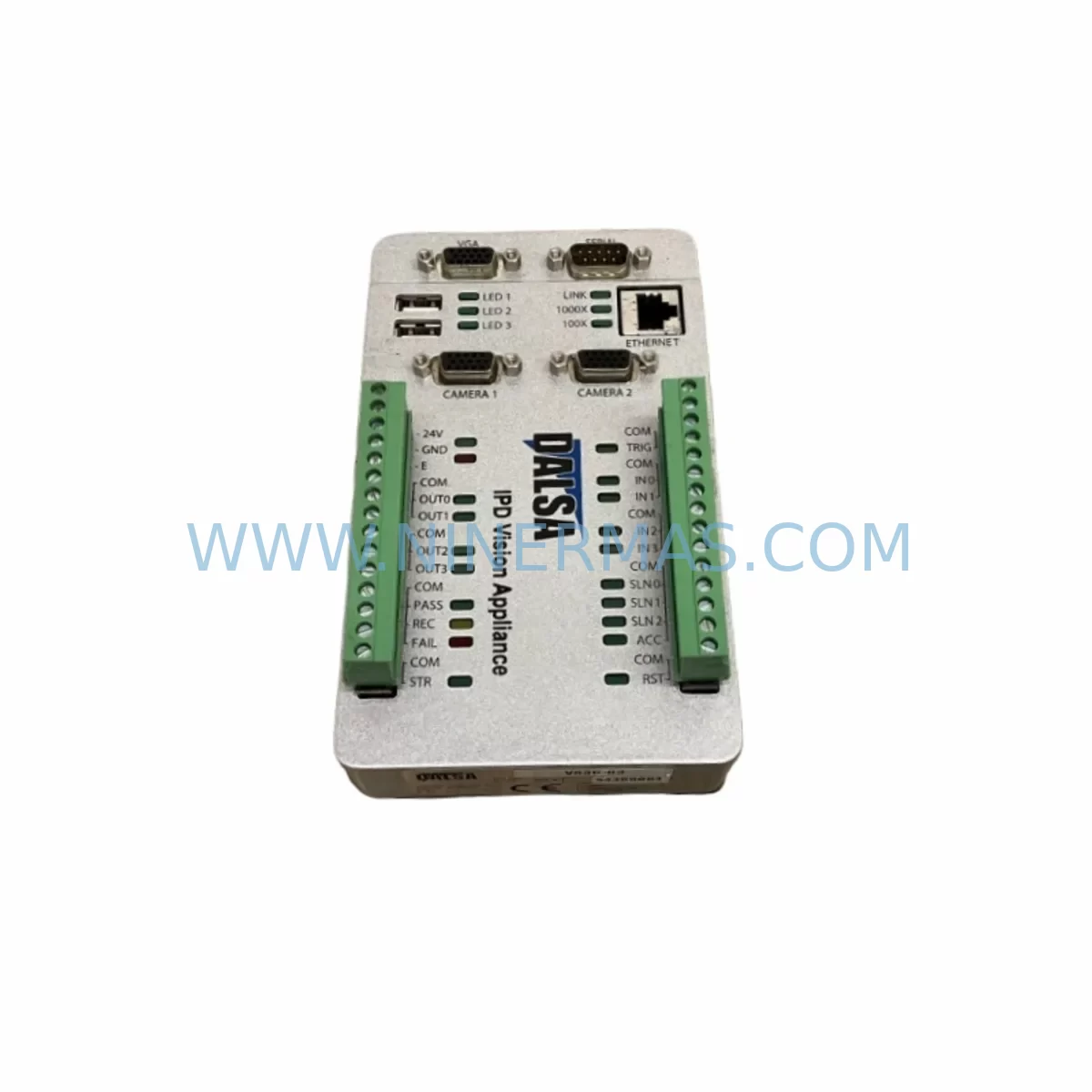
DALSA VA30-03 Retrofit-Compatible Smart Camera for Legacy Systems
Verify the part, confirm the platform family, and move straight into quotation with the right commercial details.
RFQ Ready
- SKUVA30-03
- CategoryPLC & Industrial Automation Modules
- BrandDALSA
- SupportAvailability, lead time, condition, and shipping coordination
How Buyers Usually Use This Page
- Confirm the exact part number and platform family before sending the quote request.
- Use direct email when quantity, condition, and destination are already defined internally.
- Switch to the broader brand or category archive when you need alternates nearby.
Series Navigation
Move through the most common platform families behind this part.
Product RFQ
Send this part directly for quotation.
Include quantity, required condition, destination country, and target delivery timing. Current reference: DALSA VA30-03 Retrofit-Compatible Smart Camera for Legacy Systems with SKU VA30-03.
DALSA VA30-03 Retrofit-Compatible Smart Camera for Legacy Systems
The DALSA VA30-03 is a high-performance industrial smart camera engineered for seamless integration into legacy machine vision and automation environments. As production lines age and original OEM support for end-of-life vision appliances diminishes, the VA30-03 provides a proven, drop-in retrofit path that preserves existing control logic, minimises rewiring effort, and eliminates the need for full-system overhauls. Whether you are replacing a failed unit on a bottling line, upgrading a discontinued inspection station, or migrating a multi-camera quality-control cell to a modern image-processing platform, the VA30-03 delivers the compatibility, reliability, and long-term spare-parts availability that industrial maintenance teams demand.
Sourced directly from authorised distribution channels and subject to full functional verification prior to shipment, every VA30-03 unit supplied by NINERMAS COMPANY LIMITED is backed by a 12-month warranty and supported by dedicated pre-sales and post-sales engineering assistance. In-stock inventory is maintained to support urgent breakdown replacements and planned retrofit projects alike, with same-week despatch available for most orders.
Upgrade Compatibility Table
| Parameter | Legacy Reference | DALSA VA30-03 Specification | Retrofit Note |
|---|---|---|---|
| Interface / Connectivity | RS-232, parallel I/O, proprietary bus | GigE Vision, Camera Link, discrete I/O | Verify host frame-grabber or GigE NIC compatibility; protocol adapter may be required for RS-232 legacy links |
| Power Supply | 24 VDC (typical legacy) | 24 VDC ±10% | Confirm existing PSU capacity; add a dedicated 24 VDC rail if shared supply is marginal |
| Mounting / Form Factor | Custom bracket, DIN-rail adapter | Standard C-mount / CS-mount, M6 mounting holes | Fabricate or source an adapter plate if legacy bracket pitch differs; confirm clearance in control cabinet |
| Communication Protocol | Proprietary vision bus, DeviceNet | GigE Vision (GigE), DALSA Sapera SDK | Update PLC or PC-based vision controller driver; validate Ethernet switch port speed (1 Gbps minimum) |
| I/O Trigger / Strobe | Opto-isolated TTL, relay output | Opto-isolated digital I/O, configurable trigger | Re-map trigger wiring to VA30-03 terminal block; confirm strobe timing in vision program |
| Image Resolution | VGA / SVGA legacy sensor | Higher-resolution CMOS sensor (model-dependent) | Re-calibrate inspection ROI and pixel-per-mm ratio in vision application after swap |
| Software / SDK | Legacy OEM vision software | DALSA Sapera LT / iNspect Express | Migrate inspection recipes; test all pass/fail thresholds before production restart |
| Debugging / Commissioning | Serial terminal, proprietary GUI | Web browser interface, Sapera CamExpert | Use laptop with GigE NIC for initial IP assignment and live image verification on-site |
| Warranty | OEM support discontinued | 12 Months (NINERMAS) | Covers DOA, functional failure, and firmware-related defects under normal operating conditions |
Retrofit Planning for Existing Automation Systems
A successful VA30-03 retrofit begins well before the camera arrives on-site. Maintenance engineers should first audit the existing control cabinet to confirm available 24 VDC power capacity, particularly when the legacy vision appliance shared a rail with other field devices such as a DALSA Sherlock vision controller or a third-party Cognex In-Sight 5000 series camera. If the shared supply is marginal, installing a dedicated Phoenix Contact QUINT 24 VDC power supply or equivalent DIN-rail PSU before the camera swap eliminates the risk of brownout-induced false rejects during the commissioning phase.
On the network side, the VA30-03 communicates over GigE Vision, which requires a dedicated 1 Gbps Ethernet port on the host PC or vision controller. If the existing automation network runs through a managed industrial Ethernet switch — for example, a Moxa EDS-308 or a Hirschmann SPIDER series switch — verify that the port assigned to the camera is configured for full-duplex 1000BASE-T and that jumbo frames are enabled to prevent packet loss during high-resolution image transfer. Where the legacy system relied on a Camera Link frame grabber such as a Matrox Solios or Bitflow Cyton, a Camera Link variant of the VA30-03 may be selected to preserve the existing cabling infrastructure and avoid re-qualification of the frame-grabber driver stack.
I/O wiring is another critical checkpoint. The VA30-03 provides opto-isolated digital inputs and outputs via a terminal block connector. Engineers replacing a legacy unit that used a Beckhoff EL1008 digital input terminal or a Siemens ET 200SP DI module for trigger distribution should re-map the PLC output address to the new camera’s trigger input terminal and confirm the signal voltage level (5 V or 24 V logic) matches the VA30-03 input specification. Where signal isolation between the PLC and the camera is required — particularly in environments with significant electrical noise from servo drives or welding equipment — inserting a Phoenix Contact MCR signal isolator between the PLC output and the camera trigger input is strongly recommended.
For installations where the VA30-03 replaces a camera that was integrated into a Rockwell Automation ControlLogix or CompactLogix PLC-based vision system via an EtherNet/IP adapter, engineers should verify that the updated Add-On Instruction (AOI) or vision function block in Studio 5000 correctly references the new camera’s IP address and data structure. Backup the existing PLC program and HMI project — whether running on a Rockwell PanelView Plus or a Weintek cMT series HMI — before making any changes to the vision communication tags, as tag renaming can cause HMI alarm suppression or incorrect status display on the operator panel.
Finally, confirm physical installation space within the control cabinet or machine frame. The VA30-03’s compact body typically fits within the footprint of most legacy smart camera housings, but verify the lens-to-object working distance against the original optical setup. If the legacy camera used a fixed-focus lens with a specific field of view, source a compatible C-mount lens with equivalent focal length to avoid recalibrating the entire inspection program from scratch.
Downtime Control During System Migration
Minimising unplanned downtime is the primary concern for any maintenance team executing a vision system swap on a live production line. The recommended approach is to pre-configure the VA30-03 off-line — assign its IP address, load the inspection recipe, and verify trigger response using a bench-top test fixture — before the scheduled maintenance window begins. This pre-commissioning step typically reduces on-machine installation time to under two hours for a straightforward one-for-one camera replacement.
Where the production schedule does not permit a full maintenance window, a parallel-run strategy can be employed: mount the VA30-03 alongside the existing camera, connect it to a spare Ethernet port on the vision controller, and validate inspection results against the legacy unit in shadow mode before cutting over. This approach is particularly effective when the legacy system is still partially functional and the replacement is being driven by intermittent failures rather than a complete breakdown.
To protect the original program logic, always export and archive the existing PLC program, vision recipe files, and HMI project before disconnecting the legacy camera. Store these backups on a network drive or USB key kept with the machine documentation. If the legacy vision software stored inspection parameters in a proprietary format that cannot be directly imported into DALSA Sapera or iNspect Express, photograph or document each inspection step — including ROI coordinates, threshold values, and pass/fail criteria — so that the new recipe can be rebuilt accurately during commissioning.
After the VA30-03 is installed and the inspection recipe is loaded, run a minimum of 200 known-good and known-bad reference parts through the system before releasing the line to production. Document the pass rate, false-reject rate, and cycle time, and compare these against the baseline figures from the legacy system. Only when all metrics are within acceptable tolerance should the line be returned to full production speed. This structured validation protocol, combined with pre-commissioning off-line setup, consistently delivers controlled migration with minimal impact on overall equipment effectiveness (OEE).
Retrofit Support FAQ
Q1: Is the DALSA VA30-03 a direct drop-in replacement for my existing legacy smart camera?
The VA30-03 is functionally compatible with a wide range of legacy industrial vision applications, but a direct mechanical and electrical drop-in fit depends on the specific legacy model being replaced. NINERMAS provides pre-sales compatibility assessment — share your existing camera model number, mounting configuration, and communication interface, and our engineering team will confirm the replacement path and any required adapters or wiring changes before you commit to the order.
Q2: What commissioning support is available after delivery?
Every VA30-03 supplied by NINERMAS undergoes functional verification and basic image-acquisition testing prior to despatch. Post-delivery, our technical team is available via email and phone to assist with IP configuration, trigger wiring, and initial recipe loading. For complex migrations involving PLC integration or multi-camera synchronisation, remote desktop support sessions can be arranged by appointment.
Q3: How do I verify wiring compatibility between the VA30-03 and my existing PLC I/O?
Download the VA30-03 hardware reference manual from the DALSA / Teledyne DALSA support portal and cross-reference the I/O terminal block pinout against your existing wiring diagram. Pay particular attention to trigger input voltage level (5 V TTL vs. 24 V logic), output load current rating, and ground isolation requirements. If your PLC output module operates at 24 V and the camera trigger input is rated for 5 V TTL, a signal-level converter or opto-isolator must be inserted in the trigger circuit.
Q4: What does the 12-month warranty cover, and what is the stock availability?
The 12-month warranty provided by NINERMAS covers manufacturing defects, functional failures under normal operating conditions, and firmware-related issues confirmed by our technical team. Physical damage caused by incorrect installation, overvoltage, or environmental exposure outside the rated specification is excluded. Regarding stock: NINERMAS maintains a dedicated inventory of VA30-03 units to support both emergency breakdown replacements and planned retrofit projects. Lead times and current stock levels can be confirmed by contacting our sales team directly at sale@ninermas.com or +0086 187 5021 5667.
| Product Series | Legacy |
|---|
Catalog Continuation
More DALSA modules in the catalog.
Use the brand lane to compare nearby part numbers, platform-adjacent modules, and other inquiry-ready listings before sending your final RFQ.
Catalog Continuation
Alternative parts within PLC & Industrial Automation Modules.
Stay inside the same system family when you need substitutes, adjacent modules, or a broader shortlist for procurement review.
SKU: SCE906A2-002-01 SCE906A200201
Pacific Scientific SCE906A2-002-01 Retrofit Servo Amplifier
SKU: EPC500 3183062451
Alfa Laval EPC500 3183062451 Service-Ready Spare Part



