
Original Industrial Spare Part
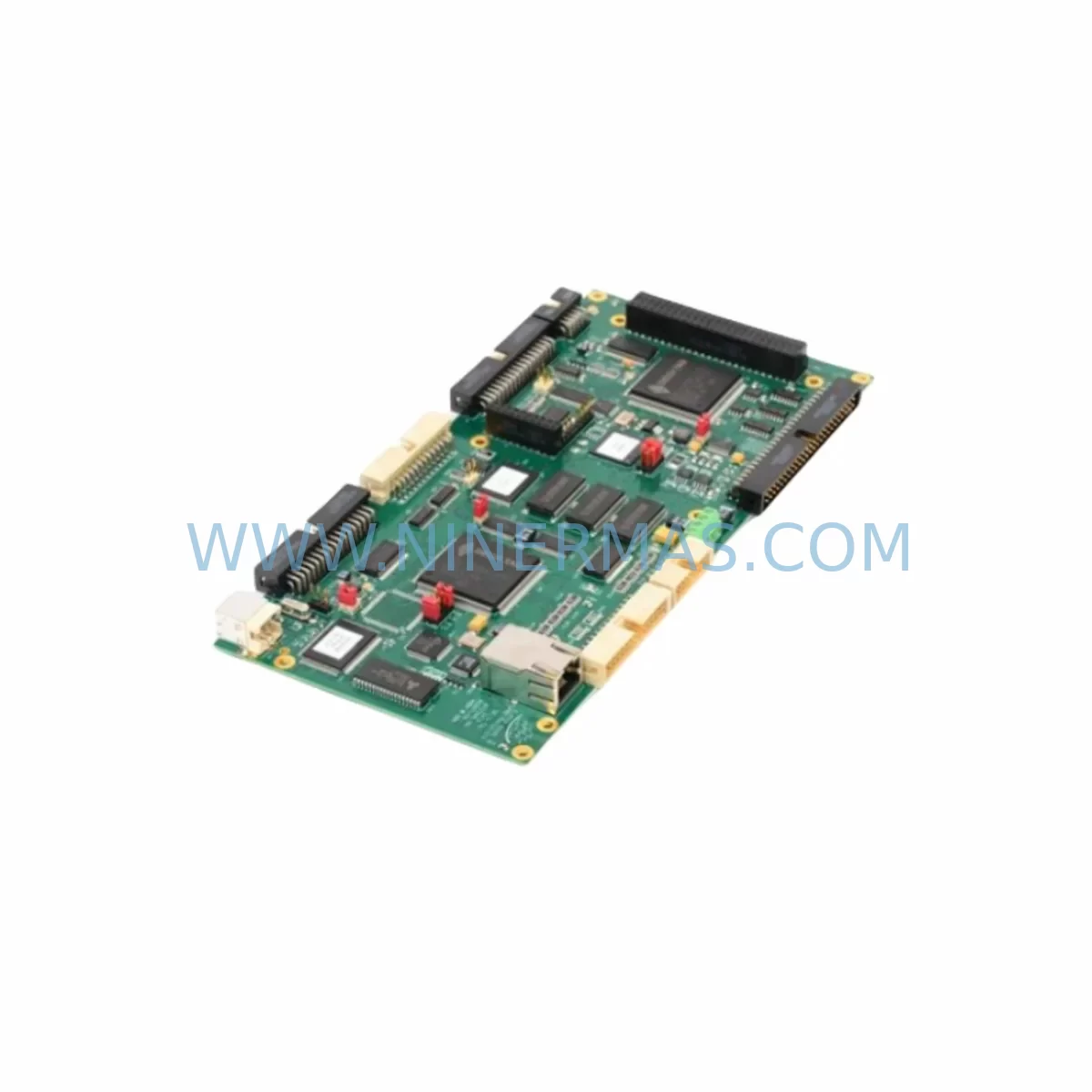
Delta Tau PMAC2A-ETH Service-Ready Spare Part for Industrial Maintenance
Verify the part, confirm the platform family, and move straight into quotation with the right commercial details.
RFQ Ready
- SKUPMAC2A-ETH
- CategoryPLC & Industrial Automation Modules
- BrandDelta Tau
- SupportAvailability, lead time, condition, and shipping coordination
How Buyers Usually Use This Page
- Confirm the exact part number and platform family before sending the quote request.
- Use direct email when quantity, condition, and destination are already defined internally.
- Switch to the broader brand or category archive when you need alternates nearby.
Series Navigation
Move through the most common platform families behind this part.
Product RFQ
Send this part directly for quotation.
Include quantity, required condition, destination country, and target delivery timing. Current reference: Delta Tau PMAC2A-ETH Service-Ready Spare Part for Industrial Maintenance with SKU PMAC2A-ETH.
Delta Tau PMAC2A-ETH Service-Ready Spare Part for Industrial Maintenance
The Delta Tau PMAC2A-ETH is the Ethernet-enabled CPU board at the heart of the Power PMAC2A multi-axis motion control platform. Deployed across CNC machining centers, semiconductor wafer handling systems, precision robotics, and high-throughput automation lines, this board governs real-time trajectory planning, servo loop closure, and coordinated axis management for up to 32 axes simultaneously. When this CPU board fails or degrades, the entire motion system halts — making a verified, service-ready spare unit a non-negotiable element of any serious maintenance inventory strategy.
At NINERMAS, every PMAC2A-ETH unit is sourced from authorized channels, subjected to pre-shipment functional verification, and dispatched with a 12-month warranty. Our global logistics infrastructure ensures rapid delivery to manufacturing sites in Europe, Southeast Asia, the Middle East, and the Americas — minimizing unplanned downtime and protecting production continuity.
Spare Maintenance Table
| Manufacturer | Delta Tau Data Systems (OMRON Group) |
| SKU / Part Number | PMAC2A-ETH |
| Series | Power PMAC2A |
| Communication Interface | Ethernet 10/100 Base-T (RJ45) |
| Maximum Axes Supported | Up to 32 axes (hardware dependent) |
| Form Factor / Mounting | UMAC rack-mount CPU slot (Turbo PMAC2 compatible backplane) |
| Operating Temperature | 0°C to +60°C (industrial ambient) |
| Supply Voltage | +5 VDC via UMAC backplane (internal regulation) |
| Compatibility | UMAC rack system, Geo Brick controller, Power PMAC Clipper platform |
| Typical Applications | CNC machining, semiconductor equipment, precision robotics, laser cutting, coordinate measurement |
| Replacement Scope | Direct drop-in for PMAC2A-ETH; firmware re-flash may be required |
| Warranty | 12 Months — tested and verified before shipment |
Maintenance Planning for Continuous Operation
Replacing the PMAC2A-ETH CPU board is rarely an isolated event. In a UMAC-based motion control cabinet, the CPU board interfaces directly with multiple downstream components, each of which should be inspected or staged as a concurrent spare during any planned or emergency replacement cycle.
The ACC-24E2A axis interface boards occupy adjacent slots in the UMAC rack and handle the encoder feedback, DAC output, and flag I/O for each servo axis. If the CPU board has experienced a power surge or backplane fault, the ACC-24E2A boards should be tested individually before the new PMAC2A-ETH is commissioned — a failed axis board can mask CPU-level diagnostics and delay root cause identification. Similarly, the ACC-51E general-purpose I/O board, which manages machine interlocks, limit switches, and auxiliary digital signals, should be verified for correct logic levels and connector integrity.
Analog signal conditioning is handled by the ACC-65E analog I/O board, commonly used for spindle speed references, pressure transducer inputs, and temperature monitoring loops. Corrosion on the edge connector or drift in the analog reference voltage can introduce positioning errors that are incorrectly attributed to the CPU. The ACC-28E digital I/O expansion board, where fitted, should also be inspected for relay contact wear and terminal block tightness.
The UMAC backplane itself is a critical passive component that is frequently overlooked during CPU replacements. Backplane slot contacts should be cleaned with isopropyl alcohol and inspected for bent pins before the replacement PMAC2A-ETH is seated. A damaged backplane can destroy a new CPU board within hours of commissioning.
For sites running legacy PMAC2-ETH (non-Power PMAC) systems alongside newer Power PMAC2A installations, maintaining cross-compatible spares requires careful firmware version management. The ACC-11E dual-port RAM board, used in some UMAC configurations for host PC communication, should be confirmed compatible with the replacement CPU firmware revision before the system is returned to production.
In compact installations using the Power PMAC Clipper or Geo Brick Drive integrated controller, the CPU and drive electronics share a common board — making the PMAC2A-ETH a critical reference spare even when the primary controller is a different form factor. Maintenance engineers should document the firmware build number, axis configuration file, and I-variable settings from the outgoing board before removal, as these are essential for rapid recommissioning of the replacement unit.
Power supply integrity is equally important: the 5 VDC UMAC backplane rail, typically sourced from a dedicated industrial DIN-rail power supply, should be load-tested and its output ripple measured before the new CPU board is installed. A marginal power supply that was previously masked by the old board’s lower current draw can cause intermittent faults on the replacement unit.
Site Replacement Workflow
Step 1 — Pre-Replacement Documentation: Record the current firmware version, all I-variable settings, motor configuration parameters, and the Ethernet IP address assigned to the PMAC2A-ETH. Export the project file from the PMAC IDE or Power PMAC IDE software. This backup is essential for rapid recommissioning and eliminates the most common source of extended downtime — lost configuration data.
Step 2 — Safe Isolation: De-energize the UMAC rack via the main cabinet isolator. Verify zero-energy state with a calibrated multimeter on the backplane 5 VDC rail. Discharge any capacitor banks on the axis drive modules before handling the CPU board.
Step 3 — Board Removal and Inspection: Remove the PMAC2A-ETH from its UMAC slot. Inspect the edge connector for oxidation, bent pins, or thermal discoloration. Inspect the backplane slot for corresponding damage. Clean both surfaces before installing the replacement unit.
Step 4 — Replacement Installation: Seat the service-ready PMAC2A-ETH firmly into the CPU slot. Reconnect the Ethernet cable and any auxiliary connectors. Re-energize the rack and confirm the board powers up with the correct LED status sequence.
Step 5 — Firmware and Configuration Restore: Connect via the Power PMAC IDE over Ethernet. Flash the correct firmware version if the replacement board ships with a different build. Restore the saved I-variable configuration and motor parameters. Verify axis homing, limit switch response, and communication with the host PLC or HMI before returning the machine to production.
Step 6 — Functional Validation: Run a dry-cycle test at reduced feedrate across all axes. Confirm encoder counts, following error limits, and servo loop stability before authorizing full production restart. Log the replacement event, board serial number, and firmware version in the site maintenance record.
Spare Parts Support FAQ
Q1: Is the PMAC2A-ETH still available as a new original spare, or only as a refurbished unit?
NINERMAS maintains service-ready PMAC2A-ETH inventory sourced from authorized distribution and verified end-of-life stock channels. Each unit undergoes functional testing prior to shipment. Where new original stock is available, it is clearly identified. Refurbished units are tested to the same functional standard and covered by the same 12-month warranty. Contact sale@ninermas.com to confirm current stock status and lead time.
Q2: How do I verify compatibility between a replacement PMAC2A-ETH and my existing UMAC rack configuration?
Compatibility depends on the UMAC rack revision, the firmware version running on the existing axis boards (ACC-24E2A, ACC-51E, etc.), and the Power PMAC IDE software version used on the host PC. Provide your existing board serial number and firmware build to our technical team before ordering — we will confirm compatibility and advise on any firmware update requirements to avoid commissioning delays.
Q3: What pre-shipment testing is performed on each PMAC2A-ETH unit?
Every PMAC2A-ETH dispatched by NINERMAS is powered up in a UMAC test rack, Ethernet communication is established, firmware integrity is verified, and basic axis command/response functionality is confirmed. A test report is available on request. Units that do not pass functional verification are not shipped.
Q4: What is the warranty coverage and what does it include?
All PMAC2A-ETH units carry a 12-month warranty from the date of shipment. The warranty covers manufacturing defects and functional failures under normal operating conditions. It does not cover damage resulting from incorrect installation, overvoltage events, or physical mishandling. NINERMAS provides direct technical support for warranty claims and offers advance replacement to minimize production downtime for qualified accounts.
| Product Series | Other series |
|---|
Catalog Continuation
Alternative parts within PLC & Industrial Automation Modules.
Stay inside the same system family when you need substitutes, adjacent modules, or a broader shortlist for procurement review.

SKU: 6FC5370-8AA20-0AA0
SIEMENS 6FC5370-8AA20-0AA0 Retrofit-Compatible CNC Memory
SKU: 6SL3020-2TE21-0AA4
Siemens 6SL3020-2TE21-0AA4 Service-Ready Spare Part
SKU: DX100DX200 jZRCR-YPP01-1 JZRCR-YPP21-1 SRDA-SDB95A01A-E 10Y-06A DC-24V
Yaskawa JZRCR-YPP01-1 Retrofit-Compatible Pendant for Legacy Systems



