Original Industrial Spare Part
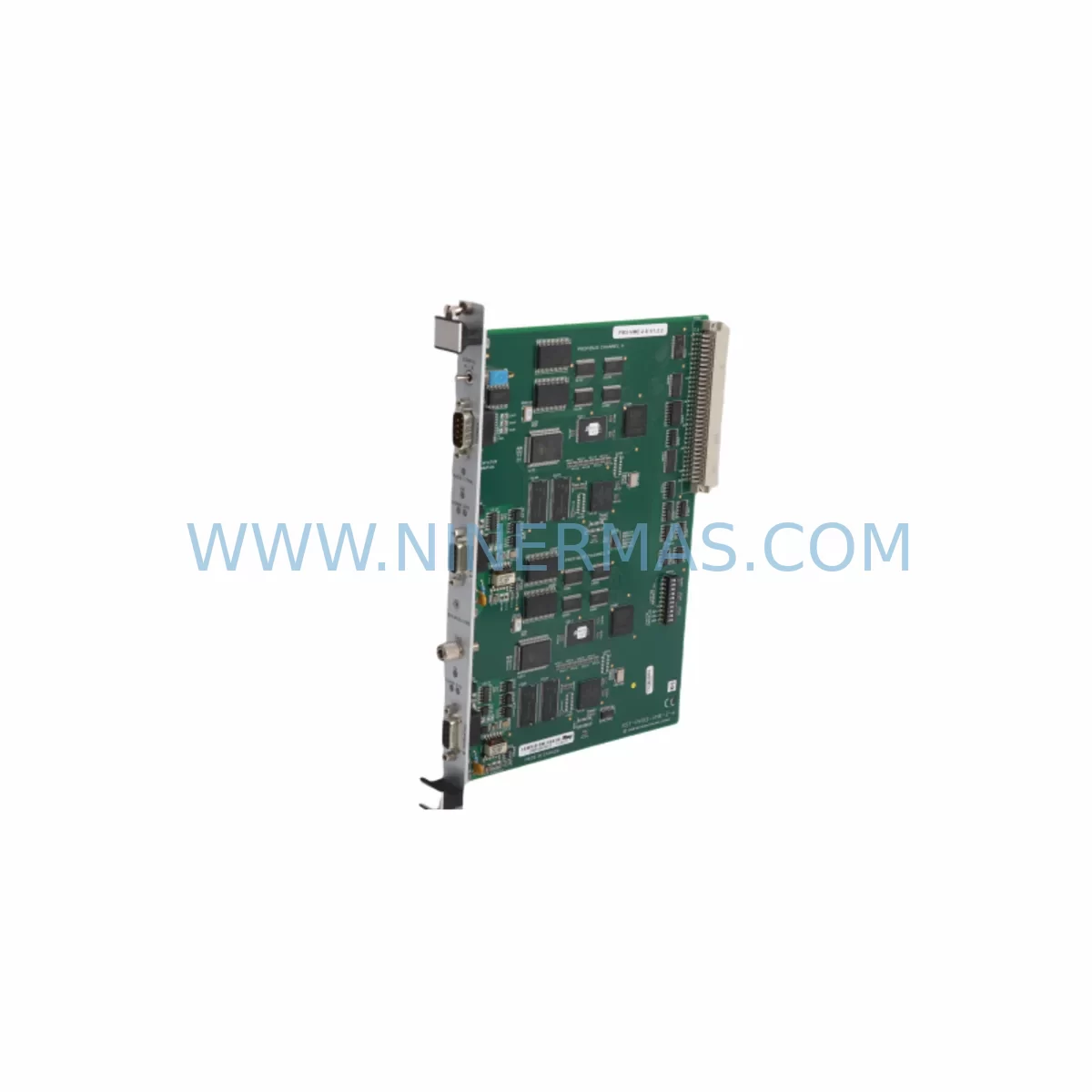
SST SST-PB3-VME-2-E Retrofit-Compatible PROFIBUS VME Module
Verify the part, confirm the platform family, and move straight into quotation with the right commercial details.
RFQ Ready
- SKUSST-PB3-VME-2-E
- CategoryPLC & Industrial Automation Modules
- BrandSST
- SupportAvailability, lead time, condition, and shipping coordination
How Buyers Usually Use This Page
- Confirm the exact part number and platform family before sending the quote request.
- Use direct email when quantity, condition, and destination are already defined internally.
- Switch to the broader brand or category archive when you need alternates nearby.
Series Navigation
Move through the most common platform families behind this part.
Product RFQ
Send this part directly for quotation.
Include quantity, required condition, destination country, and target delivery timing. Current reference: SST SST-PB3-VME-2-E Retrofit-Compatible PROFIBUS VME Module with SKU SST-PB3-VME-2-E.
SST SST-PB3-VME-2-E Retrofit-Compatible PROFIBUS VME Module: Legacy System Compatibility and Smooth Upgrade
The SST SST-PB3-VME-2-E is a ruggedized PROFIBUS DP master/slave communication module designed for VME bus architectures operating in harsh industrial environments. As legacy VME-based control platforms approach end-of-life and original spare parts become increasingly scarce, the SST-PB3-VME-2-E has become a critical retrofit component for engineers tasked with extending the operational life of existing automation systems without full platform migration. NINERMAS maintains verified stock of this module with pre-shipment functional testing and a 12-month warranty to support your retrofit and lifecycle extension programs.
Upgrade Compatibility Table
| Parameter | SST-PB3-VME-2-E Specification | Retrofit / Replacement Notes |
|---|---|---|
| Bus Interface | VME64 / VMEbus (IEEE 1014) | Confirm backplane slot pitch and J1/J2 connector compatibility before installation |
| Communication Protocol | PROFIBUS DP (EN 50170), up to 12 Mbps | Verify baud rate settings match existing field device configuration; no protocol conversion required for DP networks |
| Master/Slave Mode | Class 1 DP Master and DP Slave | Confirm GSD file version compatibility with existing PROFIBUS configurator tools |
| Power Supply | 5 VDC via VME backplane | Verify backplane power budget; total slot current draw must not exceed chassis PSU rating |
| Operating Temperature | -40°C to +85°C (ruggedized) | Suitable for harsh environment enclosures; no additional thermal derating required in standard control cabinets |
| Installation Slot | Single-width VME slot (6U) | Confirm available slot count in existing VME chassis; check for mechanical interference with adjacent modules |
| Driver / Software | SST PROFIBUS API, Windows/VxWorks/LynxOS | Validate OS version and driver compatibility before commissioning; retain original configuration backup |
| Warranty | 12-Month Warranty — All units pre-shipment tested by NINERMAS technical team | |
Retrofit Planning for Existing Automation Systems
When integrating the SST-PB3-VME-2-E into an existing VME-based control system, a structured retrofit plan is essential to minimize risk and protect the integrity of the running process. The first step is a full audit of the existing VME chassis — typically a 6U or 9U rack from manufacturers such as Motorola MVME, Radstone, or Themis — to confirm available slot positions, backplane revision, and total power budget. The SST-PB3-VME-2-E draws its operating power from the VME backplane at 5 VDC, so the chassis power supply module must have sufficient headroom after accounting for all installed boards including CPU boards, memory modules, and any existing I/O modules.
On the PROFIBUS network side, engineers should document the existing DP segment topology before replacement. This includes recording all slave device addresses, GSD file versions, baud rate settings, and termination resistor positions at both ends of the PROFIBUS cable. When the SST-PB3-VME-2-E replaces an older PROFIBUS master card — such as a first-generation SST-PB3-VME or a competing VME PROFIBUS card — the new module must be configured to assume the same master address and scan cycle parameters to avoid disrupting slave device communication. PROFIBUS DP slaves such as remote I/O stations, variable frequency drives, valve positioners, and distributed safety modules will not require reconfiguration if the master address and GSD parameters are preserved.
The host application software running on the VME CPU board — whether on a Motorola MVME5500, an Emerson MVME7100, or a similar single-board computer — must be validated against the SST PROFIBUS API version supported by the SST-PB3-VME-2-E. In many retrofit scenarios, the existing application code can be reused without modification, provided the API function calls and data buffer structures remain compatible. Where OS upgrades are involved, such as migrating from VxWorks 5.x to VxWorks 6.x or transitioning to a Linux-based real-time environment, driver recompilation and regression testing of the PROFIBUS communication stack are recommended before live deployment.
For control cabinets that also house PROFIBUS PA segments connected through DP/PA couplers or segment couplers, the SST-PB3-VME-2-E’s DP master capability is fully compatible with standard DP/PA link devices. Engineers managing mixed DP and PA field instrument networks — including pressure transmitters, flow meters, and positioners from major instrument vendors — can retain the existing PA segment architecture while replacing only the VME master card. Signal isolators and surge protection devices installed on the PROFIBUS trunk cable do not require replacement during this module swap.
Where the retrofit also involves expanding I/O capacity, the SST-PB3-VME-2-E can support additional PROFIBUS DP slave stations added to the existing segment, subject to the 126-node address limit and cable length constraints of the selected baud rate. Additional VME I/O boards, analog input modules, or digital output modules installed in the same chassis can continue to operate independently of the PROFIBUS module, sharing only the VME backplane bus arbitration.
Downtime Control During System Migration
Minimizing unplanned downtime is the primary concern in any live system retrofit. For the SST-PB3-VME-2-E replacement, the recommended approach is a cold-swap procedure performed during a scheduled maintenance window. Before powering down the VME chassis, the engineering team should capture a full backup of the existing PROFIBUS configuration using the SST Configuration Tool or equivalent PROFIBUS configurator, export all GSD-based device parameter sets, and document the current network diagnostic status of all slave devices.
Once the chassis is de-energized and the original PROFIBUS module is removed, the SST-PB3-VME-2-E is installed in the same VME slot. The PROFIBUS DB9 connector is reconnected to the existing field cable, preserving the original termination state. On power-up, the module initializes and the host application re-establishes the PROFIBUS DP master scan cycle. In most cases, all slave devices return to normal cyclic data exchange within seconds of the master restarting, provided the configuration parameters are correctly restored.
For systems where continuous operation is critical and no maintenance window is available, a parallel commissioning approach can be used: a second VME chassis is configured offline with the SST-PB3-VME-2-E and the full application stack, validated against a test PROFIBUS segment, and then cut over to the live network during the shortest available process interruption. This approach is particularly effective in water treatment, chemical processing, and power generation applications where even brief control interruptions carry significant operational risk.
NINERMAS provides pre-shipment functional testing for every SST-PB3-VME-2-E unit, including PROFIBUS communication verification at multiple baud rates, VME bus interface validation, and environmental stress screening for ruggedized variants. Each unit ships with a test report and is covered by a 12-month warranty from the date of delivery, supporting your maintenance planning and spare parts lifecycle programs.
Retrofit Support FAQ
Q1: Can the SST-PB3-VME-2-E directly replace an older SST PROFIBUS VME card without software changes?
In most cases, yes. If the replacement module uses the same SST PROFIBUS API version and the VME slot address is unchanged, the existing host application software can continue to operate without modification. A driver version check and a brief communication test on a non-production segment are recommended before returning the system to service.
Q2: What wiring changes are required when installing the SST-PB3-VME-2-E?
The PROFIBUS DP interface uses a standard DB9 connector. If the existing field cable uses the same connector pinout (pin 3 = B/+, pin 8 = A/−, pin 6 = VP, pin 5 = DGND), no wiring changes are required. Verify that the termination resistor network at the segment endpoints remains active and that the cable shield is properly grounded at the control cabinet entry point.
Q3: Is the SST-PB3-VME-2-E compatible with PROFIBUS DP-V1 and DP-V2 slave devices?
The SST-PB3-VME-2-E supports standard PROFIBUS DP (DP-V0) cyclic communication as its primary operating mode. DP-V1 acyclic parameter access and DP-V2 isochronous mode support depend on the firmware version and the SST API release. Confirm the firmware revision with NINERMAS before deployment in systems with DP-V1 parameterization requirements.
Q4: What does the 12-month warranty from NINERMAS cover?
The 12-month warranty covers manufacturing defects and functional failures under normal operating conditions. Every unit is pre-shipment tested for PROFIBUS communication integrity and VME bus interface operation. In the event of a warranty claim, NINERMAS provides advance replacement support to minimize system downtime. Contact sale@ninermas.com for warranty registration and claim procedures.
| Product Series | Other series |
|---|
Catalog Continuation
More SST modules in the catalog.
Use the brand lane to compare nearby part numbers, platform-adjacent modules, and other inquiry-ready listings before sending your final RFQ.
Catalog Continuation
Alternative parts within PLC & Industrial Automation Modules.
Stay inside the same system family when you need substitutes, adjacent modules, or a broader shortlist for procurement review.
SKU: SC752A-001-01
Pacific Scientific SC752A-001-01 Service-Ready Spare Part
SKU: CPU 314SB 314-2AG13
VIPA CPU 314SB 314-2AG13 Service-Ready Spare Part
SKU: CDN500-19 0190-07970
MKS CDN500-19 0190-07970 Service-Ready Spare Part