
Original Industrial Spare Part
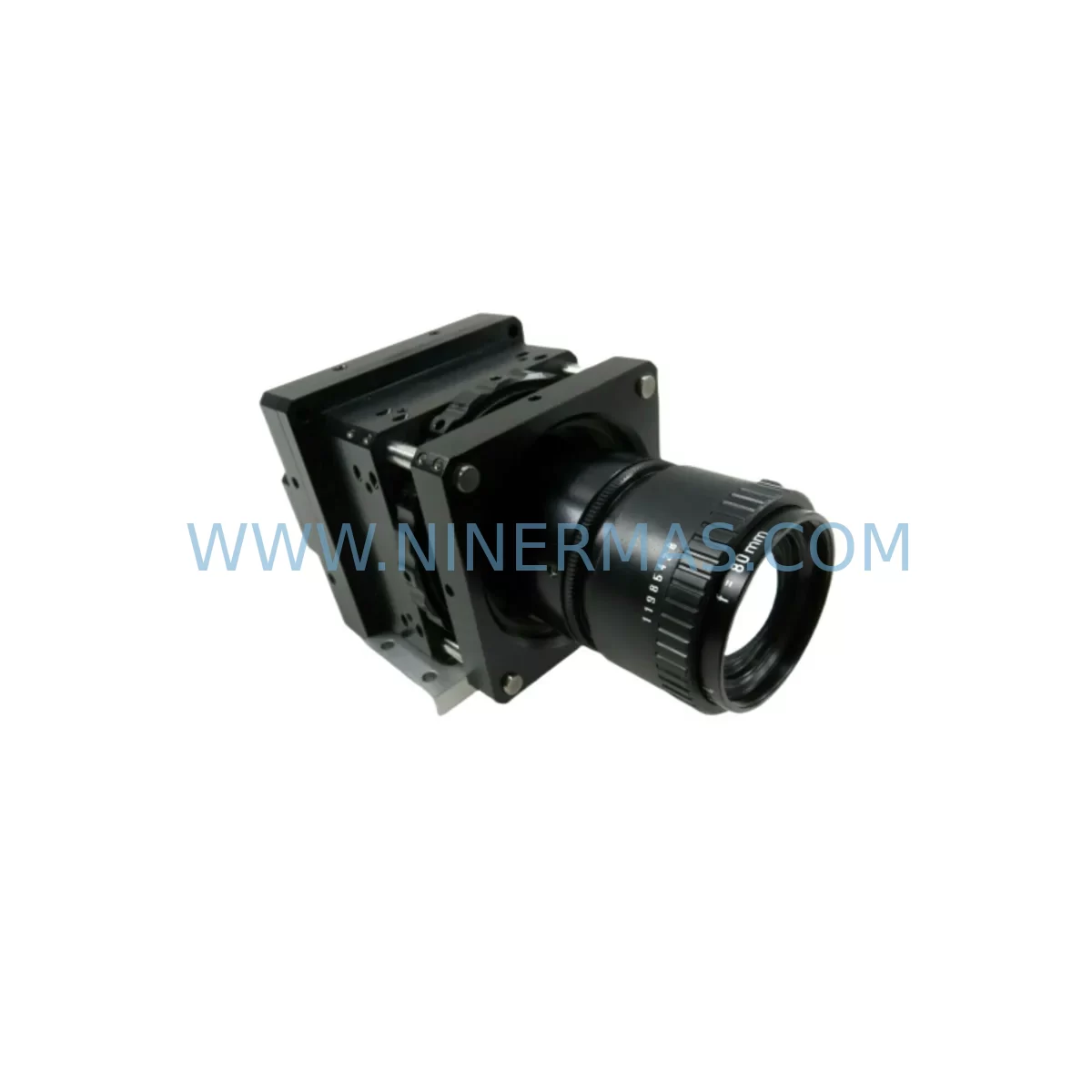
S+K SK7500CTO-XL-HE-CD10 Service-Ready Industrial Spare Part
Verify the part, confirm the platform family, and move straight into quotation with the right commercial details.
RFQ Ready
- SKUSK7500CTO-XL-HE-CD10 650069 SNNF Q 0200-36689
- CategoryPLC & Industrial Automation Modules
- BrandSchafter+Kirchhoff
- SupportAvailability, lead time, condition, and shipping coordination
How Buyers Usually Use This Page
- Confirm the exact part number and platform family before sending the quote request.
- Use direct email when quantity, condition, and destination are already defined internally.
- Switch to the broader brand or category archive when you need alternates nearby.
Series Navigation
Move through the most common platform families behind this part.
Product RFQ
Send this part directly for quotation.
Include quantity, required condition, destination country, and target delivery timing. Current reference: S+K SK7500CTO-XL-HE-CD10 Service-Ready Industrial Spare Part with SKU SK7500CTO-XL-HE-CD10 650069 SNNF Q 0200-36689.
S+K SK7500CTO-XL-HE-CD10 Service-Ready Industrial Spare Part: Spare Replacement and Downtime Risk Control
The Schäfter+Kirchhoff SK7500CTO-XL-HE-CD10 is a high-resolution CCD digital line scan camera engineered for precision machine vision applications in industrial manufacturing, quality inspection, and automated optical inspection (AOI) environments. As a service-ready original spare part, the SK7500CTO-XL-HE-CD10 is stocked and pre-tested to support rapid field replacement, minimizing unplanned downtime and protecting production continuity in safety-critical and high-throughput industrial lines.
Maintenance engineers and procurement specialists managing aging machine vision systems recognize that the SK7500CTO-XL-HE-CD10 is a long-cycle component — its failure or degradation directly impacts inspection accuracy, throughput, and regulatory compliance. Sourcing a verified original spare in advance is the most effective strategy to reduce mean time to repair (MTTR) and avoid extended production halts. Each unit shipped by NINERMAS undergoes pre-shipment functional testing and is backed by a 12-month warranty, ensuring confidence in every replacement deployment.
Spare Maintenance Table
| Parameter | Specification / Detail |
|---|---|
| Part Number / SKU | SK7500CTO-XL-HE-CD10 (650069 SNNF Q 0200-36689) |
| Brand / Manufacturer | Schäfter+Kirchhoff GmbH (Germany) |
| Series | SK7500 CTO Series — Digital Line Scan Camera |
| Sensor Type | High-efficiency CCD line sensor |
| Interface | Camera Link (CL) — Full / Medium / Base configuration |
| Resolution | 7500 pixels per line (high-resolution imaging) |
| Operating Voltage | +12 VDC / +5 VDC (via Camera Link power) |
| Operating Temperature | 0°C to +50°C (industrial ambient) |
| Compatibility | SK7500 series frame grabbers; Camera Link-compliant acquisition boards |
| Mounting | C-mount lens interface; standard industrial housing |
| Application Environment | AOI, web inspection, print quality, semiconductor, solar cell, flat panel display |
| Maintenance Recommendation | Replace every 5–8 years or upon pixel dropout, line noise, or sync failure |
| Pre-Shipment Testing | Full functional test performed before dispatch |
| Warranty | 12 months from date of shipment |
| Origin | Germany (DE) |
| Long-Term Supply | Reserved inventory available; contact for volume commitments |
Maintenance Planning for Continuous Operation
When replacing the SK7500CTO-XL-HE-CD10 in a live production environment, a thorough inspection of the surrounding electrical and optical subsystems is essential to prevent repeat failures and ensure full system restoration. Maintenance engineers should treat this replacement as an opportunity to audit the entire machine vision chain.
Begin with the Camera Link interface cable connecting the SK7500CTO-XL-HE-CD10 to the frame grabber. Camera Link cables are subject to mechanical fatigue from repeated flexing and connector wear; a degraded cable can introduce intermittent sync errors that mimic camera failure. Inspect and replace Camera Link cables rated for the correct MDR-26 or SDR-26 connector standard used in your installation.
Next, verify the frame grabber card — typically a PCIe-based Camera Link acquisition board such as those from the NI PCIe-1433 family or equivalent industrial-grade grabbers. Confirm that the grabber firmware is current and that the Camera Link configuration (Base, Medium, or Full) matches the SK7500CTO-XL-HE-CD10 output mode. A mismatched configuration will prevent image acquisition even with a fully functional camera.
Inspect the 24 VDC industrial power supply feeding the machine vision enclosure. Voltage ripple or transient spikes can degrade CCD sensor performance over time. Use a calibrated multimeter or oscilloscope to verify supply stability within ±5% of nominal. If the power supply is more than five years old or shows signs of capacitor aging, schedule a proactive replacement alongside the camera.
Check the LED line illumination module paired with the SK7500CTO-XL-HE-CD10. Line scan cameras are highly sensitive to illumination consistency; aging LED arrays with uneven intensity distribution will produce banding artifacts in captured images. Verify illumination uniformity across the full scan width and replace the LED bar if intensity has dropped more than 20% from baseline.
Review the trigger and encoder signal module providing line-rate synchronization to the camera. The SK7500CTO-XL-HE-CD10 relies on precise external trigger signals for accurate pixel-to-position mapping. Inspect the encoder cable, signal conditioner, and any opto-isolated trigger interface boards for continuity and signal integrity. A jittery or noisy trigger signal will produce geometric distortion in line scan images.
Examine the C-mount industrial lens mounted on the camera. Dust contamination, lens element delamination, or aperture mechanism wear can reduce image sharpness and contrast. Clean the lens with appropriate optical-grade materials and verify focus and depth-of-field settings after camera replacement.
For systems integrated into a broader PLC or DCS control architecture, confirm that the digital I/O signals between the machine vision controller and the PLC (e.g., inspection pass/fail outputs, trigger enable lines) are functioning correctly after camera swap. Inspect the I/O terminal blocks and signal cables for corrosion or loose terminations.
Finally, review the machine vision software configuration and camera parameter file (calibration, gain, exposure, line rate). After installing the SK7500CTO-XL-HE-CD10 replacement, reload the validated parameter set and perform a full calibration verification before returning the line to production. Document the replacement in the maintenance log with the new unit’s serial number and test results.
Site Replacement Workflow
The SK7500CTO-XL-HE-CD10 is designed as a direct drop-in replacement for existing SK7500 series installations. Follow this structured workflow to minimize downtime and ensure system compatibility:
Step 1 — Preparation: Before powering down the inspection station, capture a reference image set using the existing camera to establish a baseline for post-replacement validation. Back up the current camera parameter file from the machine vision software.
Step 2 — Safe Shutdown: Follow your site’s lockout/tagout (LOTO) procedure. Disconnect the Camera Link cable and power connections from the existing SK7500CTO-XL-HE-CD10. Label all connectors before removal to prevent misconnection during reinstallation.
Step 3 — Physical Replacement: Remove the old camera from the C-mount lens assembly. Install the replacement SK7500CTO-XL-HE-CD10, ensuring the lens is seated correctly and the focus distance is preserved. Reconnect the Camera Link cable and verify connector locking clips are fully engaged.
Step 4 — Power-On and Configuration: Restore power and launch the machine vision software. Load the backed-up camera parameter file. Verify that the frame grabber detects the SK7500CTO-XL-HE-CD10 and that the Camera Link configuration matches the original setup.
Step 5 — Validation: Acquire a test image set under standard production illumination conditions. Compare against the pre-replacement baseline for sharpness, uniformity, and geometric accuracy. Confirm that inspection pass/fail logic operates correctly before releasing the line to production.
Step 6 — Documentation: Record the replacement in the site maintenance management system (CMMS) with the date, technician name, new unit serial number, and test results. Update the spare parts inventory to trigger reorder of a replacement unit for future contingency stock.
Spare Parts Support FAQ
Q1: Is the SK7500CTO-XL-HE-CD10 supplied by NINERMAS an original Schäfter+Kirchhoff unit?
Yes. NINERMAS supplies original Schäfter+Kirchhoff SK7500CTO-XL-HE-CD10 units sourced through verified industrial channels. Each unit is individually tested before shipment to confirm full functional compliance with the original factory specification. A 12-month warranty is provided from the date of shipment.
Q2: How do I confirm compatibility with my existing SK7500 series machine vision system?
The SK7500CTO-XL-HE-CD10 is compatible with Camera Link-compliant frame grabbers configured for the SK7500 series. Verify that your frame grabber supports the Camera Link mode (Base, Medium, or Full) used by your original camera, and that your machine vision software supports the SK7500CTO-XL-HE-CD10 camera model. Contact NINERMAS with your system configuration details for pre-purchase compatibility confirmation.
Q3: What is the lead time and can NINERMAS support long-term supply commitments?
NINERMAS maintains reserved inventory of the SK7500CTO-XL-HE-CD10 to support urgent replacement requirements. Standard lead time for in-stock units is 3–7 business days for international shipment. For customers requiring long-term supply assurance — such as multi-year maintenance contracts or fleet-wide spare parts programs — NINERMAS offers reserved stock agreements with committed delivery schedules. Contact our sales team to discuss volume and timeline requirements.
Q4: What does the 12-month warranty cover and what is the return process?
The 12-month warranty covers manufacturing defects and functional failures under normal operating conditions as specified in the SK7500CTO-XL-HE-CD10 datasheet. It does not cover damage resulting from incorrect installation, overvoltage, physical impact, or use outside the specified environmental range. In the event of a warranty claim, contact NINERMAS with the unit serial number, purchase date, and a description of the failure. NINERMAS will coordinate return authorization and provide a replacement or repair within the warranty period.
| Product Series | Other series |
|---|
Catalog Continuation
Alternative parts within PLC & Industrial Automation Modules.
Stay inside the same system family when you need substitutes, adjacent modules, or a broader shortlist for procurement review.
SKU: 14L41-RS0B0-B24R-ST5S00N-R0SU
LENZE 14L41-RS0B0-B24R-ST5S00N-R0SU Retrofit for Legacy Systems
SKU: CI540 3BSE001077R1
ABB CI540 3BSE001077R1 Spare Part for Industrial Maintenance

SKU: ZINT-541 3AUA00000658960
ABB ZINT-541 3AUA00000658960 Retrofit-Compatible Inverter Power Module



