Original Industrial Spare Part
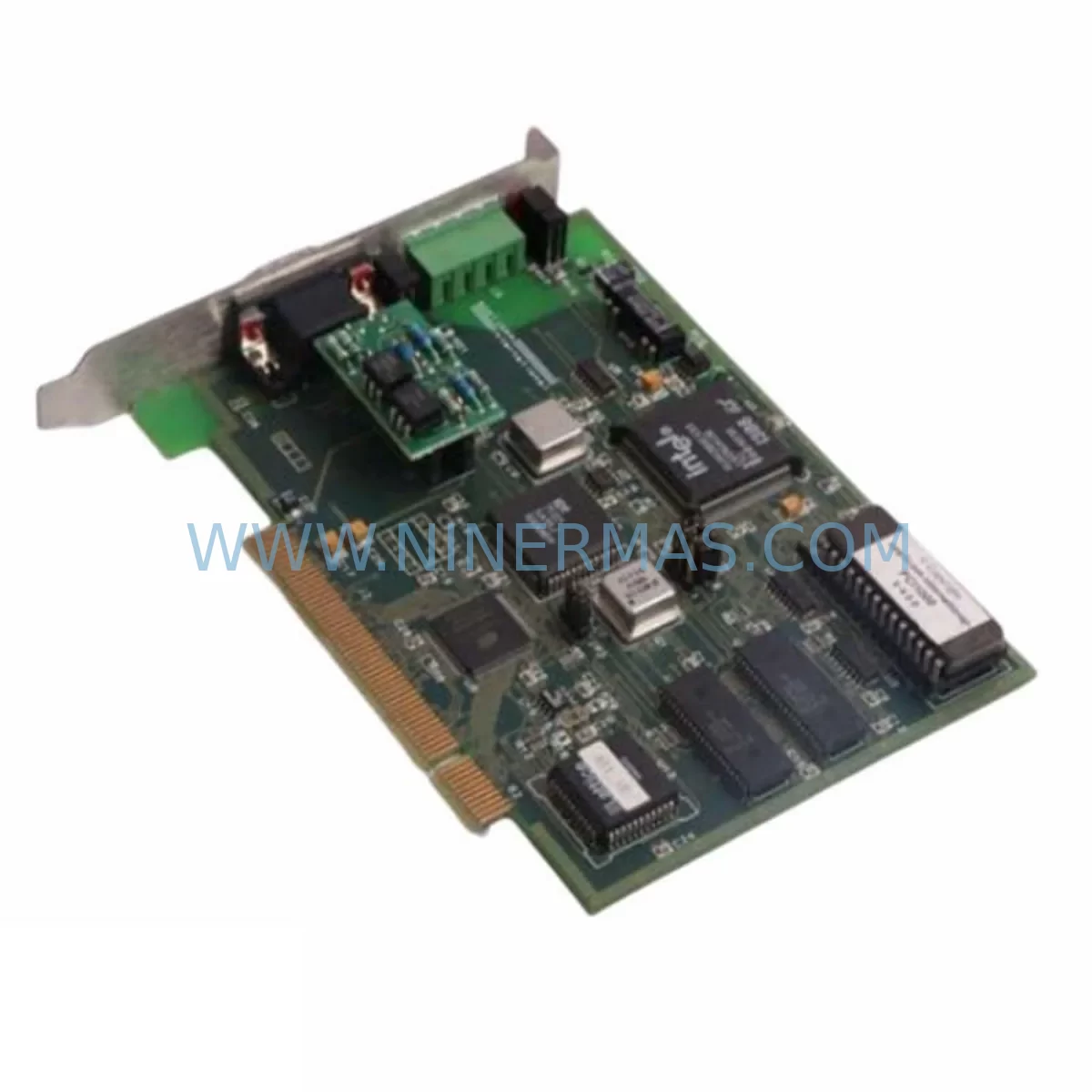
SST SST-ESR2-CPX-P Spare Part for Industrial Maintenance
Verify the part, confirm the platform family, and move straight into quotation with the right commercial details.
RFQ Ready
- SKUSST-ESR2-CPX-P
- CategoryPLC & Industrial Automation Modules
- BrandSST
- SupportAvailability, lead time, condition, and shipping coordination
How Buyers Usually Use This Page
- Confirm the exact part number and platform family before sending the quote request.
- Use direct email when quantity, condition, and destination are already defined internally.
- Switch to the broader brand or category archive when you need alternates nearby.
Series Navigation
Move through the most common platform families behind this part.
Product RFQ
Send this part directly for quotation.
Include quantity, required condition, destination country, and target delivery timing. Current reference: SST SST-ESR2-CPX-P Spare Part for Industrial Maintenance with SKU SST-ESR2-CPX-P.
SST SST-ESR2-CPX-P Spare Part for Industrial Maintenance
The SST-ESR2-CPX-P is a purpose-built communication gateway module from SST, designed to serve as a direct service-ready spare part for the ESR2 Series platform. For maintenance engineers managing aging ControlLogix-based control architectures, this module represents a critical line item in any structured spare parts program. Whether you are responding to an unplanned fault, executing a scheduled annual shutdown, or building a proactive inventory buffer for a multi-line production facility, the SST-ESR2-CPX-P delivers the compatibility, reliability, and supply continuity that industrial operations demand.
The ESR2 Series gateway modules from SST are widely deployed in process industries including oil and gas, chemical processing, water treatment, and discrete manufacturing. These modules bridge legacy fieldbus networks — including Profibus DP, DeviceNet, and ControlNet — with modern Rockwell Automation ControlLogix and CompactLogix backplane environments. As original equipment ages and OEM support windows close, maintaining a verified spare of the SST-ESR2-CPX-P becomes essential to avoiding extended unplanned downtime during a fault event.
Spare Maintenance Table
| Parameter | Specification / Detail |
|---|---|
| Part Number | SST-ESR2-CPX-P |
| Series | ESR2 Series |
| Module Type | Communication Gateway / Network Interface Module |
| Compatible Platform | Rockwell Automation ControlLogix, CompactLogix |
| Backplane Interface | ControlLogix / CompactLogix Backplane (1756 / 1769 chassis) |
| Communication Protocol | Profibus DP / DeviceNet / ControlNet (ESR2 variant dependent) |
| Power Supply | Backplane-powered via chassis; no external 24VDC required |
| Installation | Direct slot insertion into ControlLogix or CompactLogix chassis |
| Operating Temperature | 0°C to 60°C (32°F to 140°F) |
| Mounting | DIN rail or panel-mount chassis |
| Replacement Compatibility | Direct replacement for existing SST-ESR2-CPX-P installations |
| Firmware | Compatible with existing ESR2 Series firmware revisions |
| Pre-Shipment Testing | Functional test performed prior to dispatch |
| Warranty | 12-Month Warranty from date of shipment |
| Lead Time | In-stock; typically ships within 2–5 business days |
Maintenance Planning for Continuous Operation
Effective maintenance planning for a ControlLogix-based system housing the SST-ESR2-CPX-P requires a holistic view of the control cabinet and its interconnected components. When a maintenance engineer identifies a fault or degraded performance in the ESR2 gateway, the replacement workflow should not stop at the module itself. A thorough inspection of the surrounding infrastructure is essential to prevent repeat failures and ensure the replacement module operates within its rated parameters from the moment it is commissioned.
Begin by verifying the 1756-PA72 or 1756-PB72 power supply module within the ControlLogix chassis. A failing or undersized power supply is a common root cause of intermittent communication faults in gateway modules. Confirm that the chassis backplane — whether a 1756-A4, 1756-A7, or 1756-A13 — shows no signs of physical damage, corrosion on the backplane connector, or slot-level faults reported in the controller diagnostics. A damaged backplane can cause a new SST-ESR2-CPX-P to exhibit the same fault symptoms as the module it replaced.
On the fieldbus side, inspect the Profibus DP cable termination resistors and verify that the network segment is properly terminated at both ends. Loose or corroded DB9 connectors on the Profibus trunk line are a frequent source of communication instability that can be misdiagnosed as a gateway module failure. If the system uses a DeviceNet segment, check the DeviceNet trunk cable, drop lines, and the network power tap to confirm that the 24VDC network power supply — often a separate 1606-XLP or equivalent unit — is within specification.
For systems where the SST-ESR2-CPX-P interfaces with a 1756-L71 or 1756-L83 ControlLogix controller, review the controller’s I/O tree in Studio 5000 Logix Designer to confirm that the module’s slot address and configuration tags are intact. If the controller project was last modified several years ago, verify that the RSLogix 5000 or Studio 5000 project file is backed up and accessible before beginning the physical replacement. Losing the controller program during a hot-swap or chassis power cycle is a preventable risk that significantly extends downtime.
Additional components that should be inspected as part of a comprehensive maintenance cycle include the 1756-EN2T or 1756-EN3TR EtherNet/IP communication module, which handles upstream SCADA or historian connectivity, and any 1756-IB16 or 1756-OB16 digital I/O modules installed in adjacent slots. Signal isolators on analog input channels — particularly where 4–20mA field signals connect to 1756-IF16 analog input modules — should be tested for drift. Terminal blocks and wiring ferrules on the marshalling cabinet side should be inspected for looseness, especially in high-vibration environments. A PanelView Plus 7 HMI or equivalent operator interface should also be checked to confirm that its communication path to the ControlLogix controller remains stable after the gateway module is replaced.
Site Replacement Workflow
Replacing the SST-ESR2-CPX-P on a live production system requires a structured approach to minimize downtime and protect the integrity of the existing control program. Before beginning, confirm with the operations team that a maintenance window has been approved and that the affected fieldbus network segment can be taken offline without triggering a plant-wide safety interlock or process shutdown.
Step one is to export and archive the current module configuration using the SST Configuration Tool or the equivalent RSNetWorx for Profibus / DeviceNet utility. This configuration file contains the node address assignments, baud rate settings, and slave device parameters that the replacement module will need to replicate exactly. Without this file, recommissioning the network segment after module replacement can take several hours of manual re-entry and verification.
Step two is to power down the ControlLogix chassis or, if the chassis supports it, perform a live removal of the module from its slot. Confirm that the controller is in Program mode before removing the module to prevent the I/O fault from triggering an uncontrolled process response. Insert the replacement SST-ESR2-CPX-P into the same slot, ensuring the module is fully seated against the backplane connector.
Step three is to restore the saved configuration to the new module and verify that all fieldbus slave devices — including remote I/O adapters, variable frequency drives, and smart field instruments — re-establish communication within the expected timeout period. Monitor the module’s status LEDs and the controller’s I/O tree in Studio 5000 to confirm that all devices return to a healthy state before returning the system to Run mode.
Throughout the replacement process, maintain a written log of each step, including the time of module removal, the firmware version of the replacement unit, and the names of the engineers involved. This log supports both internal maintenance records and any warranty claim that may be required within the 12-month coverage period.
Spare Parts Support FAQ
Q1: Is the SST-ESR2-CPX-P a direct drop-in replacement for the existing module in my ControlLogix chassis?
A: Yes. The SST-ESR2-CPX-P is designed as a direct replacement for existing ESR2 Series installations in ControlLogix and CompactLogix chassis. The module occupies the same slot footprint and uses the same backplane interface. No chassis modification or additional wiring is required. Confirm the firmware revision of your existing module before replacement to ensure configuration compatibility.
Q2: Does the replacement module come pre-tested before shipment?
A: Yes. Every SST-ESR2-CPX-P unit shipped by NINERMAS undergoes a functional pre-shipment test to verify backplane communication, network port operation, and firmware integrity. A test report is available upon request. The module is covered by a 12-month warranty from the date of shipment.
Q3: Can NINERMAS support long-term supply of the SST-ESR2-CPX-P for multi-year maintenance contracts?
A: Yes. NINERMAS maintains stock of the SST-ESR2-CPX-P and can support blanket purchase orders and long-term supply agreements for facilities that require guaranteed spare parts availability over a 1–3 year maintenance horizon. Contact our sales team to discuss volume pricing and lead time commitments.
Q4: What should I do if my replacement SST-ESR2-CPX-P does not establish communication after installation?
A: First, verify that the module is fully seated in the backplane slot and that the chassis power supply is within specification. Check the module’s status LEDs against the ESR2 Series user manual fault code table. Confirm that the saved configuration file has been correctly restored and that the fieldbus network termination is intact. If the issue persists, contact NINERMAS technical support with your module serial number and a description of the fault symptoms. Warranty replacement is available within the 12-month coverage period.
| Product Series | Other series |
|---|
Catalog Continuation
More SST modules in the catalog.
Use the brand lane to compare nearby part numbers, platform-adjacent modules, and other inquiry-ready listings before sending your final RFQ.

SKU: SST-PFB3-VME-2/SST-PB3-VME-1
SST SST-PFB3-VME-2 Retrofit-Compatible Profibus VME Module
SKU: SST-PB3-VME-1-E
SST SST-PB3-VME-1-E Safety-Reliable PROFIBUS VME Interface
Catalog Continuation
Alternative parts within PLC & Industrial Automation Modules.
Stay inside the same system family when you need substitutes, adjacent modules, or a broader shortlist for procurement review.