Original Industrial Spare Part
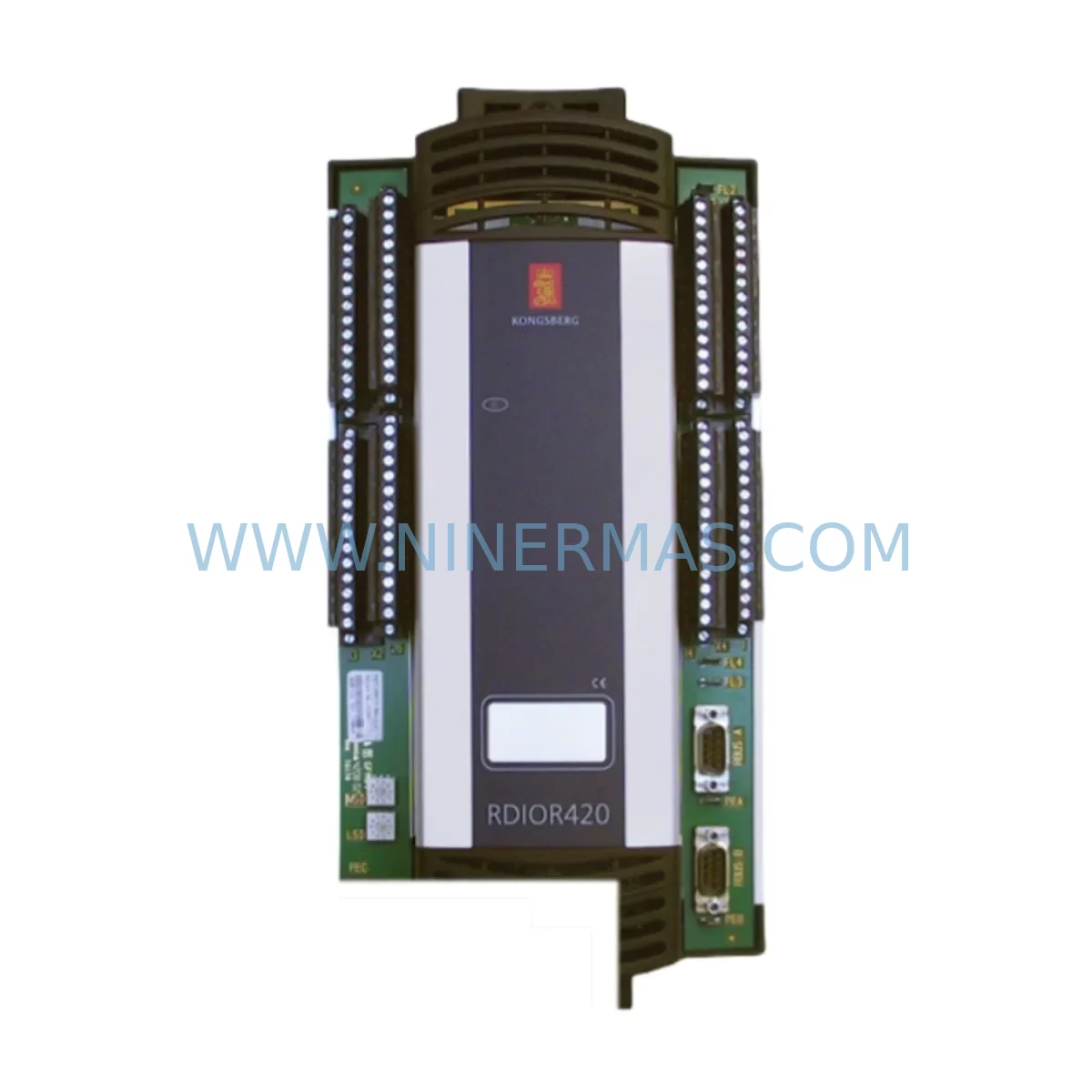
KONGSBERG RDIOR420 Retrofit-Compatible Remote I/O for Legacy Systems
Verify the part, confirm the platform family, and move straight into quotation with the right commercial details.
RFQ Ready
- SKURDIOR420
- CategoryPLC & Industrial Automation Modules
- BrandKONGSBERG
- SupportAvailability, lead time, condition, and shipping coordination
How Buyers Usually Use This Page
- Confirm the exact part number and platform family before sending the quote request.
- Use direct email when quantity, condition, and destination are already defined internally.
- Switch to the broader brand or category archive when you need alternates nearby.
Series Navigation
Move through the most common platform families behind this part.
Product RFQ
Send this part directly for quotation.
Include quantity, required condition, destination country, and target delivery timing. Current reference: KONGSBERG RDIOR420 Retrofit-Compatible Remote I/O for Legacy Systems with SKU RDIOR420.
KONGSBERG RDIOR420 Retrofit-Compatible Remote I/O for Legacy Systems
The KONGSBERG RDIOR420 is a retrofit-compatible Remote I/O module engineered to support the modernization of aging industrial control systems without requiring a full platform overhaul. As automation facilities face increasing pressure to extend the operational life of legacy KONGSBERG control architectures, the RDIOR420 provides a reliable, drop-in compatible solution for engineers managing discontinued I/O infrastructure, control cabinet upgrades, and phased migration programs.
For maintenance and retrofit engineers working within KONGSBERG’s distributed control environments, the RDIOR420 addresses one of the most common field challenges: replacing end-of-life remote I/O nodes while preserving existing program logic, field wiring, and communication topology. Whether you are restoring a failed node on a production line or executing a planned upgrade of a legacy remote I/O rack, the RDIOR420 is stocked and tested for immediate dispatch with a 12-month warranty.
Procurement engineers sourcing retrofit-compatible I/O modules for KONGSBERG systems will find the RDIOR420 particularly valuable in multi-site spare parts programs, where standardization across control cabinets reduces commissioning time and minimizes the risk of wiring errors during emergency replacements.
Upgrade Compatibility Table
| Parameter | Details |
|---|---|
| SKU / Part Number | RDIOR420 |
| Brand | KONGSBERG |
| Module Type | Remote I/O Module |
| Series | RDIO Series (Remote Distributed I/O) |
| Interface / Backplane | KONGSBERG proprietary remote I/O bus; rack-mount compatible |
| Communication Protocol | KONGSBERG fieldbus / serial remote I/O link (system-dependent) |
| I/O Channel Configuration | 420-series mixed analog/digital I/O (confirm channel count with system documentation) |
| Power Supply Compatibility | 24 VDC nominal; verify with existing cabinet power budget |
| Installation Format | DIN rail / rack-mount; confirm slot dimensions before installation |
| Replacement Scope | Direct retrofit for discontinued RDIOR-series nodes; verify firmware revision |
| Commissioning Requirement | Address configuration, I/O mapping verification, HMI tag alignment |
| Origin | Norway (KONGSBERG Industrial Systems) |
| Warranty | 12 Months — tested and verified before dispatch |
Retrofit Planning for Existing Automation Systems
A successful RDIOR420 retrofit begins well before the module arrives on site. Maintenance engineers should conduct a full audit of the affected control cabinet, starting with the 24 VDC power supply module feeding the remote I/O rack. Aging power supplies in KONGSBERG cabinets — particularly those paired with legacy RDIO nodes — are a common source of secondary failures after an I/O module replacement. Verifying output voltage stability and load capacity before commissioning the RDIOR420 prevents repeat downtime events.
Terminal block wiring should be documented and photographed prior to removal of the failed module. KONGSBERG remote I/O installations often use Phoenix Contact or Weidmüller terminal strips for field signal termination, and any corroded or loose terminals should be replaced during the same maintenance window. This is also the appropriate time to inspect signal isolator modules on analog input channels — particularly on 4–20 mA loops — as degraded isolation can cause measurement drift that is incorrectly attributed to the I/O module itself.
For systems using KONGSBERG fieldbus communication links, engineers must verify that the RDIOR420’s node address is correctly configured to match the original module’s address assignment. Duplicate or incorrect node addresses will cause communication faults at the controller level and may trigger safety interlocks. If the system uses a KONGSBERG SIM (System Interface Module) or equivalent communication gateway, confirm that the gateway firmware supports the RDIOR420 revision being installed.
HMI integration is another critical checkpoint. Facilities running KONGSBERG operator stations or third-party SCADA systems connected via OPC or serial links must verify that I/O tag addresses remain consistent after the module swap. In cases where the RDIOR420 replaces a module with a different channel mapping, HMI screen updates and tag database revisions may be required before returning the system to automatic operation.
Engineers should also inspect the backplane or rack assembly for mechanical damage, oxidized connector pins, or cracked PCB traces — particularly in high-vibration or high-humidity environments. A faulty backplane connector is a frequent root cause of intermittent I/O faults that persist even after module replacement. Where rack integrity is in question, sourcing a replacement KONGSBERG RDIO rack or chassis as part of the same procurement order eliminates the risk of a second unplanned outage.
For facilities managing multi-zone control architectures, it is advisable to maintain at least one RDIOR420 unit in the on-site spare parts inventory alongside related components such as KONGSBERG analog input modules, digital output modules, and communication repeaters. This inventory posture supports rapid response to unplanned failures and reduces mean time to repair (MTTR) across the production floor.
Downtime Control During System Migration
Minimizing downtime during an RDIOR420 replacement requires a structured pre-commissioning checklist and clear coordination between the maintenance, operations, and controls engineering teams. The following workflow is recommended for field engineers executing a live system migration:
Step 1 — Pre-Shutdown Verification: Export the current I/O configuration and tag list from the KONGSBERG controller or DCS. Capture a screenshot or printout of all active HMI alarms and analog values. Confirm that the replacement RDIOR420 has been bench-tested and that its firmware revision is compatible with the host controller.
Step 2 — Controlled Shutdown: Place the affected process zone in manual mode and notify operations. Isolate the remote I/O rack from the fieldbus using the system’s communication management tools. Do not power down the entire cabinet unless required — isolating only the affected rack reduces the scope of the outage and protects adjacent I/O nodes.
Step 3 — Physical Replacement: Remove the failed RDIOR420 and install the replacement unit. Verify that all terminal connections are secure and that the module is correctly seated in the rack. Confirm node address DIP switch or software address settings match the original configuration.
Step 4 — Recommissioning: Restore fieldbus communication and monitor the controller for I/O fault clearance. Perform a point-by-point I/O verification against the pre-shutdown tag list. Confirm analog signal values are within expected ranges before returning the zone to automatic control.
Step 5 — Documentation: Update the maintenance log with the replacement date, firmware revision, and any wiring changes made during the intervention. Archive the pre- and post-replacement I/O configuration files for future reference.
This structured approach consistently reduces RDIOR420 replacement downtime to under two hours in well-prepared facilities, compared to four to eight hours for unplanned emergency replacements without pre-staged spares.
Retrofit Support FAQ
Q1: Is the RDIOR420 a direct replacement for all RDIO-series modules in KONGSBERG systems?
The RDIOR420 is designed as a retrofit-compatible replacement within the KONGSBERG RDIO remote I/O family. However, compatibility depends on the specific system revision, firmware version, and rack configuration. We recommend providing your system’s controller model and existing module part number when placing an order so our technical team can confirm compatibility before dispatch.
Q2: What pre-installation checks are required before fitting the RDIOR420?
Before installation, verify the rack slot dimensions, backplane connector condition, node address configuration, power supply output voltage, and fieldbus communication settings. For analog I/O channels, confirm signal isolator integrity and 4–20 mA loop continuity. These checks prevent commissioning delays and protect the replacement module from damage caused by pre-existing wiring faults.
Q3: How is the RDIOR420 tested before shipment?
Every RDIOR420 unit is functionally tested on a KONGSBERG-compatible test bench prior to dispatch. Testing covers power-on self-test, I/O channel verification, and communication link validation. A test report is available upon request. All units are shipped with a 12-month warranty covering manufacturing defects and functional failures under normal operating conditions.
Q4: Can you support long-term supply agreements for the RDIOR420?
Yes. NINERMAS maintains dedicated inventory for KONGSBERG RDIO-series modules to support customers with multi-site maintenance programs and annual procurement plans. Long-term supply agreements with scheduled delivery windows are available. Contact our sales team to discuss volume pricing, lead time commitments, and consignment stock arrangements for critical spare parts.
| Product Series | Legacy |
|---|
Catalog Continuation
Nearby part numbers around RDIOR420.
Use this lane when the buyer is comparing adjacent model numbers, revision-near items, or closely related spare variants within the same brand family.
Catalog Continuation
More KONGSBERG modules in the catalog.
Use the brand lane to compare nearby part numbers, platform-adjacent modules, and other inquiry-ready listings before sending your final RFQ.

Catalog Continuation
Alternative parts within PLC & Industrial Automation Modules.
Stay inside the same system family when you need substitutes, adjacent modules, or a broader shortlist for procurement review.


SKU: HDD02.2-W040N-HS12-01-FW FWA-DIAX04-ELS-05VRS-MS
Rexroth HDD02.2-W040N-HS12-01-FW Service-Ready Spare Part

SKU: I5DAE375F10010000S
Lenze I5DAE375F10010000S Service-Ready Spare Part for Industrial Maintenance
SKU: VRDM 397/50 LNB VRDM397/50LNB
Berger Lahr VRDM 397/50 LNB Service-Ready Spare Part