
Original Industrial Spare Part
SBE M68CPU Service-Ready Spare Part for Industrial Maintenance
Verify the part, confirm the platform family, and move straight into quotation with the right commercial details.
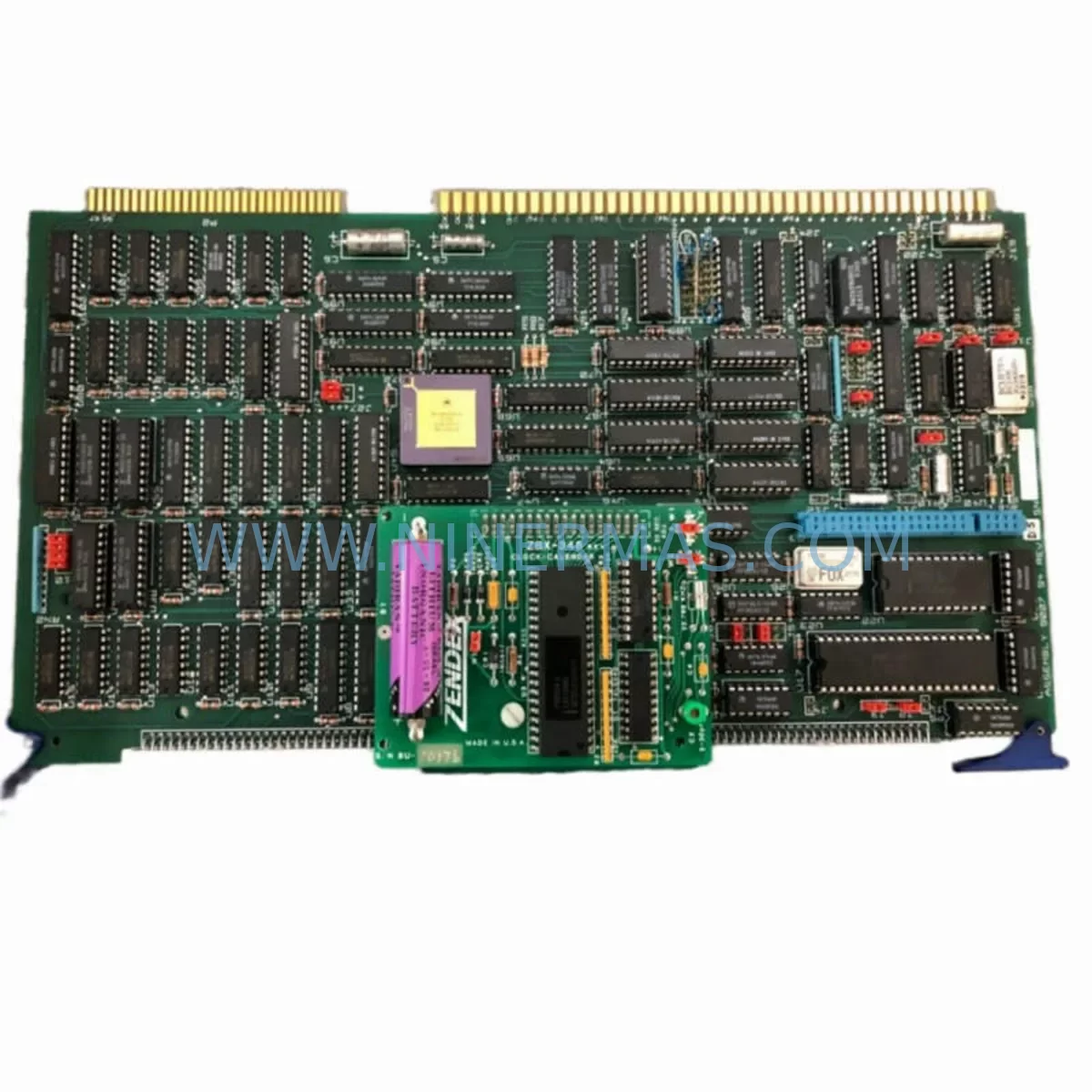
RFQ Ready
- SKUM68CPU CPU
- CategoryPLC & Industrial Automation Modules
- BrandSBE
- SupportAvailability, lead time, condition, and shipping coordination
How Buyers Usually Use This Page
- Confirm the exact part number and platform family before sending the quote request.
- Use direct email when quantity, condition, and destination are already defined internally.
- Switch to the broader brand or category archive when you need alternates nearby.
Series Navigation
Move through the most common platform families behind this part.
Product RFQ
Send this part directly for quotation.
Include quantity, required condition, destination country, and target delivery timing. Current reference: SBE M68CPU Service-Ready Spare Part for Industrial Maintenance with SKU M68CPU CPU.
SBE M68CPU Service-Ready Spare Part for Industrial Maintenance
The SBE M68CPU is a ruggedized CPU processor module engineered for continuous operation in harsh industrial environments. Designed for mission-critical control architectures, this module serves as a direct service-ready replacement for aging or failed CPU boards in SBE-based control systems. Whether you are managing a scheduled annual overhaul, responding to an unplanned shutdown, or building a proactive spare parts inventory, the M68CPU delivers the processing reliability and compatibility that maintenance engineers and procurement teams depend on.
At Ninermas, every M68CPU unit is sourced from verified supply channels, pre-shipment tested against original electrical specifications, and backed by a 12-month warranty. Our global logistics network supports rapid dispatch to minimize control system downtime and restore production continuity as quickly as possible.
Spare Maintenance Table
| Parameter | Specification / Detail |
|---|---|
| Part Number / SKU | M68CPU |
| Manufacturer | SBE (Systems & Electronics Inc. / SBE Technology) |
| Module Type | Ruggedized CPU Processor Module |
| Architecture | Motorola 68000-series (M68K) based processor |
| Operating Environment | Harsh industrial environments; extended temperature range |
| Backplane Compatibility | SBE VMEbus / proprietary SBE control backplane |
| Communication Interfaces | Serial (RS-232/RS-422), parallel I/O, bus interface |
| Power Supply Requirement | +5 VDC / ±12 VDC via backplane (typical VME standard) |
| Installation Method | Card-edge insertion into SBE control chassis backplane slot |
| Application Sectors | Oil & Gas, Power Generation, Water Treatment, Manufacturing |
| Maintenance Recommendation | Inspect every 12–24 months; replace on first sign of CPU fault or watchdog trip |
| Warranty | 12 Months – Ninermas Standard Warranty |
| Condition | New / Refurbished-to-OEM-spec (confirmed at order) |
| Lead Time | In-stock units ship within 3–5 business days; express available |
Maintenance Planning for Continuous Operation
Replacing the SBE M68CPU is rarely an isolated task. In a well-structured maintenance plan, a CPU module swap triggers a broader inspection of the surrounding control architecture. Maintenance engineers should treat the M68CPU replacement as an opportunity to audit the entire control cabinet for latent faults before returning the system to service.
Begin with the SBE backplane itself — inspect connector pins, bus termination resistors, and slot integrity before seating the new M68CPU. A damaged backplane can cause repeated CPU failures and mask the true root cause of the original fault. Alongside the backplane, verify the SBE power supply module (typically a dedicated +5 VDC / ±12 VDC card) is within voltage tolerance; an under-voltage condition is a leading cause of CPU watchdog trips and memory corruption in M68K-based systems.
Next, inspect all I/O modules connected to the CPU bus. Discrete input cards, analog output modules, and relay output boards should be checked for contact wear, blown fuses, and loose terminal connections. Pay particular attention to any signal isolation modules between field instruments and the I/O bus — degraded isolation can introduce ground loops that corrupt CPU data reads. If the system includes communication modules (serial gateway cards, Modbus RTU interfaces, or proprietary SBE network adapters), confirm firmware versions are compatible with the replacement M68CPU revision.
For systems with an HMI panel or operator workstation connected via serial link, test the communication handshake after CPU replacement before declaring the system operational. Baud rate mismatches and parity errors are common after a CPU swap if configuration parameters are not restored from backup. Ensure the EPROM or flash memory containing the application program is correctly seated and that the program checksum matches the validated backup — this is a critical step that is frequently overlooked during emergency replacements.
Procurement engineers building a long-term spare parts strategy around the M68CPU should also stock: a spare SBE backplane termination card, at least one redundant power supply module, a set of fuse cartridges for the I/O rail, and a spare serial communication interface card. For sites with extended maintenance intervals (18–36 months between scheduled shutdowns), holding two M68CPU units on-site is strongly recommended given the obsolescence risk of M68K-era components in the open market.
Site Replacement Workflow
The M68CPU is a direct card-replacement spare. Follow this workflow to minimize downtime and ensure system compatibility:
- Isolate and de-energize the control cabinet following site LOTO (Lockout/Tagout) procedures. Confirm zero-energy state on the backplane power rails before handling any modules.
- Document the existing configuration — photograph the card slot layout, record the CPU firmware/EPROM label, and back up the application program if a programming terminal is available.
- Remove the failed M68CPU by releasing the card ejector levers and sliding the module clear of the backplane connector. Inspect the backplane slot for bent pins or carbon tracking before proceeding.
- Inspect and clean the backplane slot using dry compressed air. Verify the replacement M68CPU hardware revision matches or is confirmed compatible with your system’s backplane and I/O configuration.
- Seat the replacement M68CPU firmly into the backplane slot, ensuring full connector engagement. Secure the front panel retaining screws to the chassis.
- Restore power and observe the boot sequence — confirm the CPU passes its self-test (typically indicated by a status LED sequence or front-panel display). Load the application program from backup if required.
- Verify I/O and communications — cycle all discrete outputs, confirm analog signal readings against field instruments, and test serial communication with any connected HMI or SCADA system.
- Return to service and document — log the replacement in the site maintenance record, update the spare parts inventory, and initiate a reorder to restore buffer stock.
This workflow applies equally to planned annual maintenance replacements and emergency fault-response scenarios. The M68CPU’s card-edge form factor and standard VMEbus-compatible pinout make field replacement straightforward for trained maintenance technicians without requiring specialized tooling.
Spare Parts Support FAQ
Q1: How long will Ninermas be able to supply the SBE M68CPU?
Ninermas maintains a dedicated inventory program for legacy SBE modules including the M68CPU. We source from verified surplus channels and OEM-adjacent suppliers to ensure continued availability beyond the original manufacturer’s production lifecycle. Contact our team to discuss long-term supply agreements and scheduled delivery programs tailored to your maintenance calendar.
Q2: Is the M68CPU tested before shipment?
Yes. Every M68CPU unit dispatched by Ninermas undergoes pre-shipment functional testing against original electrical and communication specifications. Units are verified for power-on self-test completion, bus interface integrity, and serial communication response before packaging. A test report is available upon request for quality-critical procurement processes.
Q3: How do I confirm compatibility with my existing SBE control system?
Compatibility is determined by the SBE chassis model, backplane revision, and application firmware version. Provide your system’s chassis part number and existing CPU label information when placing your order — our technical team will cross-reference against known compatible configurations and confirm before shipment. Hardware revision mismatches are identified and communicated proactively.
Q4: What does the 12-month warranty cover?
The Ninermas 12-month warranty covers manufacturing defects, functional failures under normal operating conditions, and confirmed compatibility issues identified after installation. Warranty claims are supported by our technical team with options for advance replacement to minimize site downtime. The warranty period begins from the date of confirmed delivery to site.
| Product Series | Other series |
|---|
Catalog Continuation
Alternative parts within PLC & Industrial Automation Modules.
Stay inside the same system family when you need substitutes, adjacent modules, or a broader shortlist for procurement review.
SKU: 14L41-RS0B0-B24R-ST5S00N-R0SU
LENZE 14L41-RS0B0-B24R-ST5S00N-R0SU Retrofit for Legacy Systems
SKU: CI540 3BSE001077R1
ABB CI540 3BSE001077R1 Spare Part for Industrial Maintenance

SKU: ZINT-541 3AUA00000658960
ABB ZINT-541 3AUA00000658960 Retrofit-Compatible Inverter Power Module



