
Original Industrial Spare Part
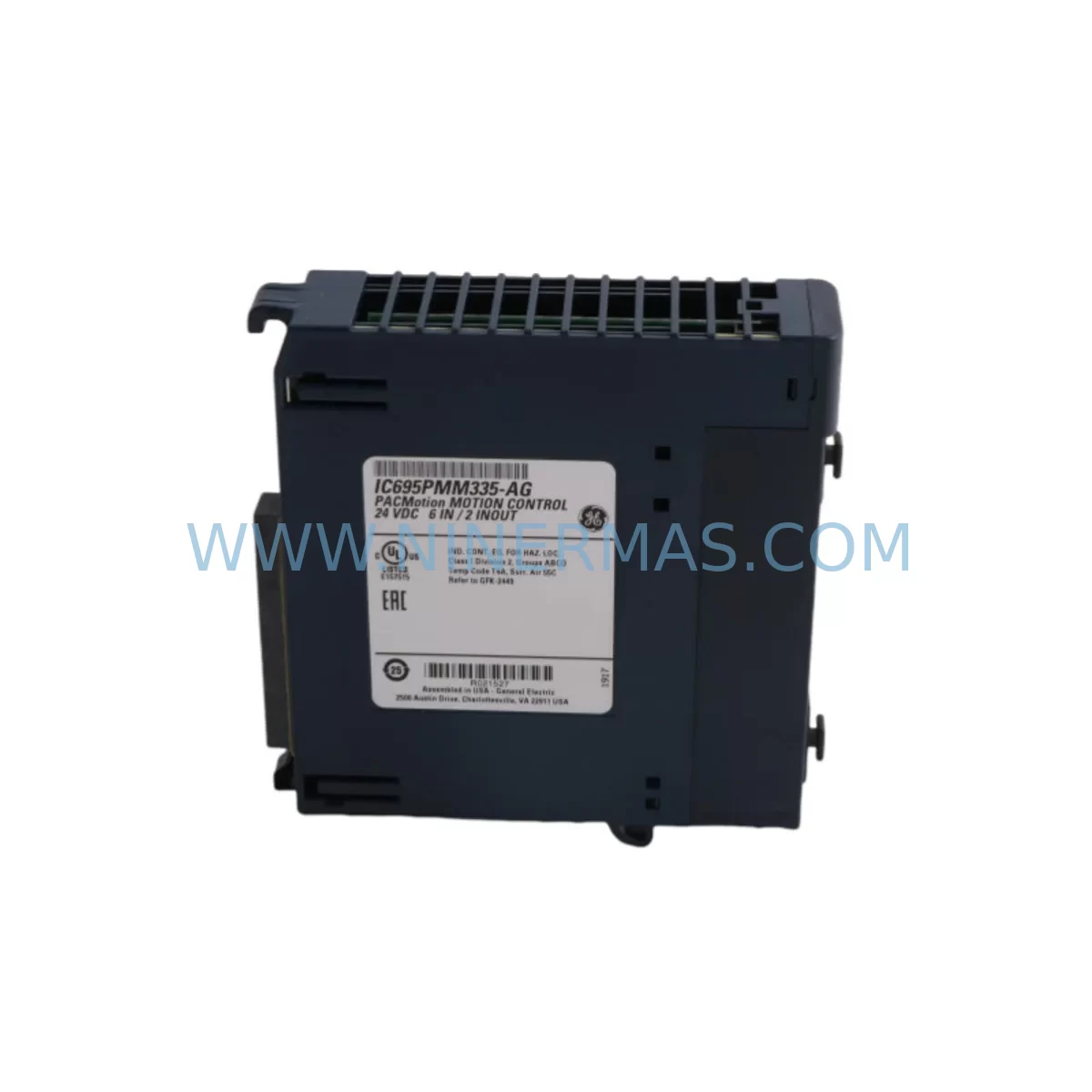
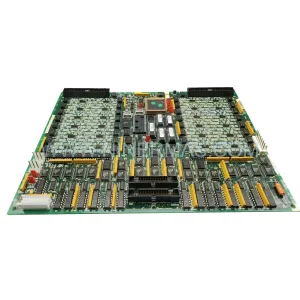
GE IC695PMM335 Spare Part for Industrial Maintenance
Verify the part, confirm the platform family, and move straight into quotation with the right commercial details.
RFQ Ready
- SKUIC695PMM335
- CategoryPLC & Industrial Automation Modules
- BrandGE
- SupportAvailability, lead time, condition, and shipping coordination
How Buyers Usually Use This Page
- Confirm the exact part number and platform family before sending the quote request.
- Use direct email when quantity, condition, and destination are already defined internally.
- Switch to the broader brand or category archive when you need alternates nearby.
Series Navigation
Move through the most common platform families behind this part.
Product RFQ
Send this part directly for quotation.
Include quantity, required condition, destination country, and target delivery timing. Current reference: GE IC695PMM335 Spare Part for Industrial Maintenance with SKU IC695PMM335.
GE IC695PMM335 Spare Part for Industrial Maintenance
The GE IC695PMM335 is a Multi-Axis Motion Position Module designed for the GE PACSystems RX3i platform — one of the most widely deployed programmable automation controller (PAC) architectures in process manufacturing, automotive assembly, material handling, and discrete production environments. As legacy RX3i systems continue to operate well beyond their original design lifecycle, maintaining a verified, service-ready stock of the IC695PMM335 is a critical element of any industrial maintenance strategy.
At NINERMAS, every IC695PMM335 unit is sourced from authorized supply channels, subjected to pre-shipment functional verification, and dispatched with a 12-month warranty. Whether you are responding to an unplanned axis fault, executing a scheduled annual overhaul, or building a long-term spare parts buffer for a multi-line facility, the IC695PMM335 is available for immediate dispatch to minimize your exposure to costly production downtime.
Spare Maintenance Table
| Parameter | Specification / Detail |
|---|---|
| Part Number | IC695PMM335 |
| Brand | GE Automation (Emerson) |
| Series | PACSystems RX3i |
| Module Type | Multi-Axis Motion Position Module |
| Axes Supported | Up to 4 axes (servo / stepper coordination) |
| Backplane Interface | RX3i Universal Backplane (IC695CHS007 / IC695CHS012 / IC695CHS016) |
| Communication | SRTP / Ethernet via CPU; internal backplane bus |
| Power Requirement | Supplied via RX3i backplane (IC695PSA040 / IC695PSD040) |
| Operating Temperature | 0 °C to 60 °C |
| Humidity | 5% to 95% non-condensing |
| Mounting | RX3i backplane slot (any universal I/O slot) |
| Firmware Compatibility | Compatible with PACSystems RX3i CPU firmware 7.x and above |
| Origin | United States |
| Condition | Original / Service-Ready |
| Warranty | 12 Months |
| Pre-Shipment Test | Functional verification performed before dispatch |
| Lead Time | In-stock: same-day to 3 business days |
Maintenance Planning for Continuous Operation
The IC695PMM335 does not operate in isolation. In a typical PACSystems RX3i control cabinet, the motion position module works in close coordination with a range of interconnected components — all of which should be assessed during any planned or corrective maintenance event involving this module.
Begin with the RX3i CPU module (such as the IC695CPE305 or IC695CPE330), which manages the motion program logic and communicates axis commands to the IC695PMM335 over the backplane bus. A CPU firmware mismatch or corrupted program memory can produce axis faults that are incorrectly attributed to the motion module itself. Always verify CPU firmware version compatibility before replacing the IC695PMM335.
The RX3i power supply module — typically an IC695PSA040 (120/240 VAC input) or IC695PSD040 (24 VDC input) — must deliver stable, within-tolerance backplane voltage. Voltage sag or ripple on the backplane rail is a leading cause of intermittent motion faults and module resets. Measure backplane voltage under load before condemning the IC695PMM335.
Inspect the RX3i backplane (IC695CHS007, IC695CHS012, or IC695CHS016) for damaged slot connectors, corrosion, or mechanical stress fractures — particularly in high-vibration environments. A compromised backplane connector can cause the IC695PMM335 to report communication errors or fail to initialize axes correctly.
Review the servo drive interface wiring between the IC695PMM335 and the connected servo amplifiers or stepper drives. Shielded encoder feedback cables, reference signal wiring, and enable/fault relay circuits should all be inspected for insulation breakdown, loose terminations, and ground loop conditions. In multi-axis configurations, verify that each axis drive’s enable relay and fault output are correctly wired and functional.
For facilities running mixed I/O architectures, check the RX3i analog and digital I/O modules (such as IC695ALG600 analog input or IC694MDL754 discrete output) that interface with limit switches, home sensors, and axis-enable circuits. A failed I/O channel feeding a home or overtravel limit signal can prevent axis homing and appear as a motion module fault.
Where the RX3i system communicates with upstream SCADA, DCS, or MES platforms, inspect the Ethernet communications module (IC695ETM001) and associated network infrastructure. Loss of motion command packets due to network instability can trigger axis timeout faults logged against the IC695PMM335.
Finally, review the terminal blocks, fuse holders, and 24 VDC field power distribution feeding the servo drive enable circuits and I/O field devices. Blown fuses or loose terminal connections in the field power circuit are frequently overlooked during motion fault diagnosis and can cause axis enable failures that mimic IC695PMM335 hardware faults.
A comprehensive spare parts kit for a PACSystems RX3i motion cell should include the IC695PMM335, a spare CPU module, at least one power supply module, a set of shielded encoder cables, and a selection of I/O modules covering the discrete and analog channels used in the motion interlock circuit. This approach ensures that any single-point failure in the motion control architecture can be resolved within one maintenance shift.
Site Replacement Workflow
Step 1 — Fault Isolation: Before removing the IC695PMM335, use the PACSystems Machine Edition (ME) programming software to review the active fault table. Confirm that the fault is logged against the motion module slot and not against the CPU, power supply, or a connected I/O module. Export the fault log for your maintenance records.
Step 2 — Safe De-energization: Follow your site LOTO (Lockout/Tagout) procedure. Remove AC power from the control cabinet and discharge any UPS or capacitor bank before opening the enclosure. Verify zero-energy state with a calibrated voltage tester.
Step 3 — Module Removal: The IC695PMM335 is a hot-swap-capable module on supported RX3i firmware versions, but NINERMAS recommends a full cabinet power-down for first-time replacements in production environments. Release the module locking tabs, slide the IC695PMM335 out of its backplane slot, and place it in an ESD-safe bag.
Step 4 — Replacement Installation: Insert the new IC695PMM335 into the same backplane slot. Ensure the module is fully seated and the locking tabs engage. Restore cabinet power and observe the module status LEDs — the OK LED should illuminate solid green within 10 seconds of power-up.
Step 5 — Configuration Restore: Using PACSystems ME, download the existing motion configuration to the replacement module. Verify that all axis parameters, encoder counts per revolution, velocity limits, and homing sequences are correctly restored. Perform a manual jog test on each axis before returning the machine to automatic mode.
Step 6 — Documentation: Record the replacement in your CMMS (Computerized Maintenance Management System), including the removed module’s serial number, the replacement unit’s serial number, and the date of installation. Retain the removed IC695PMM335 as a potential repair candidate.
This workflow is designed to minimize total downtime to under two hours for a prepared maintenance team with a verified spare IC695PMM335 on hand — compared to days or weeks of lead time if the replacement must be sourced reactively from the open market.
Spare Parts Support FAQ
Q1: Is the IC695PMM335 still available as a new original part, or only as refurbished?
NINERMAS maintains stock of original IC695PMM335 units sourced from authorized distribution and verified supply channels. Each unit undergoes pre-shipment functional testing. Where new original stock is available, it is clearly identified. Refurbished units, when offered, are fully disclosed and carry the same 12-month warranty. Contact sale@ninermas.com to confirm current stock condition before placing your order.
Q2: How do I verify compatibility between the IC695PMM335 and my existing PACSystems RX3i CPU firmware?
The IC695PMM335 is compatible with PACSystems RX3i CPU firmware version 7.x and above. To confirm compatibility, check the firmware version displayed in the PACSystems ME hardware configuration tool under the CPU module properties. If your CPU is running firmware below version 7.0, a CPU firmware upgrade may be required before the IC695PMM335 will initialize correctly. NINERMAS technical support can assist with compatibility verification prior to shipment.
Q3: What pre-shipment testing does NINERMAS perform on the IC695PMM335?
Every IC695PMM335 dispatched by NINERMAS is powered up in an RX3i test rack, initialized against a reference CPU, and verified for correct axis communication and status LED behavior. Module firmware version is recorded and included in the shipment documentation. Units that fail any stage of functional verification are quarantined and not dispatched. This process ensures that the replacement module is confirmed operational before it reaches your facility.
Q4: Can NINERMAS support long-term supply of the IC695PMM335 for multi-year maintenance contracts?
Yes. NINERMAS specializes in long-term spare parts supply for legacy and end-of-life industrial automation components, including the GE PACSystems RX3i product family. We can support blanket purchase orders, consignment stock arrangements, and annual supply agreements to ensure your facility maintains an uninterrupted supply of IC695PMM335 modules for the duration of your system’s operational life. Contact sale@ninermas.com to discuss your long-term supply requirements.
| Product Series | PACSystems |
|---|---|
| Country of Origin | US |
Catalog Continuation
More GE modules in the catalog.
Use the brand lane to compare nearby part numbers, platform-adjacent modules, and other inquiry-ready listings before sending your final RFQ.
Catalog Continuation
Alternative parts within PLC & Industrial Automation Modules.
Stay inside the same system family when you need substitutes, adjacent modules, or a broader shortlist for procurement review.

SKU: OZDPROFI12MG12
Hirschmann OZDPROFI12MG12 Spare Part for Industrial Maintenance



SKU: 07025-0000-70-1-04
KONTRON 07025-0000-70-1-04 Service-Ready Spare Part



