
Original Industrial Spare Part
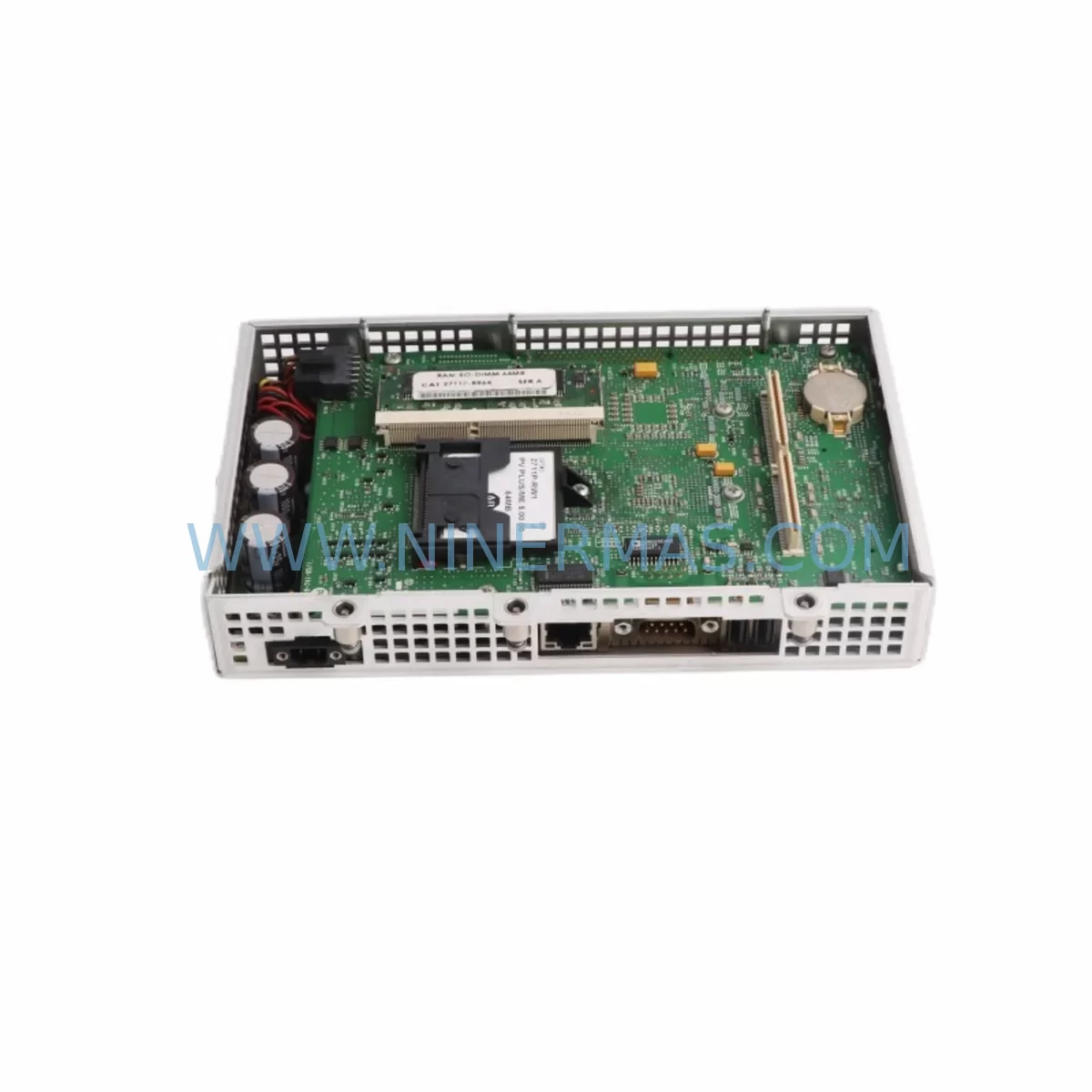
Allen-Bradley 2711P-RP1 Service-Ready Spare Part for Industrial Maintenance
Verify the part, confirm the platform family, and move straight into quotation with the right commercial details.
RFQ Ready
- SKU2711P-RP1
- CategoryPLC & Industrial Automation Modules
- BrandAllen-Bradley
- SupportAvailability, lead time, condition, and shipping coordination
How Buyers Usually Use This Page
- Confirm the exact part number and platform family before sending the quote request.
- Use direct email when quantity, condition, and destination are already defined internally.
- Switch to the broader brand or category archive when you need alternates nearby.
Series Navigation
Move through the most common platform families behind this part.
Product RFQ
Send this part directly for quotation.
Include quantity, required condition, destination country, and target delivery timing. Current reference: Allen-Bradley 2711P-RP1 Service-Ready Spare Part for Industrial Maintenance with SKU 2711P-RP1.
Allen-Bradley 2711P-RP1 Service-Ready Spare Part for Industrial Maintenance
The Allen-Bradley 2711P-RP1 is a genuine replacement component designed for PanelView Plus HMI terminals widely deployed across discrete manufacturing, process control, and critical infrastructure environments. When a PanelView Plus display or operator interface goes offline, production lines halt — and every minute of unplanned downtime translates directly into lost output and escalating recovery costs. Sourcing a verified, service-ready 2711P-RP1 from a reliable supplier is the fastest path to restoring operator visibility and resuming normal operations.
At NINERMAS, we stock the 2711P-RP1 as part of our dedicated Allen-Bradley PanelView Plus spare parts inventory. Each unit undergoes pre-shipment functional inspection and is dispatched with full traceability documentation, giving maintenance engineers and procurement teams the confidence they need when placing emergency or scheduled replenishment orders. Our 12-month warranty covers the component against manufacturing defects, supporting your site’s maintenance budget and risk management requirements.
The 2711P-RP1 is engineered for the PanelView Plus 6 and compatible PanelView Plus series terminals. These HMI platforms are the operator interface backbone in thousands of Rockwell Automation-based control architectures, communicating over EtherNet/IP and DH-485 networks to ControlLogix, CompactLogix, and MicroLogix PLCs. A failed or degraded 2711P-RP1 component disrupts the operator’s ability to monitor process variables, acknowledge alarms, and execute manual overrides — making rapid replacement a top-priority maintenance action.
Spare Maintenance Table
| Parameter | Specification / Detail |
|---|---|
| SKU / Part Number | 2711P-RP1 |
| Brand | Allen-Bradley (Rockwell Automation) |
| Series | PanelView Plus / PanelView Plus 6 |
| Product Type | HMI Replacement Part / Repair Component |
| Compatible Platforms | PanelView Plus 6, PanelView Plus Series terminals |
| Communication Interfaces | EtherNet/IP, DH-485, RS-232 |
| Compatible PLCs | ControlLogix, CompactLogix, MicroLogix, SLC 500 |
| Operating Temperature | 0 °C to 55 °C (32 °F to 131 °F) |
| Storage Temperature | -40 °C to 85 °C |
| Power Supply Compatibility | 24 VDC nominal (per PanelView Plus platform spec) |
| Origin | United States |
| Condition | Original / Service-Ready |
| Warranty | 12 Months (NINERMAS) |
| Pre-Shipment Testing | Functional inspection completed before dispatch |
| Typical Lead Time | In stock — same-day or next-business-day dispatch available |
| Application Environment | Industrial control panels, SCADA operator stations, OEM machine HMI |
Maintenance Planning for Continuous Operation
Replacing the 2711P-RP1 in a live production environment requires more than a direct component swap. Experienced maintenance engineers treat every HMI replacement as an opportunity to audit the surrounding electrical and communication infrastructure, preventing secondary failures that could return the line to downtime within days of the initial repair.
Begin with the 24 VDC power supply feeding the PanelView Plus terminal. A degraded or undersized power supply — such as an aging 1606-XLP or 1606-XLS series unit — can cause intermittent resets and display corruption that mimic HMI component failure. Verify output voltage under load and inspect for ripple or thermal stress before commissioning the replacement 2711P-RP1.
Next, inspect the EtherNet/IP communication cable and switch port connected to the terminal. Damaged Cat5e/Cat6 patch cables, loose RJ45 connectors, or a failing managed switch port can prevent the PanelView Plus from establishing a reliable connection to the ControlLogix or CompactLogix controller. If the site uses a 1783-US series unmanaged switch or a 1783-MS series managed switch, confirm port status and check for CRC errors in the switch diagnostics.
For installations using DH-485 or RS-232 communication, inspect the 1761-NET-AIC Advanced Interface Converter or equivalent serial communication adapter. Corroded terminals or a failed AIC are a common root cause of communication loss that is incorrectly attributed to the HMI component itself.
Review the I/O modules in the associated ControlLogix or CompactLogix chassis — particularly any 1756-IB16 digital input or 1756-OB16E digital output modules that interface with operator pushbuttons and indicator lights wired through the control panel. A failed I/O module can cause the PLC program to generate persistent fault alarms that appear on the HMI, creating confusion during fault isolation.
Inspect terminal blocks and wiring within the control cabinet. Loose or corroded connections on 1492-series terminal blocks introduce resistance that can cause erratic signal behavior. During the HMI replacement window, tighten all terminal screws and apply contact cleaner to any oxidized connections.
If the control system includes a 1756-EN2T or 1756-EN2TR EtherNet/IP communication module in the ControlLogix backplane, verify that the module’s IP configuration and connection count are within specification. An overloaded communication module can cause the PanelView Plus to lose its controller connection intermittently, which may have contributed to the original HMI failure.
For sites running FactoryTalk View ME application software on the PanelView Plus, confirm that the application version is compatible with the replacement 2711P-RP1 hardware revision. Maintain a backup copy of the .MER application file on a dedicated USB drive or network share to accelerate recovery if a firmware or application reload is required after component replacement.
Finally, document the replacement in your site’s CMMS (Computerized Maintenance Management System) and update the spare parts inventory to trigger a replenishment order. Maintaining at least one additional 2711P-RP1 in your on-site spare parts kit — alongside critical consumables such as fuses, surge protection devices, and backup communication cables — is a best practice for facilities operating PanelView Plus terminals in high-availability environments.
Site Replacement Workflow
Step 1 — Isolate and document. Before removing the existing component, capture a photograph of all wiring connections, note the terminal labels, and record the current firmware and application version displayed on the PanelView Plus. This documentation eliminates ambiguity during reassembly and accelerates the return-to-service process.
Step 2 — Power down safely. Follow your site’s lockout/tagout (LOTO) procedure for the control panel. Disconnect the 24 VDC supply to the PanelView Plus terminal and allow capacitors to discharge before handling the component.
Step 3 — Remove and inspect. Extract the existing component and inspect the mounting area for signs of moisture ingress, heat damage, or mechanical stress. Clean the mounting surface before installing the 2711P-RP1 replacement.
Step 4 — Install and reconnect. Install the 2711P-RP1 following the Allen-Bradley PanelView Plus installation instructions. Reconnect all communication cables and power wiring, verifying that each connection matches the pre-removal documentation.
Step 5 — Power up and verify. Restore 24 VDC power and observe the terminal’s startup sequence. Confirm that the FactoryTalk View ME application loads correctly, that the controller connection is established, and that all configured tags are updating normally. Acknowledge any startup alarms and verify that operator controls respond as expected.
Step 6 — Return to service and update records. Once the replacement is confirmed operational, remove LOTO devices, return the line to production, and update your maintenance records with the replacement date, component serial number, and any observations noted during the procedure.
The 2711P-RP1 is a direct replacement for the same part number across compatible PanelView Plus generations, eliminating the need for application software modifications in most standard installations. This backward compatibility significantly reduces the engineering effort required for emergency replacements and supports the long-term extension of existing PanelView Plus deployments beyond the original product lifecycle.
Spare Parts Support FAQ
Q1: Is the 2711P-RP1 supplied by NINERMAS an original Allen-Bradley component?
Yes. NINERMAS sources the 2711P-RP1 as an original Allen-Bradley (Rockwell Automation) component. Each unit is inspected prior to shipment and supplied with traceability documentation. We do not supply counterfeit, refurbished-without-disclosure, or third-party substitute components under the Allen-Bradley part number.
Q2: What warranty coverage applies to the 2711P-RP1, and what does it include?
NINERMAS provides a 12-month warranty from the date of shipment. The warranty covers manufacturing defects and component failure under normal operating conditions. It does not cover damage resulting from incorrect installation, overvoltage events, or physical mishandling. Warranty claims are supported by our technical team at sale@ninermas.com.
Q3: Can the 2711P-RP1 be used as a direct replacement for older PanelView Plus terminals without software changes?
In most standard installations, the 2711P-RP1 is a direct drop-in replacement within the compatible PanelView Plus series. However, NINERMAS recommends verifying the hardware revision compatibility with your specific terminal model and confirming that your FactoryTalk View ME application version supports the replacement component before installation. Our technical team can assist with compatibility verification prior to order placement.
Q4: How does NINERMAS support long-term supply for the 2711P-RP1 given Rockwell Automation’s product lifecycle changes?
NINERMAS maintains dedicated inventory of Allen-Bradley PanelView Plus spare parts, including the 2711P-RP1, specifically to support facilities operating legacy and end-of-life HMI systems. We monitor product lifecycle announcements and proactively stock components that are approaching or have passed their last-time-buy dates. Customers with ongoing maintenance contracts or high-volume requirements are encouraged to contact us to discuss scheduled replenishment agreements that guarantee supply continuity.
—
| Product Series | 2711 |
|---|---|
| Country of Origin | US |
Catalog Continuation
More Allen-Bradley modules in the catalog.
Use the brand lane to compare nearby part numbers, platform-adjacent modules, and other inquiry-ready listings before sending your final RFQ.




Catalog Continuation
Alternative parts within PLC & Industrial Automation Modules.
Stay inside the same system family when you need substitutes, adjacent modules, or a broader shortlist for procurement review.



SKU: HDD02.2-W040N-HS12-01-FW FWA-DIAX04-ELS-05VRS-MS
Rexroth HDD02.2-W040N-HS12-01-FW Service-Ready Spare Part

SKU: I5DAE375F10010000S
Lenze I5DAE375F10010000S Service-Ready Spare Part for Industrial Maintenance



