
Original Industrial Spare Part
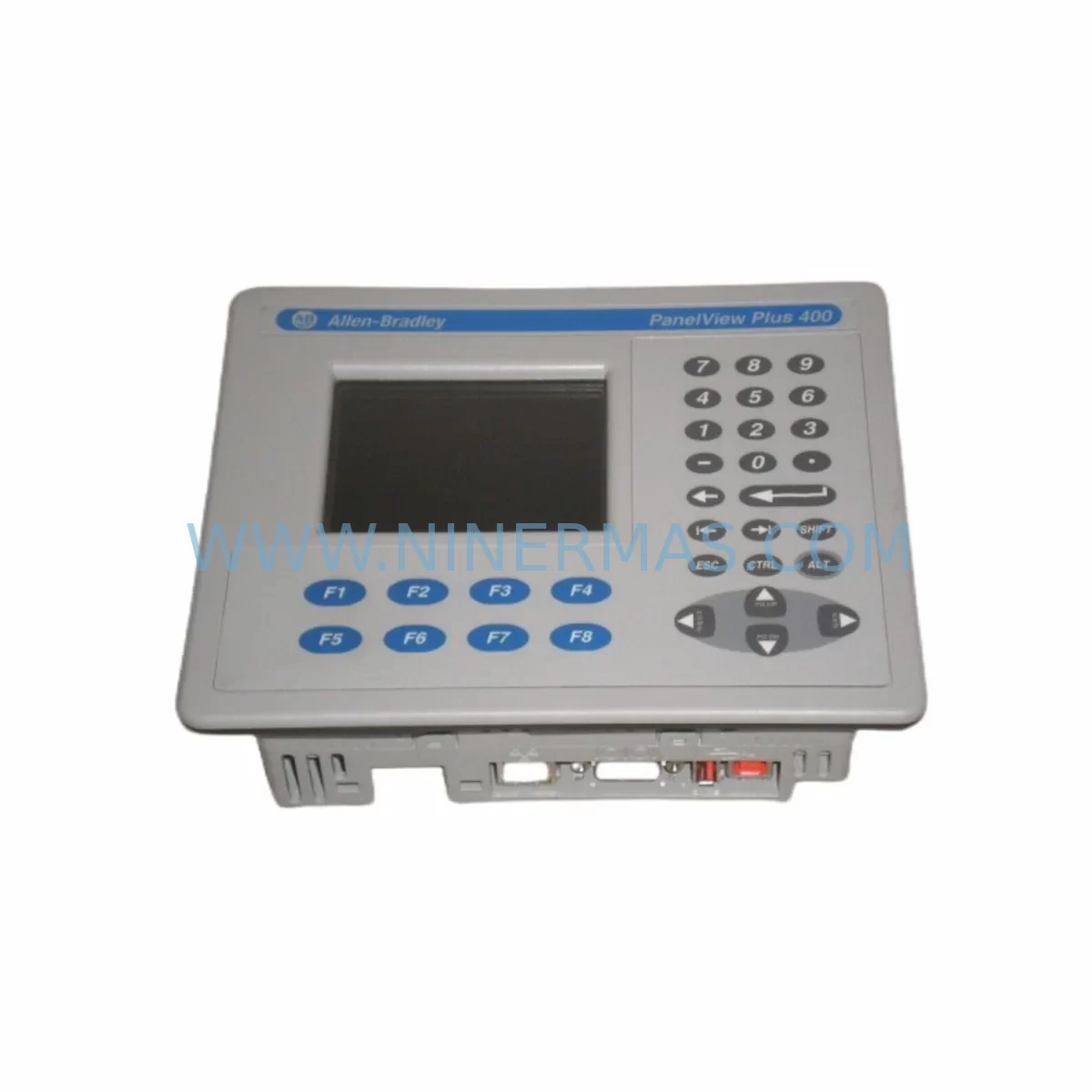
Allen-Bradley 2711P-K4M20D Retrofit-Compatible HMI Terminal
Verify the part, confirm the platform family, and move straight into quotation with the right commercial details.
RFQ Ready
- SKU2711P-K4M20D
- CategoryPLC & Industrial Automation Modules
- BrandAllen-Bradley
- SupportAvailability, lead time, condition, and shipping coordination
How Buyers Usually Use This Page
- Confirm the exact part number and platform family before sending the quote request.
- Use direct email when quantity, condition, and destination are already defined internally.
- Switch to the broader brand or category archive when you need alternates nearby.
Series Navigation
Move through the most common platform families behind this part.
Product RFQ
Send this part directly for quotation.
Include quantity, required condition, destination country, and target delivery timing. Current reference: Allen-Bradley 2711P-K4M20D Retrofit-Compatible HMI Terminal with SKU 2711P-K4M20D.
Allen-Bradley 2711P-K4M20D Retrofit-Compatible HMI Terminal: Legacy System Compatibility and Smooth Upgrade
The Allen-Bradley 2711P-K4M20D is a 4-inch monochrome keypad HMI terminal from the PanelView Plus 400 series, designed for operator interface applications in industrial control environments. As legacy automation systems age and original equipment reaches end-of-life, the 2711P-K4M20D has become a critical retrofit component for facilities seeking to extend the operational life of their existing control infrastructure without committing to a full platform migration. NINERMAS maintains verified stock of the 2711P-K4M20D to support customers engaged in panel upgrades, line modernization, and spare parts lifecycle management.
Whether you are replacing a failed unit on a running production line, upgrading a control cabinet that still relies on older PanelView 550 or PanelView 600 terminals, or migrating from a first-generation PanelView Plus platform, the 2711P-K4M20D provides a reliable, cost-effective path forward. Its compact 4-inch form factor fits standard DIN-rail and panel cutout configurations, making it compatible with most existing enclosure layouts without requiring structural modification.
Upgrade Compatibility Table
| Parameter | Details |
|---|---|
| SKU / Part Number | 2711P-K4M20D |
| Series | PanelView Plus 400 |
| Display Size | 4-inch Monochrome |
| Input Type | Keypad |
| Communication Interface | DH-485, DF1, EtherNet/IP (via 2711P-RN6 or 2711P-RN15S) |
| Power Supply Requirement | 24V DC (verify existing PSU capacity before installation) |
| Mounting | Panel cutout, compatible with standard PanelView Plus enclosure dimensions |
| Replaces / Compatible With | PanelView 550, PanelView 600, early PanelView Plus 400 variants |
| Programming Software | FactoryTalk View ME (Studio 5000 environment) |
| Retrofit Recommendation | Verify terminal block wiring, communication module slot, and application file version before swap |
| Commissioning Notes | Restore .mer application file; confirm HMI screen tag mapping and PLC address references |
| Warranty | 12 Months |
Retrofit Planning for Existing Automation Systems
Successful integration of the 2711P-K4M20D into an existing control system requires careful pre-installation planning. Before removing the legacy terminal, engineers should document all existing wiring connections at the terminal block, confirm the 24V DC power supply — typically sourced from a 1606-XLP or similar Allen-Bradley power supply module — can support the replacement unit’s current draw, and verify that the communication module installed in the terminal’s expansion slot is compatible with the plant network protocol in use.
In systems using DH-485 or DF1 serial communication, the existing RS-232 or RS-485 cable routing should be preserved and tested for continuity before the new terminal is powered on. For facilities that have already migrated their control network to EtherNet/IP, the 2711P-RN6 or 2711P-RN15S communication module can be installed in the 2711P-K4M20D to enable Ethernet connectivity, allowing the terminal to communicate directly with ControlLogix or CompactLogix processors over a standard managed switch infrastructure.
When the control system includes a 1756 ControlLogix chassis or a 1769 CompactLogix rack, the HMI application file must be validated against the current processor firmware version. FactoryTalk View ME projects should be opened, compiled, and transferred to the replacement terminal using a standard USB programming cable or over the network, depending on the site configuration. Tag database integrity — particularly for analog input scaling, alarm setpoints, and recipe parameters — must be confirmed before returning the panel to service.
For control cabinets that also house 1734 POINT I/O modules, 1756 analog I/O cards, or 1769 digital I/O modules, the retrofit process should include a full I/O status check through the RSLogix 5000 or Studio 5000 online diagnostic view to confirm that all field signals are correctly mapped and that no address conflicts exist following the terminal replacement. Signal isolators installed between field instruments and I/O modules should also be verified for correct loop power and signal range.
In multi-panel installations where several 2711P-series terminals share a common communication network, the node address assignment of the replacement 2711P-K4M20D must be confirmed to avoid duplication. This is particularly important in DH-485 networks where node conflicts can cause communication faults across the entire segment, affecting other connected devices including MicroLogix 1100 or SLC 5/05 processors that may still be in service on the same network.
Downtime Control During System Migration
Minimizing unplanned downtime is the primary concern for any facility undertaking an HMI replacement on a live production system. The recommended approach for replacing the 2711P-K4M20D is to perform a full backup of the existing terminal’s application file and configuration data before any physical work begins. FactoryTalk View ME allows the .mer runtime file to be exported directly from the terminal over USB or Ethernet, providing a verified restore point in the event of any commissioning issue.
Where possible, the replacement terminal should be pre-configured and tested offline using a bench setup that mirrors the plant network environment. Loading the application file, verifying screen navigation, confirming alarm display behavior, and testing communication with a spare processor or simulator reduces the time the panel must remain offline during the actual swap. In most cases, a well-prepared 2711P-K4M20D replacement can be completed within a single planned maintenance window of two to four hours, including wiring verification, terminal mounting, application restore, and initial functional test.
For facilities where continuous operation is critical, a staged migration approach is recommended: install the replacement terminal in parallel with the existing unit where panel space permits, validate all communication links and screen functions while the original terminal remains active, then perform the final cutover during a scheduled low-production period. This approach eliminates the risk of extended downtime caused by unexpected compatibility issues and allows the maintenance team to confirm full system functionality before committing to the change.
All units supplied by NINERMAS undergo pre-shipment functional testing to confirm power-on behavior, display operation, keypad response, and communication port integrity. Each 2711P-K4M20D is shipped with a 12-month warranty covering manufacturing defects and component failure under normal operating conditions, providing additional assurance for facilities managing tight maintenance budgets and extended spare parts lifecycles.
Retrofit Support FAQ
Q: Is the 2711P-K4M20D a direct drop-in replacement for the PanelView Plus 400 units currently installed in my control cabinet?
A: In most cases, yes. The 2711P-K4M20D shares the same panel cutout dimensions and mounting configuration as other PanelView Plus 400 series terminals. However, you should verify the communication module type installed in your existing unit and confirm that your FactoryTalk View ME application file is compatible with the firmware version on the replacement terminal before installation.
Q: What wiring checks are required before connecting the 2711P-K4M20D to our existing control panel?
A: Confirm the 24V DC supply voltage and polarity at the power terminal block, verify the communication cable type and pin assignment (RS-232 for DF1, RS-485 for DH-485, or RJ-45 for EtherNet/IP), and check that the terminal block torque specifications match your existing wiring gauge. Document all connections before disconnecting the legacy terminal.
Q: Does NINERMAS perform pre-shipment testing on the 2711P-K4M20D before dispatch?
A: Yes. Every unit undergoes functional testing covering power-on self-test, display and keypad operation, and communication port verification prior to shipment. Units are shipped with a 12-month warranty and can be accompanied by a test report upon request.
Q: What is the typical lead time and stock availability for the 2711P-K4M20D?
A: NINERMAS maintains inventory of the 2711P-K4M20D to support urgent replacement requirements. Standard orders are processed and dispatched within 1-3 business days. For large quantity requirements or scheduled maintenance programs, please contact our sales team to confirm availability and arrange priority allocation.
| Product Series | 2711 |
|---|---|
| Country of Origin | US |
Catalog Continuation
More Allen-Bradley modules in the catalog.
Use the brand lane to compare nearby part numbers, platform-adjacent modules, and other inquiry-ready listings before sending your final RFQ.




Catalog Continuation
Alternative parts within PLC & Industrial Automation Modules.
Stay inside the same system family when you need substitutes, adjacent modules, or a broader shortlist for procurement review.



SKU: HDD02.2-W040N-HS12-01-FW FWA-DIAX04-ELS-05VRS-MS
Rexroth HDD02.2-W040N-HS12-01-FW Service-Ready Spare Part

SKU: I5DAE375F10010000S
Lenze I5DAE375F10010000S Service-Ready Spare Part for Industrial Maintenance



