
Original Industrial Spare Part
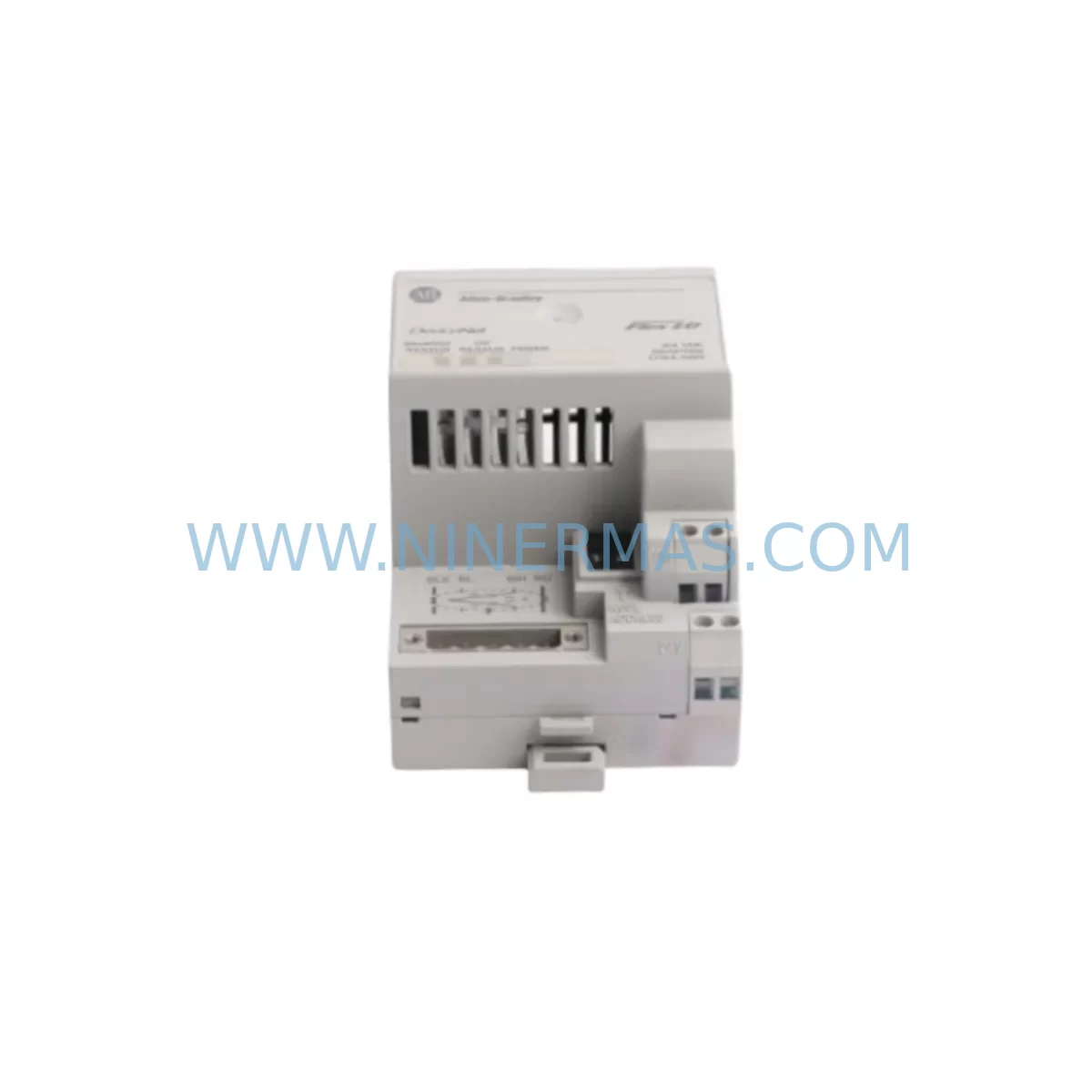
Allen-Bradley 1794-AD DeviceNet Adapter for FLEX I/O
Verify the part, confirm the platform family, and move straight into quotation with the right commercial details.
RFQ Ready
- SKU1794-AD
- CategoryPLC & Industrial Automation Modules
- BrandAllen-Bradley
- SupportAvailability, lead time, condition, and shipping coordination
How Buyers Usually Use This Page
- Confirm the exact part number and platform family before sending the quote request.
- Use direct email when quantity, condition, and destination are already defined internally.
- Switch to the broader brand or category archive when you need alternates nearby.
Series Navigation
Move through the most common platform families behind this part.
Product RFQ
Send this part directly for quotation.
Include quantity, required condition, destination country, and target delivery timing. Current reference: Allen-Bradley 1794-AD DeviceNet Adapter for FLEX I/O with SKU 1794-AD.
Allen-Bradley 1794-AD DeviceNet Adapter for FLEX I/O: Retrofit-Compatible Upgrade for Legacy DeviceNet Systems
The Allen-Bradley 1794-AD is a DeviceNet Adapter module designed for the FLEX I/O platform, enabling distributed I/O nodes to communicate over a DeviceNet network. As legacy DeviceNet-based control architectures approach end-of-life, the 1794-AD remains a critical retrofit component for engineers tasked with maintaining, extending, or migrating existing automation systems without full platform replacement. Whether you are restoring a discontinued spare, upgrading a control cabinet, or bridging an older DeviceNet segment into a modernized control environment, the 1794-AD provides a proven, drop-in compatible solution backed by a 12-month warranty and pre-shipment functional testing.
Upgrade Compatibility Table
| Parameter | Details |
|---|---|
| Module SKU | 1794-AD |
| Platform | Allen-Bradley FLEX I/O |
| Network Protocol | DeviceNet (CAN-based, ISO 11898) |
| Backplane Interface | FLEX I/O backplane (1794-TB series terminal bases) |
| Node Address Setting | Rotary switch, 0–63 |
| Baud Rate Support | 125 kbps / 250 kbps / 500 kbps |
| Power Supply Compatibility | 24 VDC via FLEX I/O power supply (e.g., 1794-PS13, 1794-PS3) |
| Compatible Terminal Bases | 1794-TB2, 1794-TB3, 1794-TB3S, 1794-TB3T |
| Typical Replacement For | 1794-ADN, 1794-ADNK (DeviceNet variants) |
| Installation Space | Single FLEX I/O slot; DIN rail or panel mount via terminal base |
| Commissioning Requirement | RSNetWorx for DeviceNet for node configuration and EDS file registration |
| Warranty | 12 Months — includes pre-shipment functional test |
Retrofit Planning for Existing Automation Systems
When integrating the 1794-AD into an existing DeviceNet segment, the first step is auditing the current network topology. Many legacy installations rely on a ControlLogix or SLC 500 controller communicating through a 1756-DNB or 1747-SDN DeviceNet scanner card. The 1794-AD adapter connects the FLEX I/O backplane to this scanner, allowing the controller to read and write I/O data across the DeviceNet trunk. Before installation, engineers should verify the available node addresses on the network — duplicate node IDs are a common commissioning error that causes immediate communication faults.
Terminal wiring is equally critical. The 1794-AD connects to the DeviceNet trunk via a 5-pin Micro connector (V+, CAN_H, Shield, CAN_L, V−). Polarity errors or shield grounding issues frequently cause intermittent communication dropouts that are difficult to diagnose without a DeviceNet protocol analyzer. Confirm that the trunk cable impedance matches the network baud rate and that termination resistors (121 Ω) are correctly placed at both ends of the trunk.
On the backplane side, the 1794-AD must be seated on a compatible FLEX I/O terminal base such as the 1794-TB3 or 1794-TB3S. The power supply module — typically a 1794-PS13 or 1794-PS3 — must provide sufficient current capacity for all I/O modules on the same backplane segment. When adding digital input modules such as the 1794-IB16 or analog output modules such as the 1794-OF4, recalculate the total backplane current draw to avoid undervoltage conditions that can cause random module resets.
For systems migrating from an older SLC 500 platform with a 1747-SDN scanner, the EDS (Electronic Data Sheet) file for the 1794-AD must be registered in RSNetWorx for DeviceNet before the scanner can recognize the adapter. The scanner’s scanlist must then be updated to include the new node, and the I/O map must be re-aligned with the controller’s I/O tree in RSLogix 500 or Studio 5000 Logix Designer. If the original program used fixed I/O addressing, verify that the new module’s input and output sizes match the existing program’s expectations — mismatched sizes will generate a configuration fault at the scanner.
In control cabinet upgrade projects where space is constrained, the FLEX I/O platform’s compact form factor is a significant advantage. A single DIN rail segment can accommodate the 1794-AD adapter alongside multiple 1794-IB16D digital input, 1794-OB16 digital output, and 1794-IE8 analog input modules, all sharing a common backplane. This density makes FLEX I/O a preferred choice for retrofit projects where the original cabinet was designed around older, bulkier I/O racks.
For installations involving HMI integration, confirm that the PanelView or FactoryTalk View SE screen tags referencing the FLEX I/O data table addresses are updated to reflect any changes in the I/O map resulting from the adapter replacement. Tag mismatches between the HMI and the controller program are a frequent source of post-retrofit alarms that delay production restart.
Downtime Control During System Migration
Minimizing unplanned downtime during a DeviceNet adapter replacement requires a structured pre-migration checklist. Before removing the existing adapter, export the current RSNetWorx for DeviceNet configuration file and save a backup of the controller program from RSLogix 500 or Studio 5000. Document the existing node address, baud rate setting, and I/O map so that the replacement 1794-AD can be configured identically before installation.
Where possible, pre-configure the replacement 1794-AD on a bench setup using a laptop with RSNetWorx for DeviceNet and a USB-to-DeviceNet interface cable (such as the 1784-U2DN). Verify that the EDS file is correctly registered and that the module responds to the expected node address before bringing it to the production floor. This bench validation step can reduce on-site commissioning time from several hours to under 30 minutes.
During the physical swap, power down only the affected FLEX I/O backplane segment rather than the entire control panel where possible. If the DeviceNet scanner supports partial network reconfiguration, the remaining nodes on the trunk can remain online during the replacement, preserving control continuity for unaffected machine zones. After reinstalling the 1794-AD and restoring power, use the scanner’s diagnostic LEDs and RSNetWorx online monitoring to confirm that the new node has joined the network and that I/O data is being exchanged correctly before releasing the machine to production.
Pre-shipment testing performed on every 1794-AD unit shipped by NINERMAS includes power-on self-test, backplane communication verification, and DeviceNet node response confirmation. This testing protocol reduces the risk of receiving a non-functional unit and supports a faster, more confident on-site installation.
Retrofit Support FAQ
Q1: Is the 1794-AD a direct replacement for the 1794-ADN?
The 1794-AD and 1794-ADN are both DeviceNet adapters for the FLEX I/O platform, but they differ in firmware revision and supported feature sets. In most retrofit applications, the 1794-AD can replace the 1794-ADN with the same node address and baud rate settings, provided the EDS file is updated in RSNetWorx for DeviceNet. Verify the I/O module count and backplane current budget before finalizing the replacement.
Q2: What commissioning tools are required for the 1794-AD?
RSNetWorx for DeviceNet is required to register the EDS file, configure the node address, and update the scanner’s scanlist. A DeviceNet interface cable such as the 1784-U2DN or a compatible USB-to-DeviceNet adapter is needed to connect a programming laptop to the network. For controller-side program updates, RSLogix 500 (SLC 500 platforms) or Studio 5000 Logix Designer (ControlLogix platforms) is required.
Q3: How do I verify wiring compatibility before installation?
Confirm that the DeviceNet trunk cable uses the standard color coding (red V+, white CAN_H, bare shield, blue CAN_L, black V−) and that the Micro connector pinout matches the 1794-AD’s port. Measure trunk voltage (nominally 24 VDC) and verify that termination resistors are present at both ends. Use a DeviceNet protocol analyzer or the scanner’s diagnostic software to check for bus-off errors or excessive error frames before connecting the new adapter.
Q4: What does the 12-month warranty cover, and what is the lead time?
Every 1794-AD unit is covered by a 12-month warranty from the date of shipment, covering manufacturing defects and functional failures under normal operating conditions. Pre-shipment testing is performed on each unit to verify power-on operation and DeviceNet communication response. Units are typically available from stock with short lead times. Contact sale@ninermas.com or +0086 187 5021 5667 for current availability and pricing.
| Product Series | Flex I/O |
|---|---|
| Country of Origin | US |
Catalog Continuation
More Allen-Bradley modules in the catalog.
Use the brand lane to compare nearby part numbers, platform-adjacent modules, and other inquiry-ready listings before sending your final RFQ.




Catalog Continuation
Alternative parts within PLC & Industrial Automation Modules.
Stay inside the same system family when you need substitutes, adjacent modules, or a broader shortlist for procurement review.
SKU: 6ES5470-4UC12
Siemens 6ES5470-4UC12 Retrofit-Compatible Analog Output
SKU: ZCU-12L 3AXD50000794058
ABB ZCU-12L 3AXD50000794058 Service-Ready Spare Part
SKU: 6AV6671-5AE00-0AX0
Siemens 6AV6671-5AE00-0AX0 Service-Ready Spare Part



