Original Industrial Spare Part
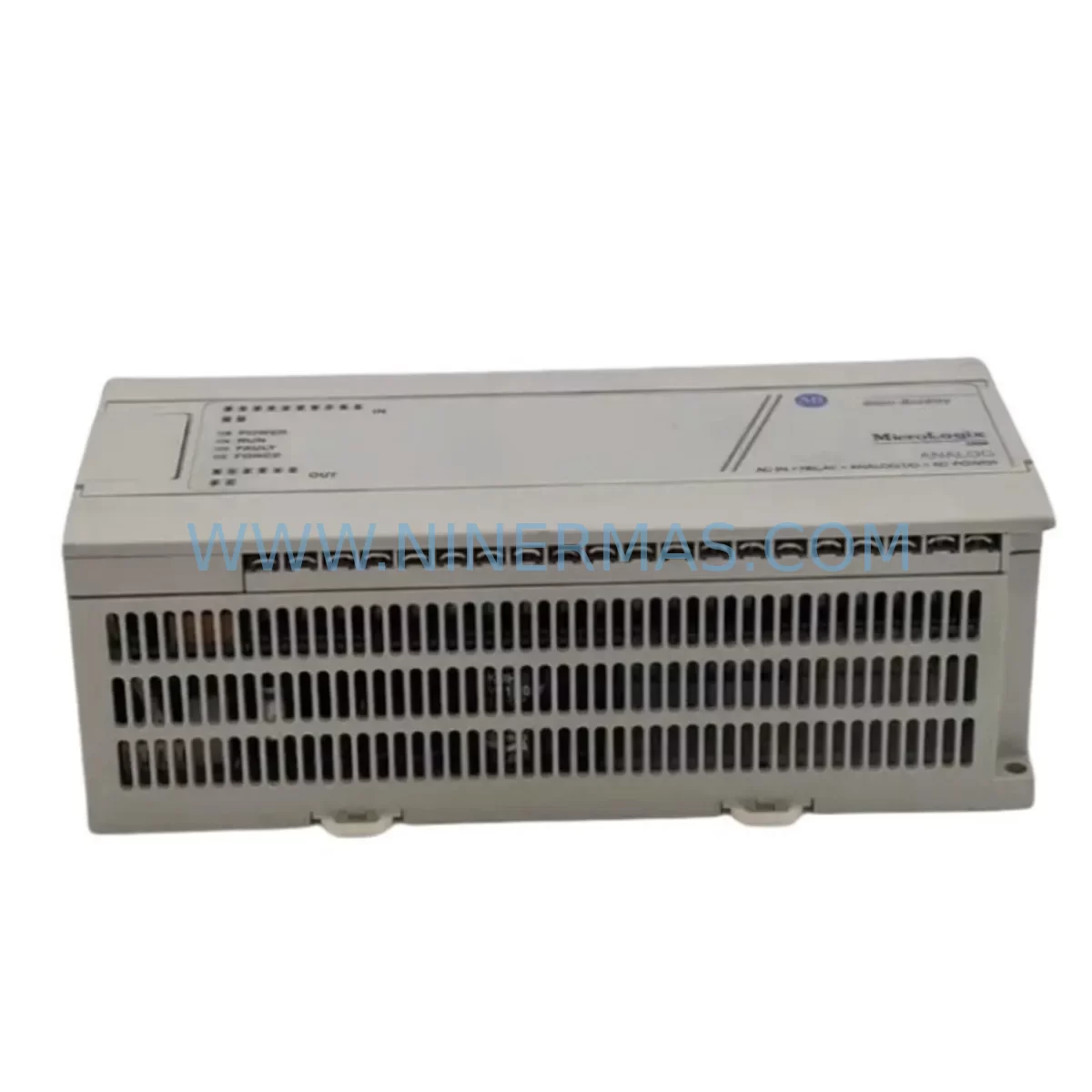
Allen-Bradley 1761-L20AWA-5A Service-Ready Spare Part
Verify the part, confirm the platform family, and move straight into quotation with the right commercial details.
RFQ Ready
- SKU1761-L20AWA-5A
- CategoryPLC & Industrial Automation Modules
- BrandAllen-Bradley
- SupportAvailability, lead time, condition, and shipping coordination
How Buyers Usually Use This Page
- Confirm the exact part number and platform family before sending the quote request.
- Use direct email when quantity, condition, and destination are already defined internally.
- Switch to the broader brand or category archive when you need alternates nearby.
Series Navigation
Move through the most common platform families behind this part.
Product RFQ
Send this part directly for quotation.
Include quantity, required condition, destination country, and target delivery timing. Current reference: Allen-Bradley 1761-L20AWA-5A Service-Ready Spare Part with SKU 1761-L20AWA-5A.
Allen-Bradley 1761-L20AWA-5A Service-Ready Spare Part: Spare Replacement & Downtime Risk Control
The Allen-Bradley 1761-L20AWA-5A is a MicroLogix 1000 series programmable logic controller (PLC) designed for compact industrial automation applications. With 20 I/O points (12 DC inputs, 8 relay outputs), 120/240V AC power supply, and a ruggedized housing rated for harsh environments, this unit is widely deployed across manufacturing lines, material handling systems, HVAC control panels, and process automation cells. When this controller fails or reaches end-of-life, every minute of unplanned downtime translates directly into production loss. Sourcing a verified, service-ready 1761-L20AWA-5A spare part from a reliable supplier is the fastest path to restoring normal operation.
At NINERMAS, we stock the 1761-L20AWA-5A as a tested, inspection-passed spare part backed by a 12-month warranty. Each unit undergoes functional verification before shipment, ensuring that what arrives on your workbench is ready for immediate installation — not a source of additional troubleshooting delays.
Spare Maintenance Table
| Parameter | Specification |
|---|---|
| Part Number / SKU | 1761-L20AWA-5A |
| Series | MicroLogix 1000 |
| Brand | Allen-Bradley (Rockwell Automation) |
| Product Type | Compact PLC Controller |
| Total I/O Points | 20 (12 Inputs / 8 Outputs) |
| Input Type | 120V AC |
| Output Type | Relay (AC/DC) |
| Power Supply | 120/240V AC, 50/60 Hz |
| Memory | 1K words (user program) |
| Communication Port | DH-485 / RS-232C (Channel 0) |
| Operating Temperature | 0°C to 55°C (32°F to 131°F) |
| Enclosure Rating | IP20 / NEMA Open Type |
| Mounting | DIN Rail or Panel Mount |
| Compatibility | MicroLogix 1000 family; RSLogix 500 programming software |
| Replacement For | 1761-L20AWA-5A (direct), legacy MicroLogix 1000 variants |
| Application Environment | Industrial control panels, OEM machines, process automation |
| Warranty | 12 Months (NINERMAS) |
| Condition | Original spare, tested before shipment |
| Origin | USA (Allen-Bradley / Rockwell Automation) |
Maintenance Planning for Continuous Operation
A field-proven maintenance strategy for MicroLogix 1000 systems goes well beyond replacing the 1761-L20AWA-5A controller itself. Maintenance engineers and procurement teams should treat this replacement as an opportunity to audit the entire control circuit for aging or at-risk components.
Start with the power supply feeding the PLC. The 1761-L20AWA-5A operates on 120/240V AC, and a degraded or undersized power supply is a common root cause of intermittent PLC faults. If the panel uses a dedicated 24V DC rail for field devices, inspect the 24V DC power supply module for output ripple and load capacity. Replacing the PLC without verifying power quality often leads to repeat failures within weeks.
Next, inspect the I/O wiring and terminal blocks. Loose or corroded terminals on the input side — particularly on 120V AC input circuits — can cause false input signals that corrupt program logic. Check all DIN rail terminal strips and ensure torque specifications are met. If the system uses signal isolators between field sensors and PLC inputs, verify that isolation barriers are functioning correctly, as degraded isolators can introduce noise that mimics sensor faults.
The DH-485 or RS-232C communication cable connecting the 1761-L20AWA-5A to an HMI panel or SCADA system should be inspected for continuity and shielding integrity. A damaged communication cable can prevent program upload/download and delay commissioning after the spare part is installed. If the system uses a 1761-NET-AIC Advanced Interface Converter or similar DH-485 network adapter, confirm it is operational before closing the panel.
For panels that include output relay modules or external relay expansion cards, check contact wear on relay outputs — especially on high-cycle actuator circuits. The 1761-L20AWA-5A’s onboard relay outputs have a rated mechanical life, and if the original unit failed due to output overload, the downstream relay or contactor may also be damaged. Inspect auxiliary contactors, motor starters, and overload relays in the same circuit.
If the control cabinet includes an HMI panel (such as a PanelView 300 or PanelView 550 communicating via DH-485), verify that the HMI firmware and communication settings are compatible with the replacement PLC program version. Mismatched tag databases after a PLC swap are a common source of post-replacement alarms.
Finally, review the fuse and circuit breaker protection for the PLC power circuit. A blown fuse or tripped breaker that caused the original failure must be identified and corrected before energizing the replacement unit. Stocking a set of control circuit fuses (typically 1A–3A for PLC power circuits) alongside the 1761-L20AWA-5A spare is a low-cost insurance policy against repeat downtime.
Procurement engineers should consider maintaining a minimum of one 1761-L20AWA-5A unit in local spare parts inventory, particularly for production lines where this controller manages critical interlocks or safety-related sequences. Long lead times from distribution channels make on-hand stock essential for rapid response.
Site Replacement Workflow
Step 1 — Backup the existing program. Before powering down the panel, connect RSLogix 500 (or RSLogix Micro) to the 1761-L20AWA-5A via the RS-232C port and upload the current ladder logic program. Save the .RSS file with a timestamped filename. If the controller is non-responsive, check whether a backup copy exists on the SCADA server or in the maintenance management system.
Step 2 — De-energize and isolate. Follow your site’s lockout/tagout (LOTO) procedure. Isolate the 120/240V AC supply to the PLC. Verify absence of voltage on all input and output terminals before disconnecting wiring.
Step 3 — Document wiring before removal. Photograph or sketch the terminal assignments on both input and output sides. The 1761-L20AWA-5A uses a fixed terminal layout, but field wiring variations between installations can cause errors during reconnection if documentation is absent.
Step 4 — Remove the faulty unit and install the replacement. Unclip the controller from the DIN rail or remove panel-mount screws. Install the 1761-L20AWA-5A spare part, reconnect all wiring per your documentation, and verify terminal torque.
Step 5 — Download program and verify I/O. Connect RSLogix 500 to the replacement unit and download the backed-up program. Set the controller to RUN mode and perform a full I/O verification — force each input and confirm the corresponding output response. Check communication with the HMI and any networked devices on the DH-485 link.
Step 6 — Return to production. Remove all forced I/O, confirm no active faults, and restore normal operation. Log the replacement in your CMMS with the date, technician name, and new unit serial number for warranty tracking.
This workflow minimizes downtime and ensures the replacement 1761-L20AWA-5A is fully validated before the line resumes production.
Spare Parts Support FAQ
Q1: Is the 1761-L20AWA-5A you supply an original Allen-Bradley part?
Yes. NINERMAS supplies original Allen-Bradley 1761-L20AWA-5A units sourced from authorized channels. Each unit is inspected and functionally tested before shipment. We do not supply counterfeit, refurbished-without-disclosure, or third-party clone units. The 12-month warranty covers functional defects identified after installation under normal operating conditions.
Q2: How do I confirm compatibility before ordering?
The 1761-L20AWA-5A is a direct replacement for existing MicroLogix 1000 installations using the same part number. Confirm your existing unit’s label matches SKU 1761-L20AWA-5A and that your application uses 120/240V AC power input with relay outputs. If you are replacing a different MicroLogix 1000 variant (such as the 1761-L16AWA or 1761-L32AWA), contact our technical team at sale@ninermas.com to confirm I/O count and power compatibility before ordering.
Q3: What is your shipping and testing process?
Every 1761-L20AWA-5A unit is powered on and tested for basic I/O functionality and communication port operation before packaging. Units are shipped with anti-static protection and impact-resistant packaging. Standard lead time is 3–7 business days for in-stock units. Expedited shipping is available for emergency maintenance situations. Tracking information is provided upon dispatch.
Q4: Can NINERMAS support long-term supply for this part?
Yes. NINERMAS maintains ongoing stock of MicroLogix 1000 series components, including the 1761-L20AWA-5A, to support customers with aging automation systems that depend on this platform. We offer blanket order arrangements for customers who require guaranteed supply over 12–36 month periods. Contact sale@ninermas.com to discuss volume pricing and long-term supply agreements.
| Product Series | MicroLogix |
|---|---|
| Country of Origin | US |
Catalog Continuation
More Allen-Bradley modules in the catalog.
Use the brand lane to compare nearby part numbers, platform-adjacent modules, and other inquiry-ready listings before sending your final RFQ.




Catalog Continuation
Alternative parts within PLC & Industrial Automation Modules.
Stay inside the same system family when you need substitutes, adjacent modules, or a broader shortlist for procurement review.



SKU: HDD02.2-W040N-HS12-01-FW FWA-DIAX04-ELS-05VRS-MS
Rexroth HDD02.2-W040N-HS12-01-FW Service-Ready Spare Part

SKU: I5DAE375F10010000S
Lenze I5DAE375F10010000S Service-Ready Spare Part for Industrial Maintenance