
Original Industrial Spare Part
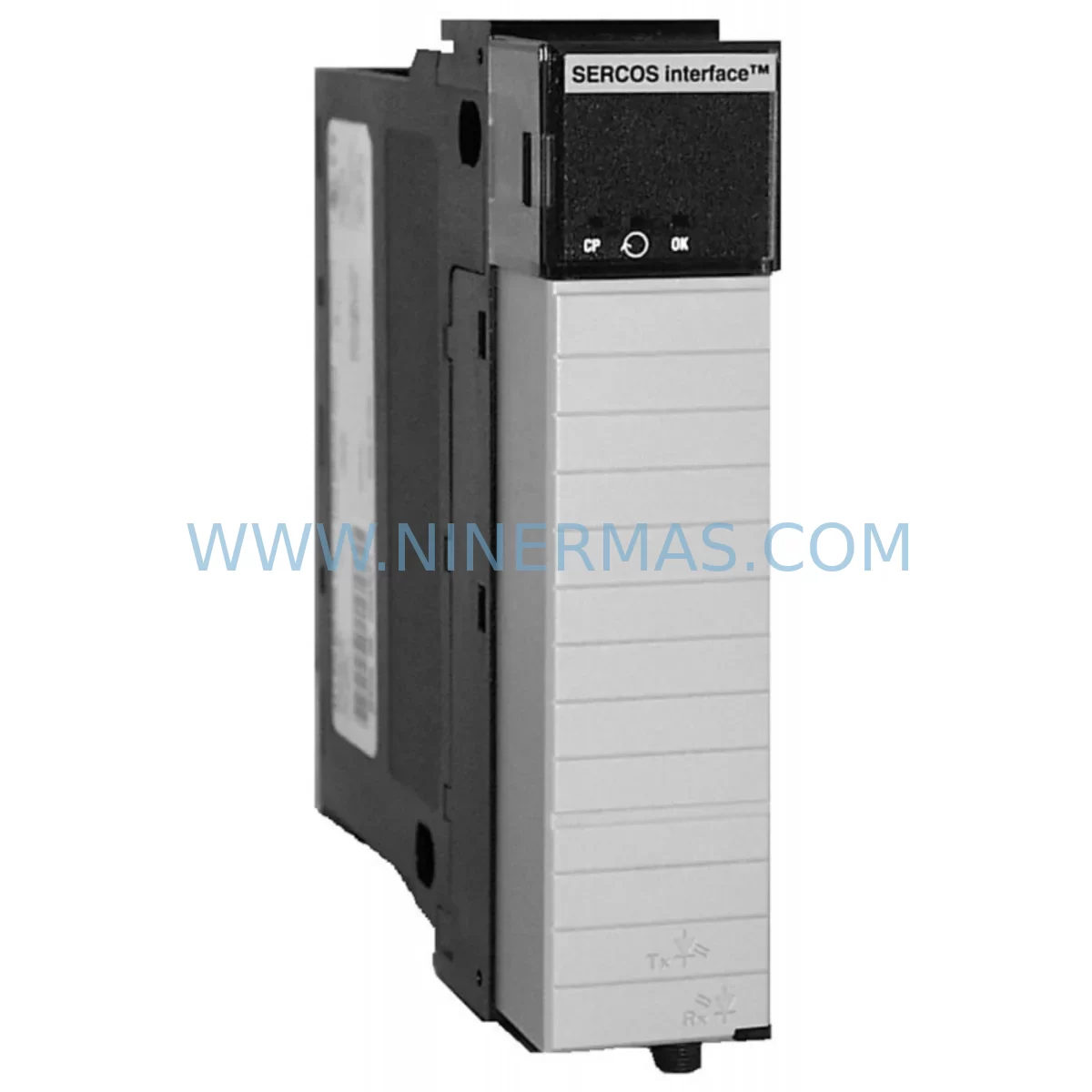
Allen-Bradley 1756-M03SE Retrofit-Compatible 3-Axis Servo Module
Verify the part, confirm the platform family, and move straight into quotation with the right commercial details.
RFQ Ready
- SKU1756-M03SE
- CategoryPLC & Industrial Automation Modules
- BrandAllen-Bradley
- SupportAvailability, lead time, condition, and shipping coordination
How Buyers Usually Use This Page
- Confirm the exact part number and platform family before sending the quote request.
- Use direct email when quantity, condition, and destination are already defined internally.
- Switch to the broader brand or category archive when you need alternates nearby.
Series Navigation
Move through the most common platform families behind this part.
Product RFQ
Send this part directly for quotation.
Include quantity, required condition, destination country, and target delivery timing. Current reference: Allen-Bradley 1756-M03SE Retrofit-Compatible 3-Axis Servo Module with SKU 1756-M03SE.
Allen-Bradley 1756-M03SE Retrofit-Compatible 3-Axis Servo Module for Legacy ControlLogix Systems
The Allen-Bradley 1756-M03SE is a 3-axis SERCOS (Serial Real-time Communication System) servo control module designed for the ControlLogix platform. As a retrofit-compatible replacement for discontinued or aging servo control infrastructure, the 1756-M03SE enables engineers and maintenance teams to restore, upgrade, and modernize legacy motion control systems without requiring a full platform migration. Whether you are replacing a failed module in an existing control cabinet, expanding I/O capacity on an aging production line, or migrating from an older SLC 500 or PLC-5 motion architecture, the 1756-M03SE provides a proven, drop-in-compatible upgrade path within the 1756 ControlLogix chassis ecosystem.
NINERMAS maintains verified in-stock inventory of the 1756-M03SE, fully tested prior to shipment and backed by a 12-month warranty. Each unit undergoes pre-shipment functional verification to ensure compatibility with your existing SERCOS ring topology and ControlLogix backplane.
Upgrade Compatibility Table
| Parameter | Details |
|---|---|
| SKU / Part Number | 1756-M03SE |
| Brand / Series | Allen-Bradley / ControlLogix |
| Axes Supported | 3-Axis SERCOS Interface |
| Communication Protocol | SERCOS I / SERCOS II (fiber optic ring) |
| Backplane Interface | 1756 ControlLogix Backplane (any slot) |
| Compatible Chassis | 1756-A4, 1756-A7, 1756-A10, 1756-A13, 1756-A17 |
| Compatible Controllers | 1756-L61, 1756-L62, 1756-L63, 1756-L71, 1756-L72, 1756-L73 |
| Power Requirements | Supplied via 1756 backplane; verify 1756-PA72 or 1756-PB72 power supply capacity |
| Installation Slot | Any available ControlLogix chassis slot; confirm physical clearance |
| Replacement For | 1756-M03SE (failed/EOL units), legacy PLC-5 SERCOS motion cards |
| Firmware Compatibility | Verify Logix Designer / RSLogix 5000 project firmware revision before swap |
| Commissioning Tool | RSLogix 5000 / Studio 5000 Logix Designer; 1756-CP3 or USB-1761-CBL-PM02 programming cable |
| Warranty | 12 Months — NINERMAS COMPANY LIMITED |
Retrofit Planning for Existing Automation Systems
Successful integration of the 1756-M03SE into a legacy or aging automation system requires careful pre-installation planning across several technical dimensions. Before removing the failed or end-of-life module, engineers should document the existing SERCOS ring configuration, including fiber optic cable routing, drive node addresses, and baud rate settings. The SERCOS ring must be properly terminated and all connected servo drives — such as the Kinetix 6000 (2094-BC01-M01-S) or Kinetix 6500 series — must be powered down in the correct sequence to avoid drive fault states or axis position loss.
Power budget verification is a critical first step. The 1756-PA72 or 1756-PB72 power supply modules must have sufficient remaining capacity to support the 1756-M03SE alongside other installed modules such as 1756-IB16 digital input modules, 1756-OB16E digital output modules, 1756-IF8 analog input modules, and any 1756-EN2T EtherNet/IP communication modules already occupying the chassis. Overloading the backplane power supply is a common cause of intermittent faults during retrofit projects and must be ruled out before commissioning.
Backplane slot assignment should be confirmed against the existing Logix Designer project file. The module’s slot number is embedded in the controller program’s I/O tree, and changing the physical slot location without updating the project configuration will result in a module fault at startup. If the original slot is no longer available due to chassis reconfiguration, the program must be updated accordingly before going online.
For systems migrating from older PLC-5 or SLC 500 motion platforms, a program conversion step is required. Rockwell Automation’s Migration Assistant or manual re-mapping of motion instructions (MAM, MAS, MSO, MDF) into Studio 5000 format is necessary. During this phase, HMI screens built on PanelView Plus 6 or PanelView 800 terminals may also require tag remapping if axis names or data types have changed in the converted project.
Communication link integrity should be verified after module installation. The SERCOS fiber optic ring connecting the 1756-M03SE to each servo drive must be inspected for bend radius violations, connector contamination, and proper SFP transceiver seating. Signal isolation between the SERCOS ring and any adjacent 1756-EN2T or 1756-DNB DeviceNet bridge modules should also be confirmed to prevent cross-talk or ground loop issues in the control cabinet.
For I/O expansion requirements during the same retrofit window, consider adding 1756-IB32 high-density digital input modules or 1756-OB32 output modules to the same chassis to consolidate field wiring and reduce cabinet footprint. If the retrofit involves migrating to a newer ControlLogix L7x or L8x controller platform, the 1756-M03SE remains fully compatible and no hardware changes to the servo module are required — only firmware and project file updates.
Downtime Control During System Migration
Minimizing unplanned downtime is the primary concern for any production environment undertaking a servo module replacement or control system retrofit. A structured migration approach using the 1756-M03SE can reduce total changeover time to under four hours for a single-axis group swap, provided all pre-commissioning steps are completed offline in advance.
Begin by creating a full backup of the existing Logix Designer project, including all controller tags, motion group configurations, axis parameters, and cam profiles. Store this backup on an offline engineering workstation and a secondary USB drive. This ensures that if commissioning encounters unexpected axis behavior, the original program logic can be restored within minutes without requiring a full re-engineering effort.
During the physical swap, maintain field wiring continuity wherever possible. If the control cabinet layout allows, leave all servo drive power and feedback wiring connected to the drives while only the SERCOS fiber connections to the old module are transferred to the new 1756-M03SE. This approach preserves axis homing offsets stored in the drive and reduces re-commissioning time significantly.
After installing the 1756-M03SE and downloading the updated project, bring axes online one at a time using the Motion Direct Commands (MDC) panel in Studio 5000. Verify each axis’s actual position feedback against the expected home position before enabling automatic mode. For systems with absolute encoders on Kinetix 6000 or Kinetix 6500 drives, confirm that the multi-turn data has not been lost during the power cycle. If position data has been cleared, a controlled re-homing sequence must be executed before resuming production.
Throughout the migration, maintain continuous communication with the plant floor supervisor to coordinate safe windows for axis enable and first-cycle testing. Document all parameter changes, firmware versions, and test results in a retrofit commissioning report for future reference and warranty validation purposes.
Retrofit Support FAQ
Q1: Is the 1756-M03SE a direct replacement for a failed ControlLogix SERCOS servo module?
Yes. The 1756-M03SE is a direct slot-compatible replacement for existing 1756-M03SE units within any ControlLogix 1756-series chassis. No hardware modifications to the chassis, backplane, or servo drives are required. The replacement module will inherit the existing SERCOS node addresses and axis configurations stored in the controller program, provided the Logix Designer project is not modified prior to the swap.
Q2: What commissioning steps are required after installing the replacement module?
After physical installation, download the existing (or updated) Logix Designer project to the controller and go online. Navigate to the Motion Group in the I/O tree and verify that all three axes show an “OK” status. Run a Motion Axis Fault Reset (MAFR) instruction if any axis faults are present. Perform a manual jog test on each axis at low speed before enabling automatic operation. Confirm SERCOS ring status via the module’s diagnostic LEDs and the controller’s I/O diagnostics screen.
Q3: Can the 1756-M03SE be used with both SERCOS I and SERCOS II drives?
The 1756-M03SE supports SERCOS II fiber optic communication at standard baud rates. Compatibility with specific drive models — including Kinetix 6000, Ultra 3000, and third-party SERCOS-compliant drives — should be verified against the drive’s firmware revision and the module’s compatibility matrix in the Rockwell Automation product compatibility and download center (PCDC). NINERMAS technical support can assist with compatibility verification prior to order placement.
Q4: What does the 12-month warranty cover, and how is it validated?
All 1756-M03SE units supplied by NINERMAS are covered by a 12-month warranty from the date of shipment. The warranty covers manufacturing defects and functional failures under normal operating conditions. Each unit is pre-tested prior to shipment and accompanied by a test report. Warranty claims require the original invoice number and a description of the fault condition. NINERMAS provides advance replacement service for warranty claims to minimize production downtime. Contact sale@ninermas.com or +0086 187 5021 5667 to initiate a warranty claim.
| Product Series | ControlLogix |
|---|---|
| Country of Origin | US |
Catalog Continuation
More Allen-Bradley modules in the catalog.
Use the brand lane to compare nearby part numbers, platform-adjacent modules, and other inquiry-ready listings before sending your final RFQ.




Catalog Continuation
Alternative parts within PLC & Industrial Automation Modules.
Stay inside the same system family when you need substitutes, adjacent modules, or a broader shortlist for procurement review.



SKU: HDD02.2-W040N-HS12-01-FW FWA-DIAX04-ELS-05VRS-MS
Rexroth HDD02.2-W040N-HS12-01-FW Service-Ready Spare Part

SKU: I5DAE375F10010000S
Lenze I5DAE375F10010000S Service-Ready Spare Part for Industrial Maintenance



