
Original Industrial Spare Part
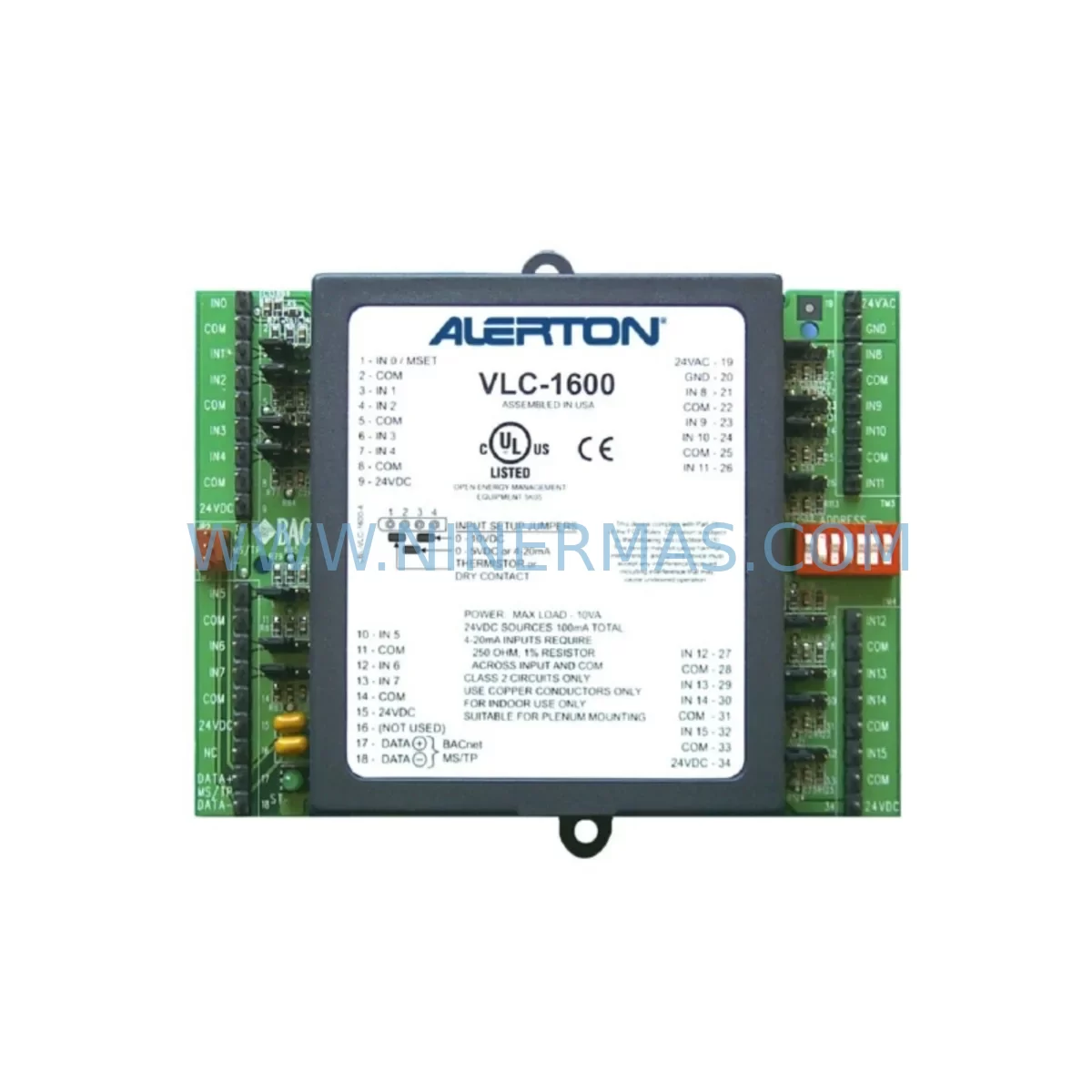
Alerton VLC1600 Service-Ready Spare Part for Industrial Maintenance
Verify the part, confirm the platform family, and move straight into quotation with the right commercial details.
RFQ Ready
- SKUVLC1600
- CategoryPLC & Industrial Automation Modules
- BrandAlerton
- SupportAvailability, lead time, condition, and shipping coordination
How Buyers Usually Use This Page
- Confirm the exact part number and platform family before sending the quote request.
- Use direct email when quantity, condition, and destination are already defined internally.
- Switch to the broader brand or category archive when you need alternates nearby.
Series Navigation
Move through the most common platform families behind this part.
Product RFQ
Send this part directly for quotation.
Include quantity, required condition, destination country, and target delivery timing. Current reference: Alerton VLC1600 Service-Ready Spare Part for Industrial Maintenance with SKU VLC1600.
Alerton VLC1600 Service-Ready Spare Part for Industrial Maintenance
The Alerton VLC1600 is a high-capacity Variable Logic Controller designed for large-scale building automation and industrial HVAC control applications. As a core component in Alerton’s VLC series, the VLC1600 manages complex sequences of operation across air handling units, chillers, boilers, and multi-zone VAV systems. When this controller fails or reaches end-of-life, the downstream impact is immediate: loss of environmental control, unplanned downtime, and potential damage to process-sensitive equipment. Maintaining a verified, service-ready VLC1600 spare in your inventory is a fundamental risk-mitigation strategy for any facility relying on Alerton BACnet-based automation infrastructure.
NINERMAS stocks the Alerton VLC1600 as an original, pre-tested spare part with full 12-month warranty coverage. Each unit undergoes functional verification prior to shipment, ensuring that the replacement controller arrives ready for immediate installation without the uncertainty of untested surplus stock. Our global logistics network supports fast dispatch to maintenance teams across manufacturing plants, commercial facilities, data centers, and process industries.
Spare Maintenance Table
| Parameter | Specification / Detail |
|---|---|
| Part Number / SKU | VLC1600 |
| Brand | Alerton (Honeywell Building Technologies) |
| Series | VLC (Variable Logic Controller) Series |
| Product Type | Building Automation Controller / BACnet DDC Controller |
| Communication Protocol | BACnet MS/TP, BACnet/IP |
| I/O Capacity | Up to 160 physical I/O points (expandable via expansion modules) |
| Power Supply | 24 VAC / 24 VDC (class 2 transformer required) |
| Operating Temperature | 0°C to 50°C (32°F to 122°F) |
| Humidity | 10% to 90% RH, non-condensing |
| Mounting | DIN rail or panel mount |
| Compatibility | Alerton VLC series, BACtalk network, Alerton Compass software |
| Application | AHU, chiller, boiler, VAV, multi-zone HVAC, industrial process control |
| Condition | Original spare, pre-shipment tested |
| Warranty | 12 months from date of shipment |
| Origin | United States |
| Lead Time | Contact NINERMAS for current stock availability |
Maintenance Planning for Continuous Operation
Replacing the VLC1600 in the field is rarely an isolated task. Experienced maintenance engineers understand that a controller failure often signals stress across the broader control cabinet and field wiring infrastructure. Before commissioning a replacement VLC1600, a systematic inspection of all associated components is essential to prevent repeat failures and ensure stable long-term operation.
Begin with the 24 VAC power supply feeding the controller. A degraded transformer or unstable power rail is a common root cause of controller lockups and premature failure. Verify output voltage under load and inspect for signs of overheating or insulation breakdown. If the cabinet uses a dedicated Alerton PS-2450 or equivalent Class 2 power supply module, confirm its output is within specification before energizing the new VLC1600.
Next, audit the BACnet MS/TP network wiring. The VLC1600 communicates over a two-wire RS-485 bus, and impedance mismatches, missing termination resistors, or corroded connections can cause intermittent communication faults that are often misdiagnosed as controller failures. If the site uses a BCM-ETH BACnet/IP communication module for Ethernet integration, inspect its firmware version and network configuration for compatibility with the replacement unit.
For sites with high I/O counts, the VLC1600 is frequently paired with Alerton EXP-1048 expansion modules to extend analog and digital I/O capacity. Inspect each expansion module’s ribbon cable connections and verify that the I/O addresses are correctly mapped in the Alerton Compass programming environment. Damaged ribbon cables or loose connectors are a frequent source of phantom I/O faults after a controller swap.
Review all terminal block wiring — particularly the TB-8 and similar screw-terminal assemblies used for field device connections. Loose terminals on analog inputs (temperature sensors, pressure transducers) or digital outputs (relay coils, actuator signals) can introduce noise or open-circuit faults that corrupt the controller’s control loop performance. Re-torque all terminals to specification during the replacement procedure.
If the control cabinet includes signal isolation modules between field sensors and the VLC1600’s analog inputs, verify that each isolator’s output range matches the controller’s configured input type (0–10 VDC or 4–20 mA). Mismatched signal ranges are a common commissioning error that can damage analog input circuits over time.
For facilities running parallel VLC controllers — such as a VLC1188 or VLC440 managing secondary zones — confirm that the BACtalk MS/TP network segment is properly segmented and that device instance numbers do not conflict after the VLC1600 replacement. A device instance conflict will prevent the new controller from appearing on the network, causing unnecessary diagnostic delays.
Finally, inspect any relay output modules and fuse protection in the output circuits. Blown fuses on digital output channels are often overlooked during a controller replacement and can cause confusion when the new VLC1600 fails to drive actuators or contactors. Replace any suspect fuses and verify relay coil resistance before closing the cabinet.
Procurement engineers should consider maintaining a minimum spare inventory that includes the VLC1600 controller, at least one EXP-1048 expansion module, a replacement power supply, and a set of terminal block spares. For sites with aging BACtalk infrastructure, a VLC1664 or VLCP processor module should also be evaluated as a forward-compatible upgrade path to extend system life beyond the VLC1600’s service horizon.
Site Replacement Workflow
Step 1 — Pre-Replacement Backup: Before removing the failed VLC1600, connect a laptop running Alerton Compass software and perform a full program backup if the controller is still partially responsive. Save the application program, I/O configuration, and network parameters to a secure location. If the controller is completely unresponsive, retrieve the last known-good program backup from your site documentation archive.
Step 2 — Power Isolation: De-energize the control cabinet following your site’s lockout/tagout (LOTO) procedure. Verify zero voltage at the controller’s power terminals before proceeding. Label all field wiring connections with numbered tags before disconnecting to ensure accurate re-termination.
Step 3 — Physical Replacement: Remove the failed VLC1600 from its DIN rail or panel mount. Install the replacement unit in the same position. Re-terminate all field wiring according to the labeled tags and the original wiring diagram. Reconnect the BACnet MS/TP network cable and verify termination resistor placement at the network segment endpoints.
Step 4 — Program Restore and Commissioning: Restore power and download the backed-up application program to the new VLC1600 via Alerton Compass. Verify that the controller’s BACnet device instance, network address, and I/O configuration match the original settings. Perform a point-by-point I/O verification to confirm all field devices are responding correctly before returning the system to automatic control.
Step 5 — System Validation: Monitor the controller for a minimum of 24 hours after replacement to confirm stable operation across all control loops. Document the replacement in your site maintenance log, including the date, replaced unit serial number, and technician name, to support warranty claims and future audit requirements.
Spare Parts Support FAQ
Q1: Is the VLC1600 supplied by NINERMAS an original Alerton part or a third-party compatible unit?
All VLC1600 units supplied by NINERMAS are original Alerton spare parts sourced through verified supply channels. We do not supply counterfeit, rebranded, or third-party compatible substitutes. Each unit is individually tested prior to shipment to confirm functional integrity.
Q2: What is the warranty coverage and what does it include?
NINERMAS provides a 12-month warranty from the date of shipment on all VLC1600 spare parts. The warranty covers manufacturing defects and functional failures under normal operating conditions. It does not cover damage resulting from incorrect installation, overvoltage events, or physical mishandling. Warranty claims are supported by our technical team with replacement or repair at no additional cost.
Q3: How do I confirm compatibility between the replacement VLC1600 and my existing Alerton BACtalk system?
Compatibility is determined by the firmware version of the replacement controller and the version of Alerton Compass software used at your site. NINERMAS technical support can assist with firmware version verification prior to shipment. We recommend providing your existing controller’s firmware version and Compass software version when placing your order to ensure a fully compatible replacement is dispatched.
Q4: Can NINERMAS support long-term supply agreements for the VLC1600 and related VLC series components?
Yes. NINERMAS offers reserved inventory agreements for customers with ongoing maintenance requirements for end-of-life and hard-to-source Alerton components. Contact our procurement team to discuss minimum stock levels, lead time guarantees, and pricing structures for multi-year supply agreements covering the VLC1600 and associated VLC series spare parts.
| Product Series | Other series |
|---|
Catalog Continuation
More Alerton modules in the catalog.
Use the brand lane to compare nearby part numbers, platform-adjacent modules, and other inquiry-ready listings before sending your final RFQ.
Catalog Continuation
Alternative parts within PLC & Industrial Automation Modules.
Stay inside the same system family when you need substitutes, adjacent modules, or a broader shortlist for procurement review.
SKU: SCE906A2-002-01 SCE906A200201
Pacific Scientific SCE906A2-002-01 Retrofit Servo Amplifier
SKU: EPC500 3183062451
Alfa Laval EPC500 3183062451 Service-Ready Spare Part



