Original Industrial Spare Part
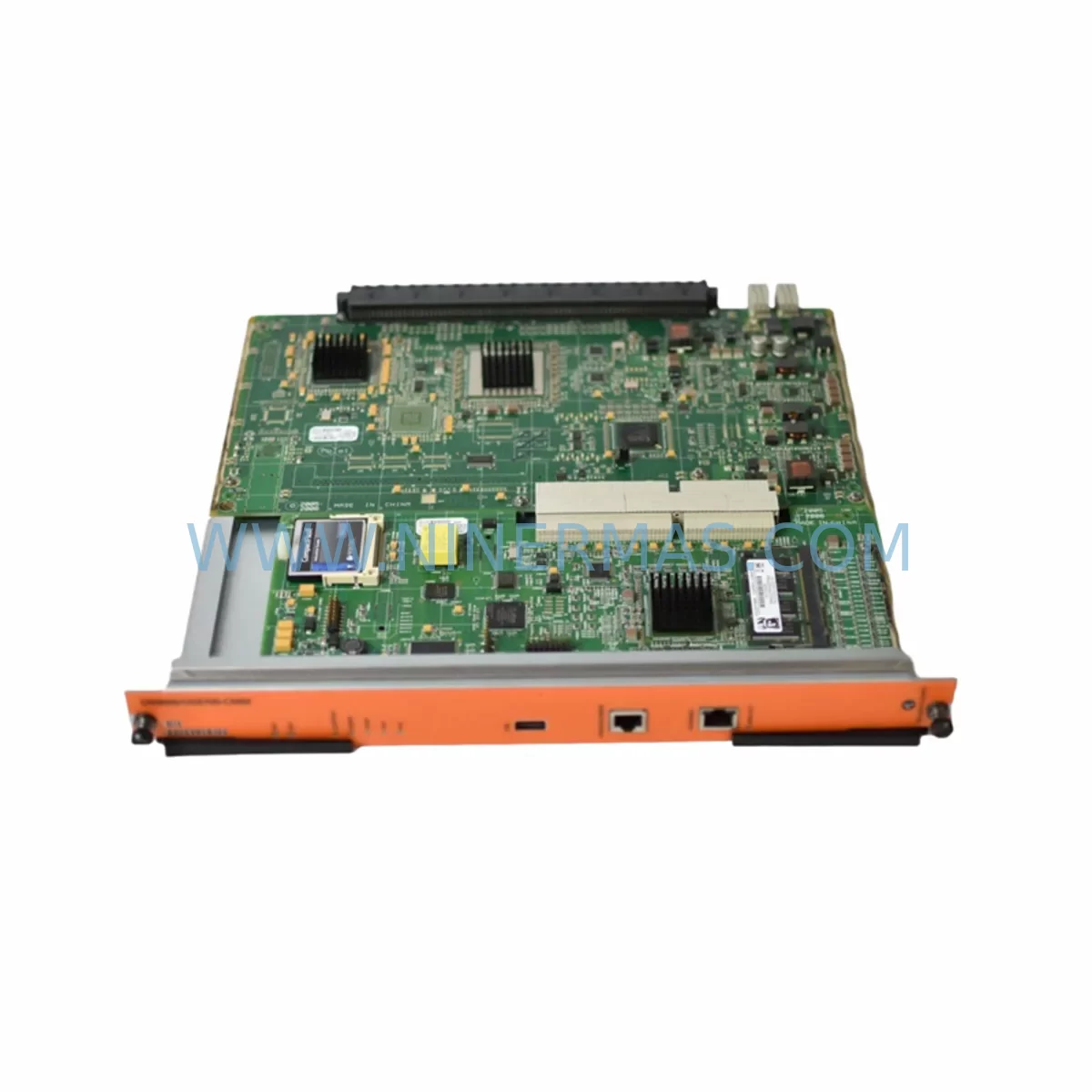
Alcatel OS9600/OS9700-CMM Service-Ready Spare Part
Verify the part, confirm the platform family, and move straight into quotation with the right commercial details.
RFQ Ready
- SKUOS9600/OS9700-CMM
- CategorySIS Safety & Redundancy Systems
- BrandAlcatel
- SupportAvailability, lead time, condition, and shipping coordination
How Buyers Usually Use This Page
- Confirm the exact part number and platform family before sending the quote request.
- Use direct email when quantity, condition, and destination are already defined internally.
- Switch to the broader brand or category archive when you need alternates nearby.
Series Navigation
Move through the most common platform families behind this part.
Product RFQ
Send this part directly for quotation.
Include quantity, required condition, destination country, and target delivery timing. Current reference: Alcatel OS9600/OS9700-CMM Service-Ready Spare Part with SKU OS9600/OS9700-CMM.
Alcatel OS9600/OS9700-CMM Service-Ready Spare Part for Industrial Maintenance
The Alcatel OS9600/OS9700-CMM is the Chassis Management Module (CMM) designed for the OmniSwitch 9600 and OmniSwitch 9700 modular chassis platforms. As the central control and management processor of the chassis, the CMM governs system initialization, redundancy switchover, software image management, and real-time health monitoring across all installed line cards and fabric modules. In mission-critical industrial networking environments — including manufacturing automation, process control, and distributed SCADA infrastructure — an unplanned CMM failure can bring down an entire network segment, halting production lines and triggering costly unplanned downtime.
NINERMAS maintains verified, pre-tested stock of the OS9600/OS9700-CMM to support maintenance engineers and procurement teams who require fast, reliable spare part fulfillment. Each unit undergoes functional verification prior to dispatch, and is covered by a 12-month warranty from the date of shipment. Our long-term supply program ensures continued availability for OmniSwitch 9600/9700 platforms even as these systems approach or exceed their original end-of-support dates.
Spare Maintenance Table
| Part Number / SKU | OS9600/OS9700-CMM |
| Brand | Alcatel (Alcatel-Lucent Enterprise) |
| Series | OmniSwitch 9600 / OmniSwitch 9700 |
| Module Type | Chassis Management Module (CMM) |
| Function | System control plane, redundancy management, software image boot, health monitoring |
| Chassis Compatibility | OmniSwitch 9600 (OS9600), OmniSwitch 9700 (OS9700) modular chassis |
| Redundancy Support | Dual CMM hot-standby supported (primary + secondary CMM slots) |
| Management Interfaces | Console port, Ethernet management port, USB (model-dependent) |
| Operating Temperature | 0°C to 45°C (32°F to 113°F) — industrial ambient range |
| Storage Temperature | -25°C to 70°C |
| Power Input | Supplied via chassis backplane (no external power connector) |
| Form Factor | Hot-swappable blade module for OS9600/OS9700 chassis slot |
| Condition | Original / Refurbished-Tested (pre-shipment functional verification) |
| Warranty | 12 months from date of shipment |
| Lead Time | Subject to stock availability — contact for confirmation |
| Maintenance Recommendation | Inspect CMM seating, console connectivity, and redundancy sync status during scheduled chassis audits |
Maintenance Planning for Continuous Operation
When planning a replacement or inspection of the OS9600/OS9700-CMM, maintenance engineers should treat the CMM as the apex of a broader chassis health review. The CMM interfaces directly with every module installed in the chassis, meaning its failure or degraded performance can mask or amplify faults in adjacent components. A structured maintenance sweep should accompany any CMM replacement or pre-emptive swap.
Begin with the chassis power supply modules (such as the OS9600-PS or OS9700-PS series). The CMM depends on stable, clean DC power delivered through the chassis backplane; a failing or undersized power supply can cause intermittent CMM resets that are misdiagnosed as CMM hardware faults. Verify that both power supply bays are populated and that load-sharing is functioning correctly before condemning the CMM itself.
Next, inspect the switching fabric modules installed in the OS9700 chassis (where applicable). The CMM coordinates traffic forwarding policy across fabric planes; a degraded fabric module can generate error logs that appear CMM-originated. Confirm fabric module seating and check for any error LEDs on the fabric blades.
Review all installed line card modules — including Gigabit Ethernet, 10GbE, and legacy Fast Ethernet blades — for proper registration with the CMM after a swap. A newly installed CMM will re-enumerate all line cards during boot; any card that fails to register should be reseated or flagged for replacement. Pay particular attention to OS9600-GNI or OS9700-GNI series Gigabit Network Interface modules, which are common in long-running installations.
The chassis backplane itself warrants inspection during any CMM replacement. Backplane connector pins can oxidize or sustain mechanical damage over years of module insertions. Use compressed air to clear debris from the CMM slot and visually inspect the backplane connector before seating the replacement module.
For sites running dual CMM configurations, confirm that the secondary CMM (standby) is also functional and synchronized. A common oversight is discovering that the standby CMM has been silently failed for months — only revealed when the primary CMM is removed for replacement. Both CMM units should be tested and logged in the site’s spare parts register.
From a network management perspective, verify that the out-of-band management Ethernet port on the CMM is correctly patched to the site’s management VLAN or dedicated management switch. Loss of out-of-band access after a CMM swap is a frequent cause of extended recovery time. Confirm IP addressing, SNMP community strings, and SSH key configurations are restored from backup before returning the chassis to service.
Procurement engineers building annual spare parts budgets for OmniSwitch 9600/9700 installations should consider stocking at minimum one OS9600/OS9700-CMM per chassis cluster, alongside matched spares for power supplies, at least one representative line card per installed type, and any SFP or SFP+ transceivers used in uplink ports. Transceiver failures are statistically more frequent than CMM failures but are often overlooked in spare parts planning until a link-down event occurs during a critical production window.
Site Replacement Workflow
Step 1 — Pre-replacement preparation: Download and archive the current chassis configuration using the CMM’s console or management port (write memory / configuration backup). Confirm the replacement OS9600/OS9700-CMM firmware version matches or is compatible with the installed AOS (Alcatel Operating System) image on the chassis. If the replacement unit carries an older firmware, plan for an in-service upgrade before cutover.
Step 2 — Redundancy verification (dual-CMM sites): If the chassis is equipped with a secondary CMM, initiate a controlled switchover to the standby CMM before removing the primary. This confirms the standby is operational and allows the primary slot to be vacated without a network outage. Document the switchover time and confirm all line cards remain registered post-switchover.
Step 3 — Hot-swap procedure: The OS9600/OS9700-CMM supports hot-swap in dual-CMM configurations. For single-CMM chassis, a maintenance window is required. Loosen the CMM ejector levers, slide the module out smoothly, and immediately insert the replacement unit. Avoid leaving the CMM slot open for extended periods to prevent backplane contamination.
Step 4 — Post-installation verification: Monitor the chassis management console for successful CMM initialization messages. Confirm all line cards re-register, verify management port connectivity, and validate that SNMP traps and syslog forwarding resume correctly. Run a full show chassis and show module command sequence to confirm system health before closing the maintenance window.
Step 5 — Documentation and spare parts replenishment: Log the replaced CMM’s serial number, failure mode, and replacement date in the site’s maintenance register. Immediately initiate a procurement request to replenish the consumed spare, maintaining the minimum stock level defined in the site’s spare parts plan. Contact NINERMAS to confirm lead time and reserve a replacement unit for the next maintenance cycle.
Spare Parts Support FAQ
Q1: Is the OS9600/OS9700-CMM compatible with both the OmniSwitch 9600 and OmniSwitch 9700 chassis?
The SKU OS9600/OS9700-CMM is designed to serve both the OS9600 and OS9700 chassis platforms. However, always verify the specific hardware revision and AOS firmware compatibility before installation. NINERMAS can provide compatibility confirmation based on your chassis serial number and installed AOS version upon request.
Q2: What pre-shipment testing does NINERMAS perform on the OS9600/OS9700-CMM?
Each unit undergoes functional power-on verification and basic management interface testing prior to dispatch. Units that fail any stage of testing are quarantined and not shipped. A 12-month warranty covers hardware defects from the date of shipment, and our team provides post-sale technical support for installation-related queries.
Q3: Can NINERMAS support long-term or scheduled supply of the OS9600/OS9700-CMM for multi-site maintenance programs?
Yes. NINERMAS operates a long-term supply program for end-of-life and long-lifecycle industrial networking components, including OmniSwitch 9600/9700 series modules. We can reserve stock, agree on fixed lead times, and support annual procurement schedules for maintenance teams managing multiple chassis installations across distributed sites.
Q4: What should I do if the replacement CMM does not initialize correctly after installation?
First, verify that the CMM is fully seated and the ejector levers are locked. Check the chassis console port for boot error messages and confirm the AOS image on the replacement CMM is compatible with the chassis configuration. If the unit fails to initialize after correct installation, contact NINERMAS immediately — our warranty process includes advance replacement support to minimize site downtime.
| Product Series | Other series |
|---|
Catalog Continuation
Alternative parts within SIS Safety & Redundancy Systems.
Stay inside the same system family when you need substitutes, adjacent modules, or a broader shortlist for procurement review.