Original Industrial Spare Part
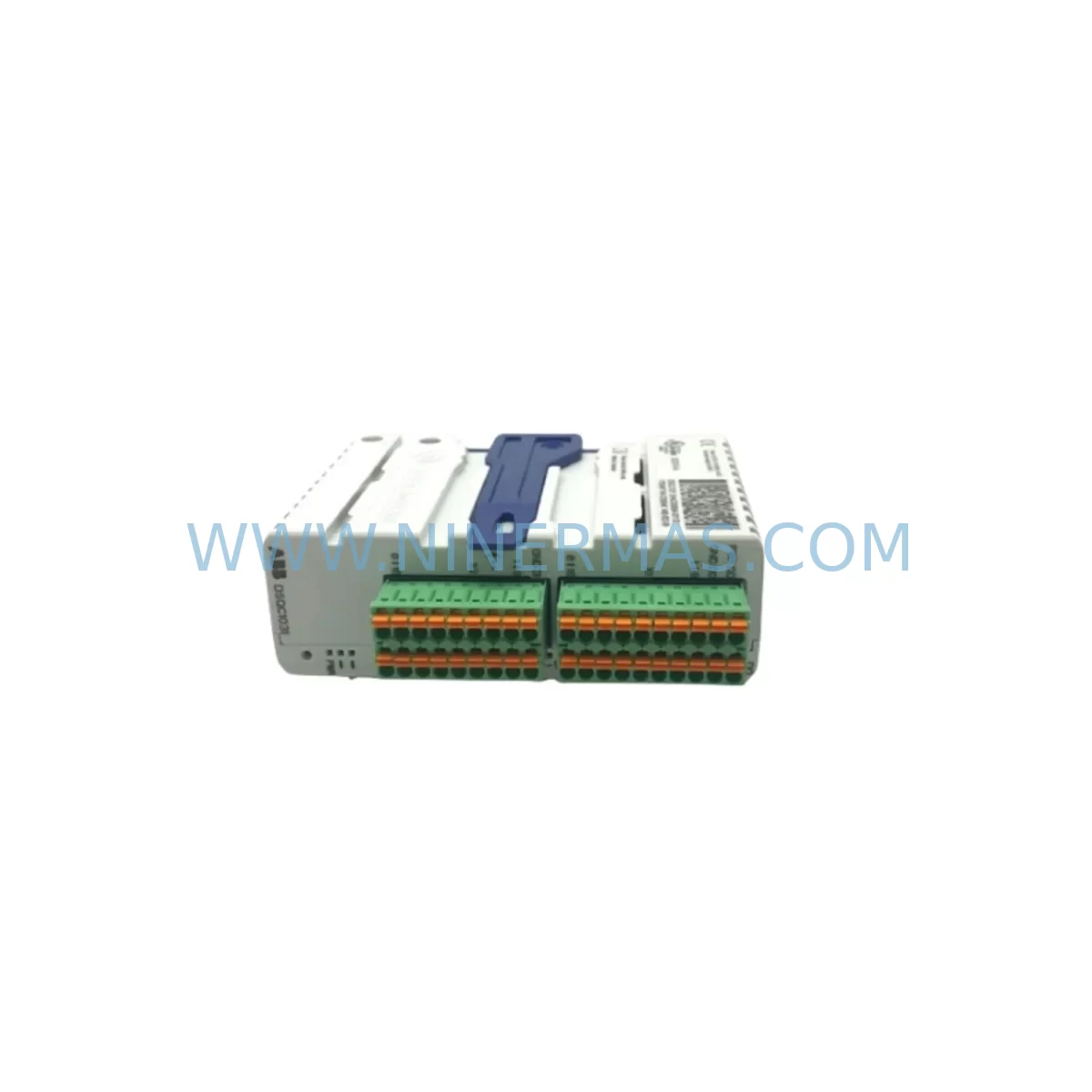
ABB DSQC1031 3HAC058664-001 Retrofit I/O Board for IRC5
Verify the part, confirm the platform family, and move straight into quotation with the right commercial details.
RFQ Ready
- SKUIO DSQC1031 3HAC058664-001
- CategoryPLC & Industrial Automation Modules
- BrandABB
- SupportAvailability, lead time, condition, and shipping coordination
How Buyers Usually Use This Page
- Confirm the exact part number and platform family before sending the quote request.
- Use direct email when quantity, condition, and destination are already defined internally.
- Switch to the broader brand or category archive when you need alternates nearby.
Series Navigation
Move through the most common platform families behind this part.
Product RFQ
Send this part directly for quotation.
Include quantity, required condition, destination country, and target delivery timing. Current reference: ABB DSQC1031 3HAC058664-001 Retrofit I/O Board for IRC5 with SKU IO DSQC1031 3HAC058664-001.
ABB DSQC1031 3HAC058664-001 Retrofit I/O Board for IRC5: Legacy-Compatible Upgrade for Industrial Robot Systems
The ABB DSQC1031 (part number 3HAC058664-001) is a digital I/O board designed for use within the ABB IRC5 robot controller platform. As production lines age and original ABB spare parts become increasingly difficult to source, the DSQC1031 has become a critical retrofit component for maintenance engineers tasked with keeping legacy robotic cells operational without committing to a full system overhaul. This board provides the digital input/output interface between the IRC5 controller cabinet and field devices, enabling continued operation of robot arms, welding cells, material handling systems, and assembly lines that were originally commissioned on the IRC5 architecture.
For facilities running IRB 1600, IRB 2400, IRB 4600, or IRB 6640 robot models paired with IRC5 single-cabinet or dual-cabinet controllers, the DSQC1031 serves as a direct replacement for failed or end-of-life I/O boards. Engineers undertaking a retrofit must first verify the existing backplane slot assignment within the IRC5 controller cabinet, confirm the DeviceNet or PROFIBUS node address configured in RobotStudio or the FlexPendant teach pendant, and cross-reference the terminal block wiring against the original electrical schematics. The 24 VDC power supply rail feeding the I/O section — typically sourced from the DSQC609 or DSQC661 power distribution board — must be confirmed within specification before installation to avoid damage to the replacement module.
During the retrofit planning phase, it is equally important to document the existing signal mapping in the IRC5 system parameters. The I/O configuration stored in the controller’s system software defines each digital input and output channel by unit name, signal name, and device address. When replacing the DSQC1031, these parameters must be preserved or re-imported to ensure that the robot program logic — including RAPID routines, interrupt signals, and safety interlock chains — continues to execute without modification. Failure to maintain signal mapping consistency is one of the most common causes of extended downtime during I/O board replacements on IRC5 platforms.
In multi-robot cells or integrated production lines, the DSQC1031 may interface with external PLCs, safety controllers, or SCADA systems via hardwired I/O or fieldbus communication. If the existing cell uses a DSQC378B or DSQC652 DeviceNet board alongside the DSQC1031, the node address and baud rate settings must be verified to prevent bus conflicts after the replacement. Similarly, if the control cabinet includes a DSQC688 fieldbus adapter or a DSQC1000 main computer board, firmware compatibility between the new I/O board and the existing controller software version (RobotWare 5.x or 6.x) should be confirmed prior to commissioning.
Physical installation requires confirming that the replacement DSQC1031 matches the mechanical form factor of the original — including the backplane connector pitch, DIN rail mounting footprint, and front-panel terminal block layout. In older IRC5 cabinets where the original board has been in service for over a decade, corrosion on the backplane connector pins or terminal block contacts may require cleaning or replacement of the DSQC509 backplane assembly before the new board is seated. Adequate installation space within the control cabinet must also be confirmed, particularly in compact IRC5 Panel Mounted Controller (PMC) configurations where clearance between modules is limited.
For customers managing a fleet of IRC5 controllers across multiple production sites, maintaining a buffer stock of DSQC1031 boards is a recognized best practice for minimizing unplanned downtime. Given that ABB has progressively moved its robot controller platform toward the IRC5 Compact and OmniCore architectures, availability of original DSQC1031 boards through standard distribution channels has become constrained. NINERMAS maintains verified inventory of the DSQC1031 3HAC058664-001 to support customers requiring immediate dispatch for emergency breakdowns or planned maintenance windows.
All units supplied by NINERMAS are subject to pre-shipment functional testing, including power-on verification, I/O channel continuity checks, and visual inspection for physical damage. Each DSQC1031 is shipped with a 12-month warranty covering manufacturing defects and functional failures under normal operating conditions. Customers are encouraged to contact our technical team prior to ordering to confirm compatibility with their specific IRC5 controller serial number, RobotWare version, and existing I/O configuration.
Upgrade Compatibility Table
| Parameter | Details |
|---|---|
| Part Number | 3HAC058664-001 |
| Model | DSQC1031 |
| Compatible Controller | ABB IRC5 (Single Cabinet, Dual Cabinet, Panel Mounted Controller) |
| Compatible Robot Models | IRB 1600, IRB 2400, IRB 4600, IRB 6640 and other IRC5-based models |
| Function | Digital I/O Board — field device interface for robot controller |
| Backplane Interface | IRC5 internal backplane connector (verify slot assignment before installation) |
| Power Supply Requirement | 24 VDC (sourced from IRC5 internal power distribution, e.g. DSQC609 / DSQC661) |
| Communication Compatibility | Compatible with DeviceNet and PROFIBUS configurations within IRC5 platform |
| RobotWare Compatibility | RobotWare 5.x and 6.x (confirm firmware version with controller serial number) |
| Replacement For | Failed or end-of-life DSQC1031 boards in existing IRC5 installations |
| Installation Space | Standard IRC5 cabinet slot; verify clearance in PMC configurations |
| Commissioning Requirement | Re-import I/O system parameters; verify signal mapping and RAPID program logic |
| Pre-Shipment Testing | Power-on verification, I/O channel continuity, visual inspection |
| Warranty | 12 Months — manufacturing defects and functional failures under normal use |
Retrofit Planning for Existing Automation Systems
A successful DSQC1031 retrofit begins well before the replacement board arrives on site. Maintenance engineers should extract a full backup of the IRC5 controller system — including system parameters, RAPID programs, and I/O configuration files — using RobotStudio or the FlexPendant backup function. This backup preserves the complete signal database, ensuring that digital input and output assignments can be restored exactly after the board swap.
Within the IRC5 cabinet, the DSQC1031 typically occupies a defined slot on the internal backplane. Before removal of the failed board, the slot number and unit label should be recorded, as these values are referenced in the I/O system parameters. The terminal block wiring — which connects field devices such as sensors, actuators, solenoid valves, and safety relays to the I/O board — must be photographed or mapped against the electrical drawings before disconnection. In installations where the DSQC652 digital I/O board or DSQC378B DeviceNet slave board is installed in adjacent slots, care must be taken to avoid disturbing their connections during the DSQC1031 replacement.
Power sequencing is a critical consideration. The 24 VDC supply to the I/O section, distributed through the DSQC609 power supply unit or the DSQC661 power distribution board, must be isolated before the board is removed. After installation of the replacement DSQC1031, the power supply voltage should be verified at the backplane connector before the controller is powered on. If the IRC5 cabinet also contains a DSQC1000 main computer board or a DSQC688 fieldbus adapter, the system boot sequence should be monitored via the FlexPendant to confirm that all modules are recognized and that no hardware fault codes are generated.
For cells where the IRC5 controller communicates with an external HMI panel — such as an ABB Panel PC or a third-party SCADA terminal — the I/O signal states displayed on the HMI screens should be verified against the physical field device states after the retrofit is complete. Any discrepancy in signal polarity or address mapping will require correction in either the IRC5 system parameters or the HMI tag database. In lines where a DSQC1030 or DSQC1032 I/O board is installed alongside the DSQC1031, the complete I/O unit list should be reviewed to confirm that no address conflicts exist after the replacement.
Downtime Control During System Migration
Minimizing production downtime during an IRC5 I/O board replacement requires a structured approach to pre-work, execution, and verification. The most effective strategy is to complete all preparatory steps — system backup, wiring documentation, spare parts staging, and parameter export — during a scheduled maintenance window or planned production break, so that the physical board swap and recommissioning can be completed within a single shift.
Before the replacement window opens, the DSQC1031 should be on-site and confirmed as the correct part number (3HAC058664-001). The IRC5 controller should be placed in manual mode and all robot programs halted in a safe, known position. The system backup should be verified as complete and accessible on an external storage device. Terminal block wiring labels should be checked against the electrical drawings to ensure accurate reconnection.
During the swap, the failed DSQC1031 is removed from its backplane slot, the replacement board is seated and secured, and the terminal block wiring is reconnected in accordance with the documented layout. After power restoration, the IRC5 system parameters are reloaded from the backup, and the I/O configuration is verified channel by channel using the FlexPendant I/O monitoring function. RAPID program execution is tested in manual reduced-speed mode before returning the cell to automatic production mode.
For facilities where continuous production is critical, a pre-configured hot-spare DSQC1031 — with system parameters pre-loaded and verified — can reduce the active replacement time to under two hours. NINERMAS supports customers in establishing spare parts inventory strategies that align with their maintenance schedules and production criticality assessments, ensuring that replacement boards are available before a failure occurs rather than after.
Retrofit Support FAQ
Q: Is the DSQC1031 (3HAC058664-001) a direct drop-in replacement for the original board in my IRC5 controller?
A: Yes, the DSQC1031 3HAC058664-001 is designed as a direct replacement for the same part number in IRC5 single-cabinet, dual-cabinet, and Panel Mounted Controller configurations. No hardware modification is required. However, you must restore the I/O system parameters from a controller backup after installation to ensure correct signal mapping and program compatibility.
Q: What commissioning steps are required after installing the replacement DSQC1031?
A: After physical installation, restore the IRC5 system backup via RobotStudio or the FlexPendant. Verify that the I/O unit is recognized in the system parameter I/O list, confirm all digital input and output channel states against field device conditions, and run the RAPID program in manual reduced-speed mode before returning to automatic operation. Check for any hardware fault codes on the FlexPendant event log.
Q: How do I verify terminal block wiring compatibility before installation?
A: Cross-reference the existing terminal block wiring against the IRC5 electrical drawings for your specific robot model and cabinet configuration. The DSQC1031 uses a standard terminal block layout consistent across IRC5 installations. Photograph the existing wiring before disconnection and verify each signal against the I/O signal database exported from the controller backup.
Q: What does the 12-month warranty cover, and what is the lead time for dispatch?
A: All DSQC1031 units supplied by NINERMAS carry a 12-month warranty covering manufacturing defects and functional failures under normal operating conditions. Units are subject to pre-shipment functional testing including power-on verification and I/O channel continuity checks. In-stock units are available for same-day or next-business-day dispatch. Contact our team at sale@ninermas.com or +0086 187 5021 5667 to confirm current stock availability and shipping options for your location.
| Product Series | IRC5 |
|---|---|
| Country of Origin | SE |
Catalog Continuation
More ABB modules in the catalog.
Use the brand lane to compare nearby part numbers, platform-adjacent modules, and other inquiry-ready listings before sending your final RFQ.
SKU: 3HAC033388-001
ABB 3HAC033388-001 Safety-Reliable Robot Harness Module
SKU: DSTA001B 3BSE018316R1
ABB DSTA001B 3BSE018316R1 Retrofit-Compatible Interface for Legacy Systems
SKU: 3BHE028915R0101 PCD237 A101
ABB 3BHE028915R0101 PCD237 A101 Retrofit Safety Controller
Catalog Continuation
Alternative parts within PLC & Industrial Automation Modules.
Stay inside the same system family when you need substitutes, adjacent modules, or a broader shortlist for procurement review.



SKU: HDD02.2-W040N-HS12-01-FW FWA-DIAX04-ELS-05VRS-MS
Rexroth HDD02.2-W040N-HS12-01-FW Service-Ready Spare Part

SKU: I5DAE375F10010000S
Lenze I5DAE375F10010000S Service-Ready Spare Part for Industrial Maintenance