Original Industrial Spare Part
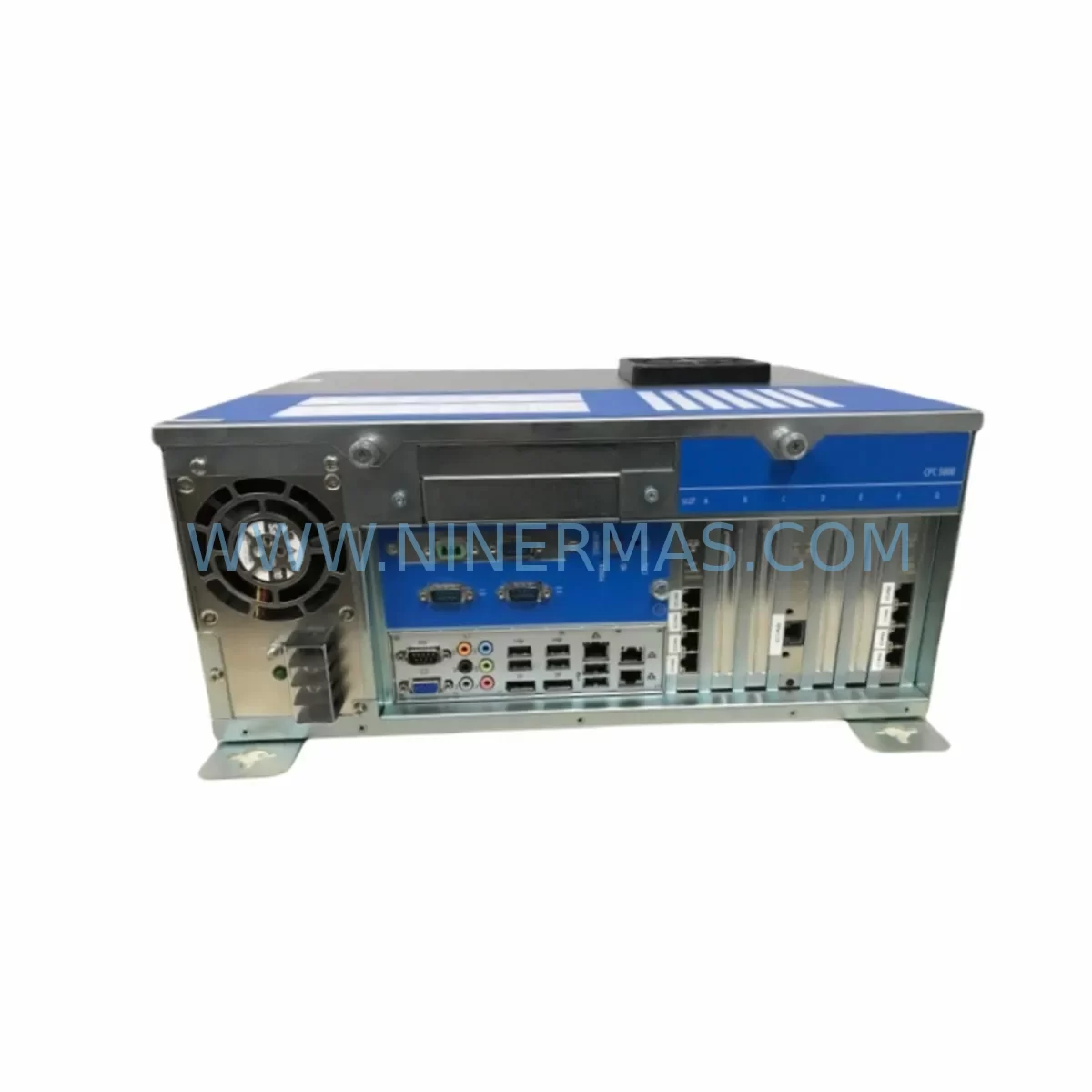
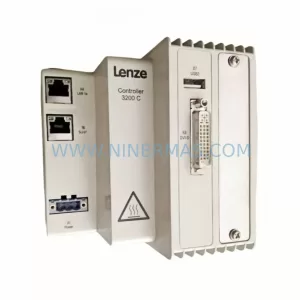
Lenze CPC5100 Retrofit-Compatible Panel Controller for Legacy Systems
Verify the part, confirm the platform family, and move straight into quotation with the right commercial details.
RFQ Ready
- SKUCPC5100
- CategoryPLC & Industrial Automation Modules
- BrandLenze
- SupportAvailability, lead time, condition, and shipping coordination
How Buyers Usually Use This Page
- Confirm the exact part number and platform family before sending the quote request.
- Use direct email when quantity, condition, and destination are already defined internally.
- Switch to the broader brand or category archive when you need alternates nearby.
Series Navigation
Move through the most common platform families behind this part.
Product RFQ
Send this part directly for quotation.
Include quantity, required condition, destination country, and target delivery timing. Current reference: Lenze CPC5100 Retrofit-Compatible Panel Controller for Legacy Systems with SKU CPC5100.
Lenze CPC5100 Retrofit-Compatible Panel Controller for Legacy Systems
The Lenze CPC5100 is a panel-mounted industrial controller from the Lenze Controller-based Automation (CBA) platform, designed for demanding machine control environments. As a discontinued model, the CPC5100 remains a critical spare part for manufacturers operating legacy Lenze automation lines. NINERMAS maintains verified stock of the CPC5100 to support retrofit projects, unplanned breakdowns, and planned system upgrades — backed by a 12-month warranty and pre-shipment functional testing on every unit.
Whether you are replacing a failed unit on a packaging line, upgrading a legacy control cabinet, or migrating from an older CBA architecture to a more current Lenze platform, the CPC5100 serves as a reliable bridge component. Its compatibility with the Lenze CBA software environment, combined with its standard DIN-rail and panel-mount form factor, makes it a preferred choice for system integrators and maintenance engineers who need to restore production with minimal downtime.
Upgrade Compatibility Table
| Parameter | CPC5100 (This Unit) | Retrofit / Upgrade Notes |
|---|---|---|
| Interface | RS-232, CAN, Ethernet (model-dependent) | Verify backplane connector pinout against existing wiring harness before installation |
| Installation | Panel-mount / DIN-rail compatible | Confirm cutout dimensions and depth clearance in existing control cabinet |
| Communication Compatibility | CANopen, PROFIBUS (optional), Ethernet | Match protocol configuration to existing network topology; update node address if required |
| Replacement Suggestion | Direct replacement for CPC5100 variants | For full platform migration, consider Lenze c300 or p300 controller series |
| Commissioning Focus | Program upload, I/O mapping, HMI screen binding | Backup original program via Lenze Engineer software before swapping hardware |
| 12-Month Warranty | Covered | All units pre-tested before shipment; warranty covers functional defects under normal operating conditions |
Retrofit Planning for Existing Automation Systems
Replacing a Lenze CPC5100 in an active production environment requires careful pre-planning across several technical dimensions. Before the replacement unit arrives on-site, engineers should document the existing terminal wiring layout, confirm the 24 VDC power supply capacity available from the control cabinet’s power module — typically a Lenze EPM-H501 or EPM-H502 — and verify that the backplane interface on the existing rack is mechanically and electrically compatible with the replacement unit.
In systems where the CPC5100 communicates with Lenze EVF9321 or EVF9323 frequency inverters over CANopen, the node address and baud rate settings stored in the original controller must be recorded and replicated exactly on the replacement unit. Failure to match these parameters will result in communication faults on startup and may trigger protective shutdowns across connected drives. Similarly, if the system includes Lenze E94ASHE servo drive modules, the motion profile parameters and axis assignments must be verified against the original program before the new controller is brought online.
For installations that include distributed I/O expansion — such as Lenze EWL0010 or EWL0020 I/O modules connected via the system bus — the module address assignments must be confirmed and re-entered during commissioning. Any mismatch between the physical module address and the program’s I/O map will cause input/output errors that can be difficult to diagnose without the original project documentation.
HMI integration is another critical checkpoint. If the CPC5100 drives a local operator panel or connects to an external HMI via serial or Ethernet, the communication parameters — including IP address, port, and screen variable bindings — must be preserved. In many legacy installations, the HMI screens were developed in an older version of the Lenze VisualEditor or a third-party SCADA tool, and the variable tag list must be re-validated after the controller swap to ensure all process values display correctly.
Where the existing system uses a Lenze CPC5000 or CPC5200 as a companion controller in a multi-axis or multi-zone configuration, the inter-controller communication links — typically implemented over CANopen or a proprietary Lenze system bus — must be tested end-to-end after the CPC5100 replacement is installed. Programming cables such as the Lenze EWL0011 or a standard USB-to-serial adapter with the appropriate driver are required to connect a laptop running Lenze Engineer for program upload and parameter verification.
Finally, confirm that the installation space in the control cabinet allows for adequate ventilation around the CPC5100. Thermal management is a common oversight in retrofit projects, particularly in older cabinets where the original layout was designed around a different component footprint. Ensure that the replacement unit’s heat dissipation requirements are met by the existing cabinet cooling arrangement before closing the cabinet and returning the system to service.
Downtime Control During System Migration
Minimizing production downtime during a CPC5100 replacement is achievable with structured preparation. The most effective approach is to complete all pre-commissioning steps — program backup, parameter documentation, wiring verification, and spare parts staging — before the machine is taken offline. This reduces the actual switchover window to the physical swap, program upload, and functional test sequence, which experienced engineers can typically complete within two to four hours for a standard single-controller installation.
Protecting the original program logic is the highest priority. Use Lenze Engineer software to export a full project backup, including all drive parameters, I/O configurations, and communication settings, before disconnecting the original CPC5100. Store this backup on at least two separate media — a local laptop and a network share — to guard against data loss during the swap.
To maintain field control continuity during the transition, consider placing connected frequency inverters in local manual mode where process safety permits. This allows the drives to continue operating at a fixed setpoint while the controller is being replaced, reducing the impact on upstream and downstream process equipment. Once the replacement CPC5100 is installed and the program is uploaded, perform a staged restart: bring the controller online first, verify communication with all connected modules and drives, then transfer control back from manual to automatic mode one zone at a time.
All NINERMAS-supplied CPC5100 units undergo pre-shipment functional testing to confirm that the unit powers up correctly, communication interfaces respond as expected, and no hardware faults are present. This testing step, combined with the 12-month warranty coverage, reduces the risk of a second unplanned outage caused by a defective replacement part.
Retrofit Support FAQ
Q1: Is the CPC5100 a direct drop-in replacement for all CPC5100 variants?
The CPC5100 was produced in several hardware revisions. NINERMAS will confirm the exact hardware revision of the unit in stock against your original part number before shipment. In most cases, later revisions are backward-compatible, but firmware version alignment should be verified during commissioning using Lenze Engineer software.
Q2: What commissioning steps are required after installing the replacement unit?
After physical installation, connect a programming laptop via the appropriate cable, upload the backed-up project file using Lenze Engineer, verify all I/O assignments and communication node addresses, and perform a full functional test covering all control modes. HMI variable bindings should be checked last to confirm all display values are updating correctly.
Q3: How should I handle terminal wiring differences between the original and replacement unit?
Compare the terminal layout of the replacement unit against the original wiring diagram before making any connections. If the terminal assignment differs between hardware revisions, update the wiring accordingly and document all changes in the as-built drawing set. Do not assume terminal numbering is identical across revisions without verification.
Q4: What does the 12-month warranty cover, and how is it claimed?
The 12-month warranty covers functional defects arising under normal operating conditions, including power supply, communication interface, and I/O port failures. It does not cover damage caused by incorrect installation, overvoltage, or environmental conditions outside the unit’s rated specification. To initiate a warranty claim, contact NINERMAS with the original invoice number and a description of the fault. A replacement or repair will be arranged within the agreed lead time.
| Product Series | Legacy |
|---|---|
| Country of Origin | DE |
Catalog Continuation
More Lenze modules in the catalog.
Use the brand lane to compare nearby part numbers, platform-adjacent modules, and other inquiry-ready listings before sending your final RFQ.

SKU: I5DAE375F10010000S
Lenze I5DAE375F10010000S Service-Ready Spare Part for Industrial Maintenance
SKU: BFK458-25 (400 N.M) 180VDC
Lenze BFK458-25 400NM 180VDC Service-Ready Spare Part
SKU: E32GAC10000M5H0XXX-02S13300000
Lenze E32GAC10000M5H0XXX Safety Servo Drive Critical Sites
Catalog Continuation
Alternative parts within PLC & Industrial Automation Modules.
Stay inside the same system family when you need substitutes, adjacent modules, or a broader shortlist for procurement review.



SKU: HDD02.2-W040N-HS12-01-FW FWA-DIAX04-ELS-05VRS-MS
Rexroth HDD02.2-W040N-HS12-01-FW Service-Ready Spare Part
SKU: VRDM 397/50 LNB VRDM397/50LNB
Berger Lahr VRDM 397/50 LNB Service-Ready Spare Part