Original Industrial Spare Part
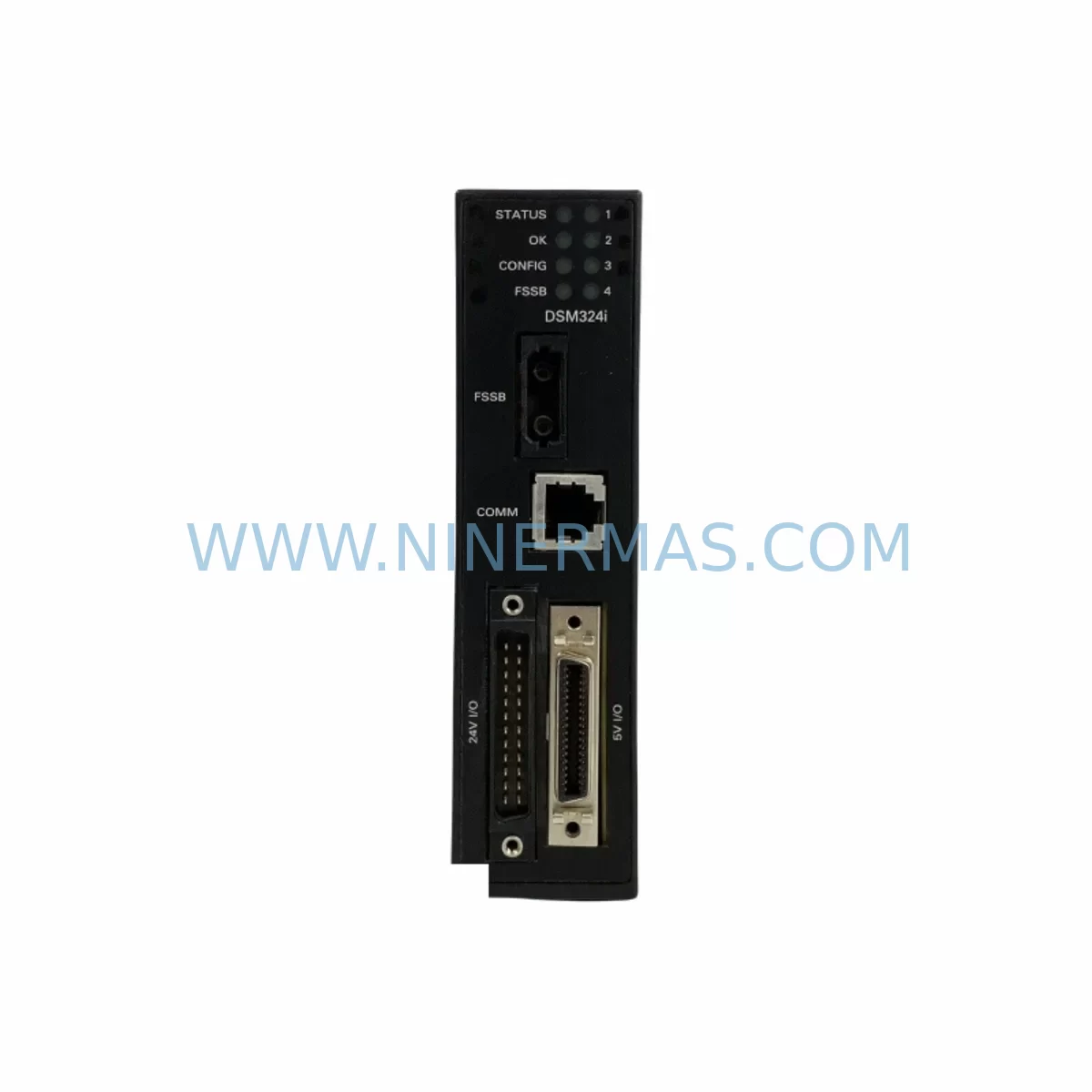
GE Fanuc IC693DSM324-BE Retrofit-Compatible Motion Controller
Verify the part, confirm the platform family, and move straight into quotation with the right commercial details.
RFQ Ready
- SKUIC693DSM324-BE
- CategoryPLC & Industrial Automation Modules
- BrandGE Fanuc
- SupportAvailability, lead time, condition, and shipping coordination
How Buyers Usually Use This Page
- Confirm the exact part number and platform family before sending the quote request.
- Use direct email when quantity, condition, and destination are already defined internally.
- Switch to the broader brand or category archive when you need alternates nearby.
Series Navigation
Move through the most common platform families behind this part.
Product RFQ
Send this part directly for quotation.
Include quantity, required condition, destination country, and target delivery timing. Current reference: GE Fanuc IC693DSM324-BE Retrofit-Compatible Motion Controller with SKU IC693DSM324-BE.
GE Fanuc IC693DSM324-BE Retrofit-Compatible Motion Controller for Legacy Systems
The GE Fanuc IC693DSM324-BE is a high-performance Digital Servo Module (DSM) designed for the GE Fanuc Series 90-30 PLC platform. As legacy automation systems face end-of-life pressures, the IC693DSM324-BE has become a critical retrofit component for plant engineers managing aging motion control architectures. Whether you are replacing a failed DSM324 module, upgrading a multi-axis servo drive system, or migrating from an obsolete motion controller to a supportable platform, this module delivers the compatibility, reliability, and performance required for seamless integration into existing Series 90-30 control cabinets.
Engineered to support up to four axes of servo motion control, the IC693DSM324-BE interfaces directly with the Series 90-30 backplane — including the IC693CHS391 and IC693CHS397 rack chassis — without requiring structural modifications to the control cabinet. Its compatibility with the standard IC693 I/O bus ensures that existing wiring, terminal blocks, and field device connections can be retained during the retrofit, significantly reducing installation time and minimising the risk of wiring errors during changeover.
Upgrade Compatibility Table
| Parameter | IC693DSM324-BE Specification | Retrofit / Replacement Notes |
|---|---|---|
| Platform Compatibility | GE Fanuc Series 90-30 | Direct slot replacement in IC693 rack chassis |
| Axes Supported | Up to 4 servo axes | Verify axis count matches legacy DSM configuration |
| Backplane Interface | IC693 I/O Bus (Series 90-30 standard) | Compatible with IC693CHS391 / IC693CHS397 chassis |
| Communication Protocol | Genius Bus / SNP / SRTP (via CPU) | Confirm CPU firmware supports DSM324 function blocks |
| Power Requirement | +5 VDC via backplane (IC693PWR321 / IC693PWR330) | Verify PSU capacity before adding DSM module |
| Programming Environment | Proficy Machine Edition (ME) / Logicmaster 90 | DSM function blocks must be re-validated post-swap |
| Installation Space | Single slot, Series 90-30 form factor | No mechanical modification required |
| Firmware / Revision | -BE hardware revision | Confirm revision compatibility with existing CPU firmware |
| Debugging Interface | Via CPU serial port (IC693CPU374 / IC693CPU364) | Use Proficy ME for online monitoring and axis tuning |
| Warranty | 12-Month Warranty — Covered against manufacturing defects and functional failure | |
Retrofit Planning for Existing Automation Systems
Successful integration of the IC693DSM324-BE into a legacy production environment requires a structured pre-installation assessment. Before removing the failed or obsolete DSM module, engineers should document the existing axis configuration, servo amplifier wiring, and encoder feedback connections. The DSM324 typically interfaces with servo drives via a dedicated motion bus connector, and the field wiring to the IC693MDL655 or similar discrete I/O modules used for limit switches, home sensors, and fault signals must be carefully labelled and preserved.
Power budget verification is a mandatory step. The Series 90-30 power supply — commonly the IC693PWR321 (30W) or IC693PWR330 (40W) — must have sufficient 5 VDC capacity to support the DSM324 module alongside the existing I/O complement. If the rack is already near capacity, consider redistributing modules across a secondary IC693CHS391 expansion chassis connected via the IC693CBL316 expansion cable.
For systems running Logicmaster 90 software, the motion program and DSM configuration parameters — including axis type, gear ratio, velocity limits, acceleration/deceleration ramps, and position loop gains — must be exported and re-imported into the replacement module using Proficy Machine Edition. The IC690ACC901 programming cable or equivalent SNP serial interface is required for initial module configuration. Where the control system includes an IC693CMM321 communications module for Genius Bus connectivity, verify that the DSM’s motion commands are correctly mapped within the Genius Bus scan list to avoid axis command conflicts after restart.
HMI screens connected via the IC693CMM302 or a third-party SCADA system using SRTP protocol should be reviewed to confirm that all motion status tags — including axis position, velocity feedback, fault codes, and homing status — remain correctly mapped after the module swap. In multi-axis systems, the IC693DSM302 (2-axis DSM) may coexist in the same rack; ensure module slot addressing is correctly assigned in the hardware configuration to prevent I/O map conflicts.
Where the retrofit involves a broader control cabinet upgrade — for example, replacing an aging IC693CPU331 with a higher-capacity IC693CPU374 — the DSM324 module swap should be coordinated with the CPU upgrade to allow a single, consolidated commissioning event. This approach minimises the number of planned shutdowns and reduces the cumulative risk of incremental changes to a live production system.
Downtime Control During System Migration
Minimising production downtime during a DSM module replacement requires careful pre-staging and a disciplined changeover procedure. Begin by creating a full backup of the Series 90-30 CPU program using Proficy Machine Edition, including all DSM configuration blocks, motion programs, and I/O mapping tables. Store the backup on a dedicated engineering laptop and verify the backup integrity before proceeding with any hardware removal.
Where possible, pre-configure the replacement IC693DSM324-BE offline using a bench test rack equipped with a compatible IC693CPU364 or IC693CPU374 CPU and a IC693PWR321 power supply. Load the exported DSM configuration, verify axis parameter acceptance, and confirm that the module firmware revision is compatible with the target CPU firmware version. This offline validation step can reduce on-site commissioning time from several hours to under 30 minutes.
During the live changeover, follow a structured sequence: isolate the servo drives from the motion bus, remove the failed DSM module, install the pre-configured replacement, restore power, and perform a controlled axis homing sequence before returning the machine to automatic mode. Retain the original program logic unchanged — do not attempt to optimise or restructure ladder logic or motion programs during a corrective maintenance event, as this introduces unnecessary risk to production continuity.
For systems where continuous operation is critical, consider implementing a temporary manual control bypass using the existing IC693MDL940 relay output modules to hold critical outputs in a safe state during the module swap window. Document the bypass configuration and ensure all field personnel are briefed on the temporary control arrangement before work begins.
Retrofit Support FAQ
Q1: Is the IC693DSM324-BE a direct drop-in replacement for the IC693DSM324 (without the -BE suffix)?
The -BE suffix denotes a specific hardware revision of the IC693DSM324. In most applications, the -BE revision is backward compatible with earlier hardware revisions and can be installed in the same rack slot without changes to the hardware configuration file. However, it is recommended to verify CPU firmware compatibility using the GE Fanuc Series 90-30 Hardware Compatibility Guide before installation. Our team performs pre-shipment functional testing on all units to confirm module operability prior to dispatch.
Q2: What commissioning steps are required after installing the replacement DSM324 module?
After physical installation, reload the DSM configuration from your Proficy Machine Edition backup, perform a power cycle, and execute the axis homing sequence for each configured servo axis. Verify position feedback from the encoder interface, confirm velocity and torque limits are within the servo amplifier’s rated parameters, and check all fault and limit switch inputs via the associated I/O modules. A full cycle test at reduced speed is recommended before returning the machine to full production speed.
Q3: Can you confirm stock availability and lead time for the IC693DSM324-BE?
NINERMAS maintains dedicated inventory of GE Fanuc Series 90-30 spare parts, including the IC693DSM324-BE, to support urgent maintenance and planned retrofit projects. Stock status is confirmed at the time of order. For time-critical requirements, contact our sales team directly to confirm current availability and expedited shipping options. All units are supplied with a 12-month warranty covering manufacturing defects and functional failure.
Q4: What is covered under the 12-month warranty, and what is the return process?
All IC693DSM324-BE units supplied by NINERMAS are covered by a 12-month warranty from the date of shipment. The warranty covers functional failure and manufacturing defects under normal operating conditions. Units that fail within the warranty period should be returned with a completed fault description form. Upon receipt, our technical team will perform a failure analysis and arrange a replacement or repair within the agreed service timeline. Warranty claims are processed directly through our sales team at sale@ninermas.com.
| Product Series | Fanuc |
|---|---|
| Country of Origin | US |
Catalog Continuation
More GE Fanuc modules in the catalog.
Use the brand lane to compare nearby part numbers, platform-adjacent modules, and other inquiry-ready listings before sending your final RFQ.
Catalog Continuation
Alternative parts within PLC & Industrial Automation Modules.
Stay inside the same system family when you need substitutes, adjacent modules, or a broader shortlist for procurement review.


SKU: 00-176-037 00-176-037 00-262-652 00-262-652 00-178-888 00-178-888
KUKA 00-176-037 Retrofit Reducer Module for Legacy Systems

SKU: 6SE7027-2TD84-6HF3
SIEMENS 6SE7027-2TD84-6HF3 Service-Ready Spare Part