
Original Industrial Spare Part
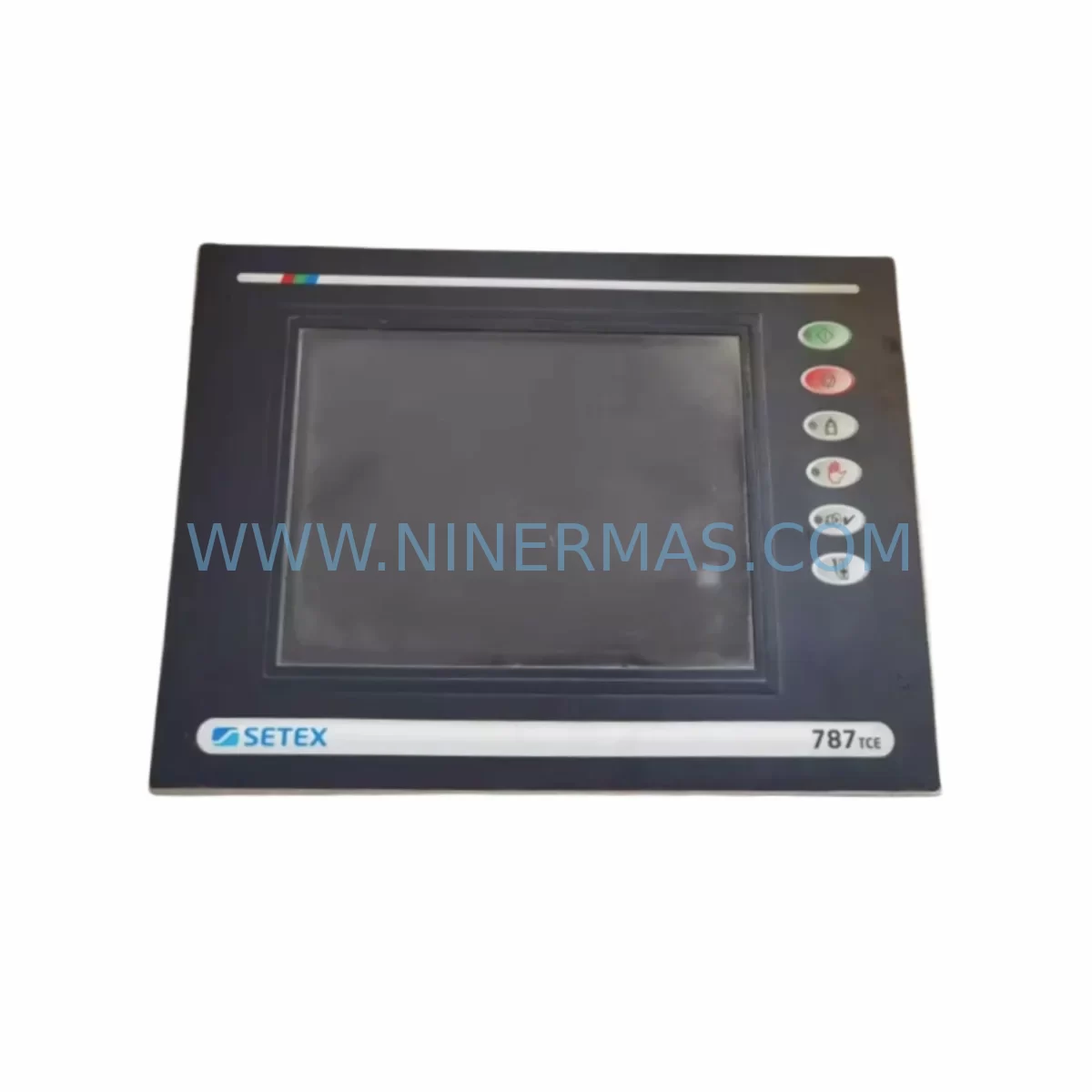
SECOM 787TCE Service-Ready Spare Part for Industrial Maintenance
Verify the part, confirm the platform family, and move straight into quotation with the right commercial details.
RFQ Ready
- SKU787TCE
- CategoryPLC & Industrial Automation Modules
- BrandSECOM
- SupportAvailability, lead time, condition, and shipping coordination
How Buyers Usually Use This Page
- Confirm the exact part number and platform family before sending the quote request.
- Use direct email when quantity, condition, and destination are already defined internally.
- Switch to the broader brand or category archive when you need alternates nearby.
Series Navigation
Move through the most common platform families behind this part.
Product RFQ
Send this part directly for quotation.
Include quantity, required condition, destination country, and target delivery timing. Current reference: SECOM 787TCE Service-Ready Spare Part for Industrial Maintenance with SKU 787TCE.
SECOM 787TCE Service-Ready Spare Part for Industrial Maintenance
The SECOM 787TCE is a service-critical HMI touchpad module designed for the SECOM 787 Series human-machine interface panels widely deployed across industrial automation environments including discrete manufacturing, process control, and utility infrastructure. As legacy HMI systems age beyond their original support lifecycle, maintaining a verified stock of the 787TCE becomes a frontline strategy for minimizing unplanned downtime and protecting production continuity.
Sourced as an original spare part, the 787TCE is supplied fully tested and ready for immediate field deployment. Each unit undergoes pre-shipment functional verification to confirm touchpad response accuracy, interface signal integrity, and panel compatibility before dispatch. With a 12-month warranty covering manufacturing defects and operational failures under normal use conditions, procurement engineers can confidently integrate this component into their annual maintenance budget and spare parts inventory plan.
For maintenance engineers managing aging SECOM 787 Series installations, the 787TCE represents a direct, non-invasive replacement that preserves existing panel wiring, communication protocols, and operator interface logic without requiring software reconfiguration or hardware adaptation. This makes it especially valuable in facilities where system downtime carries significant production cost or safety risk.
Spare Maintenance Table
| Parameter | Specification / Detail |
|---|---|
| Part Number / SKU | 787TCE |
| Brand | SECOM |
| Series | 787 Series |
| Product Type | HMI Touchpad Module |
| Application | Industrial HMI Panel — Operator Interface Replacement |
| Compatibility | SECOM 787 Series HMI Panels |
| Interface | Resistive / Capacitive Touchpad (series-dependent) |
| Installation | Direct panel replacement; no software reconfiguration required |
| Operating Environment | Industrial — control cabinet, panel-mount, harsh environment rated |
| Operating Temperature | 0°C to +55°C (typical industrial HMI range) |
| Part Condition | Original, New — Pre-shipment tested |
| Warranty | 12 Months from date of shipment |
| Lead Time | In-stock units ship within 3–5 business days |
| Long-Term Supply | Available — suitable for multi-year maintenance contracts |
Maintenance Planning for Continuous Operation
When replacing the SECOM 787TCE touchpad module in a live production environment, a disciplined maintenance approach requires inspecting and validating all adjacent components within the same control cabinet and HMI subsystem. Touchpad failures in the 787 Series are frequently symptomatic of broader electrical stress — including power supply instability, communication signal degradation, or accumulated environmental contamination — rather than isolated component failure.
Maintenance engineers should begin by verifying the 24VDC panel power supply feeding the HMI unit. Voltage ripple or transient spikes are a common root cause of touchpad interface degradation and premature failure. If the existing power supply module shows signs of aging — such as output voltage drift, audible noise, or thermal discoloration — it should be replaced concurrently with the 787TCE to prevent repeat failures.
The communication cable assembly connecting the HMI panel to the PLC or DCS controller should be inspected for insulation wear, connector oxidation, and signal continuity. In SECOM 787 Series installations, the RS-232, RS-485, or Ethernet communication link is critical to touchpad responsiveness; a degraded cable can manifest as erratic touch registration or complete panel lockout. Replacement of the communication cable harness alongside the 787TCE is recommended during any scheduled outage.
Inspect the I/O terminal blocks and relay output modules within the same control cabinet. Loose terminal connections or failed relay contacts can introduce ground loops or signal noise that affect HMI display and touch accuracy. Terminal block inspection and torque verification should be part of every HMI replacement workflow.
For systems where the SECOM 787 Series HMI interfaces with a PLC backplane or remote I/O rack, verify that all backplane connectors are seated correctly and that no communication modules — such as PROFIBUS DP adapters, DeviceNet scanners, or Modbus RTU interface cards — show fault indicators. A communication module fault can be misdiagnosed as an HMI touchpad failure, leading to unnecessary component replacement.
Signal isolators and surge protection devices installed on analog input lines feeding the HMI should also be checked. In environments with variable-frequency drives (VFDs), welding equipment, or large motor starters, electromagnetic interference can corrupt HMI touch signals. Replacing or upgrading signal isolation modules during the same maintenance window reduces the risk of recurrence.
Finally, inspect the fuse holders and circuit protection on the HMI power circuit. Blown or weakened fuses are a leading indicator of power quality issues that will damage replacement components if left unaddressed. A complete spare parts kit for a SECOM 787 Series HMI station should include the 787TCE touchpad, a compatible power supply module, communication cable assembly, terminal block sets, and relevant fuse cartridges — ensuring that any field technician can restore full panel operation within a single maintenance visit.
Site Replacement Workflow
Replacing the SECOM 787TCE in the field follows a structured procedure designed to minimize system downtime and eliminate the risk of installation errors that could damage the new component or the host panel.
Step 1 — Pre-Replacement Verification: Confirm the replacement unit SKU (787TCE) matches the installed panel model. Cross-reference the panel nameplate, wiring diagram, and maintenance log to validate compatibility before removing the existing touchpad. Do not rely solely on visual inspection — verify the part number against SECOM documentation or the original purchase record.
Step 2 — Safe Isolation: De-energize the HMI panel at the main disconnect. Verify zero-voltage state using a calibrated multimeter before opening the panel enclosure. Lock out / tag out (LOTO) procedures must be followed in accordance with site safety protocols.
Step 3 — Component Removal: Disconnect the touchpad interface cable and any grounding connections. Remove the 787TCE module from the panel frame using the appropriate tools. Inspect the panel cavity for contamination, corrosion, or mechanical damage before installing the replacement unit.
Step 4 — Installation and Connection: Install the new 787TCE module, ensuring all connectors are fully seated and locking mechanisms are engaged. Reconnect the interface cable and grounding connections. Verify cable routing does not create pinch points or contact with sharp edges.
Step 5 — Power-Up and Functional Test: Re-energize the panel and observe the HMI startup sequence. Confirm touchpad calibration, display response, and communication link status. Test all operator interface functions — navigation, data entry, alarm acknowledgment — before returning the system to production.
Step 6 — Documentation: Record the replacement in the site maintenance log, including the date, technician name, replaced SKU, and post-installation test results. Update the spare parts inventory to reflect consumption and initiate a reorder if stock falls below the minimum holding level.
Spare Parts Support FAQ
Q1: Is the SECOM 787TCE an original spare part or an aftermarket substitute?
The 787TCE supplied by NINERMAS is an original spare part sourced through verified industrial supply channels. Each unit is pre-shipment tested for functional integrity and supplied with a 12-month warranty covering manufacturing defects and operational failures under normal use conditions. We do not supply uncertified aftermarket or counterfeit components.
Q2: How should I manage 787TCE inventory for a multi-site maintenance program?
For facilities operating multiple SECOM 787 Series HMI stations, we recommend maintaining a minimum holding stock of one to two 787TCE units per site, with a centralized buffer stock for regional distribution. Given the end-of-life status of many 787 Series installations, procurement engineers should consider placing a blanket purchase order to secure long-term supply at a fixed price, reducing exposure to market availability risk as the component approaches obsolescence.
Q3: Can the 787TCE be used as a direct replacement for older 787 Series HMI variants?
The 787TCE is designed for compatibility with the SECOM 787 Series HMI platform. Before installation, maintenance engineers should verify the specific panel model and revision against the 787TCE specification to confirm dimensional, electrical, and interface compatibility. If you require compatibility confirmation for a specific panel variant, contact our technical support team with the panel nameplate details and we will advise accordingly.
Q4: What is included in the 12-month warranty and what are the claim procedures?
The 12-month warranty covers manufacturing defects and component failures occurring under normal operating conditions from the date of shipment. It does not cover damage resulting from incorrect installation, electrical overstress, environmental contamination beyond rated limits, or unauthorized modification. To initiate a warranty claim, contact NINERMAS with the original order reference, a description of the failure mode, and photographic evidence of the defect. Replacement units are dispatched upon claim verification, with return shipping of the defective unit required for warranty processing.
| Product Series | Other series |
|---|
Catalog Continuation
Alternative parts within PLC & Industrial Automation Modules.
Stay inside the same system family when you need substitutes, adjacent modules, or a broader shortlist for procurement review.

SKU: 6SL3224-0BE33-7UA0
Siemens 6SL3224-0BE33-7UA0 Service-Ready Spare Part
SKU: HENF331395R0001 P4LDA
ABB HENF331395R0001 Service-Ready Industrial Spare Part




