Original Industrial Spare Part
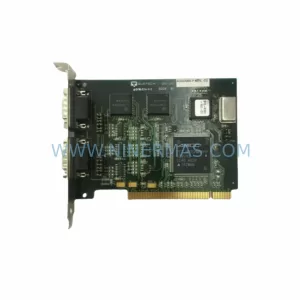
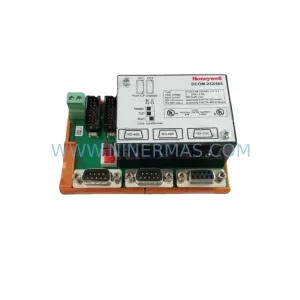
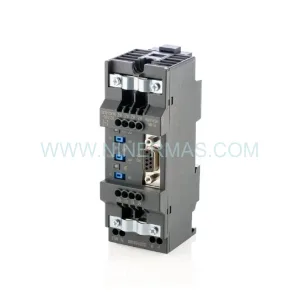
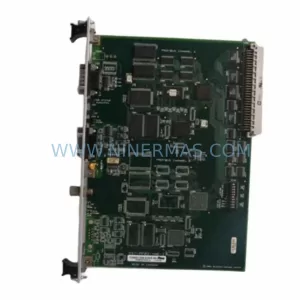
W&T 58631 Retrofit-Compatible COM Server for Legacy Systems
Verify the part, confirm the platform family, and move straight into quotation with the right commercial details.
RFQ Ready
- SKU58631
- CategoryPLC & Industrial Automation Modules
- BrandW&T
- SupportAvailability, lead time, condition, and shipping coordination
How Buyers Usually Use This Page
- Confirm the exact part number and platform family before sending the quote request.
- Use direct email when quantity, condition, and destination are already defined internally.
- Switch to the broader brand or category archive when you need alternates nearby.
Series Navigation
Move through the most common platform families behind this part.
Product RFQ
Send this part directly for quotation.
Include quantity, required condition, destination country, and target delivery timing. Current reference: W&T 58631 Retrofit-Compatible COM Server for Legacy Systems with SKU 58631.
W&T 58631 Retrofit-Compatible COM Server for Legacy Industrial Systems
The W&T 58631 is a Wiesemann & Theis COM Server designed for serial-to-Ethernet communication in industrial automation environments. As legacy control architectures age and OEM support windows close, the W&T 58631 has become a critical retrofit component for engineers tasked with modernizing serial communication links without replacing entire control platforms. Whether you are migrating from RS-232 or RS-485 field devices to TCP/IP-based SCADA systems, or simply restoring a discontinued communication node in an existing control cabinet, the 58631 provides a proven, drop-in compatible upgrade path.
NINERMAS maintains verified stock of the W&T 58631 with full pre-shipment functional testing and a 12-month warranty, supporting procurement teams and maintenance engineers who cannot afford unverified surplus parts in critical production environments.
Upgrade Compatibility Table
| Parameter | W&T 58631 Specification | Retrofit Notes |
|---|---|---|
| Series | W&T COM Server | Compatible with COM Server Basic, Advanced, and Office series migration paths |
| Communication Interface | RS-232 / RS-485 serial to Ethernet | Verify existing field wiring: RS-232 (DB9/DB25) or RS-485 (2-wire/4-wire terminal) |
| Network Protocol | TCP/IP, UDP, Telnet, RFC 2217 | Confirm SCADA or PLC polling protocol; RFC 2217 supports virtual COM port redirection |
| Power Supply | 24 VDC (typical W&T COM Server range) | Verify control cabinet 24 VDC rail capacity before installation; check existing PSU headroom |
| Mounting | DIN rail mountable | Confirm available DIN rail space in control cabinet; standard 35 mm rail compatible |
| IP Address Configuration | Web browser / WuTility software | Assign static IP within existing plant network subnet; update SCADA device address table |
| Replacement Compatibility | Direct replacement for discontinued W&T COM Server variants | Cross-reference W&T 58xxx series for pin-compatible substitution |
| Commissioning Tool | WuTility (free, W&T supplied) | Required for IP discovery and initial configuration on plant network |
| Warranty | 12-Month Warranty — All units pre-shipment tested by NINERMAS before dispatch | |
Retrofit Planning for Existing Automation Systems
Integrating the W&T 58631 into an existing automation architecture requires a structured pre-installation review. In most legacy control environments, the COM Server sits between a serial field device — such as a Modbus RTU energy meter, a barcode scanner, a weighing terminal, or a legacy variable frequency drive — and the plant Ethernet backbone. Before removing the failed or discontinued unit, engineers should document the existing serial port parameters: baud rate, data bits, stop bits, parity, and flow control settings. These must be replicated exactly in the 58631 configuration to avoid communication faults after cutover.
In control cabinets where the W&T 58631 operates alongside a Siemens S7-300 or S7-400 PLC, the communication path typically runs from the PLC’s CP 343-1 or CP 443-1 Ethernet module through the plant switch to the COM Server, which then bridges to the serial field device. When replacing the COM Server, the CP module configuration in STEP 7 or TIA Portal does not require modification — only the IP address of the COM Server endpoint must be updated in the SCADA or PLC communication block. Similarly, in systems using a Schneider Electric Modicon M340 with a BMX NOE 0100 Ethernet module, the COM Server replacement is transparent to the PLC program as long as the IP address and TCP port are preserved.
For installations involving Beckhoff CX series embedded controllers or PC-based control platforms running TwinCAT, the W&T 58631 is commonly used to extend serial COM ports over Ethernet using virtual COM port drivers. In these environments, confirm that the virtual COM port driver (such as W&T’s own driver or a third-party RFC 2217 client) is reinstalled and pointed to the new unit’s IP address after replacement. No changes to the TwinCAT PLC program are required if the virtual COM port number is preserved.
Terminal wiring is a critical checkpoint. The 58631’s serial terminal block must be wired to match the original unit’s pinout. For RS-485 two-wire configurations, confirm the A/B polarity convention used by the field device manufacturer, as polarity labeling varies between vendors. In RS-232 applications, verify that only the required signals (TxD, RxD, GND, and optionally RTS/CTS) are connected, and that no unused pins are shorted. A signal isolator or surge protection module — such as a W&T 11211 or equivalent DIN rail isolator — should be retained in the wiring path if one was present in the original installation.
Where the control cabinet also houses a W&T 57736 Isolated RS-485 COM Server or a W&T 58437 COM Server Basic for other serial channels, the 58631 replacement can be configured in parallel without disrupting adjacent communication nodes. Each COM Server unit maintains its own IP address and operates independently on the plant network. If the cabinet uses a managed industrial Ethernet switch — such as a Hirschmann RS20 or Phoenix Contact FL SWITCH — verify that the switch port VLAN and speed/duplex settings are compatible with the 58631’s 10/100 Mbps auto-negotiation.
For systems where an HMI panel — such as a Siemens TP700 Comfort or a Weintek MT8000 series — communicates with field devices through the COM Server, the HMI project does not require modification after replacement. The HMI communicates with the PLC or directly with the serial device via the COM Server’s TCP socket; as long as the IP address and port number are unchanged, the HMI screens and tag connections remain valid. If the IP address must change due to network restructuring, update the HMI communication settings in WinCC Flexible, TIA Portal HMI, or EasyBuilder Pro before going live.
Downtime Control During System Migration
Minimizing production downtime during a COM Server replacement requires preparation before the maintenance window begins. The recommended approach is to pre-configure the replacement W&T 58631 on a bench using WuTility, assigning the same IP address, subnet mask, gateway, and serial port parameters as the unit being replaced. This allows the cutover to be completed in minutes: power down the control cabinet, swap the unit on the DIN rail, reconnect the terminal wiring, restore power, and verify communication within the same maintenance window.
Before the cutover, back up the original unit’s configuration using WuTility’s export function if the unit is still partially functional. This configuration file can be imported directly into the replacement 58631, eliminating manual re-entry of serial parameters, IP settings, and port mapping. If the original unit has already failed and no configuration backup exists, reconstruct the settings from the plant documentation or from the SCADA system’s device address table.
To protect the original PLC program logic during the migration, do not modify any communication function blocks, Modbus address tables, or OPC server configurations until communication has been verified on the new unit. Run a loopback test or a live data check against a known field device before declaring the migration complete. In Modbus RTU environments, use a portable Modbus tester or a laptop running Modbus Poll to confirm that the 58631 is correctly bridging serial data to the Ethernet network before reconnecting the PLC or SCADA system.
For critical production lines where even a brief interruption is unacceptable, consider a parallel installation strategy: install the replacement 58631 on a temporary DIN rail clip adjacent to the original unit, configure it with a temporary IP address, and verify full communication before switching the field wiring and IP address over. This approach keeps the original unit active until the replacement is confirmed operational, reducing the risk of an extended outage caused by a configuration error.
Retrofit Support FAQ
Q1: Is the W&T 58631 a direct replacement for other COM Server models in the 58xxx series?
The W&T 58631 shares the same COM Server platform architecture as other models in the 58xxx series, including the 58437 and 58631 variants. However, specific interface configurations (RS-232 vs. RS-485, number of ports, isolation level) vary by model number. Always cross-reference the original unit’s datasheet against the 58631 specification before ordering to confirm pin and protocol compatibility. NINERMAS can assist with cross-reference verification prior to shipment.
Q2: What commissioning steps are required after installing the W&T 58631?
After physical installation and terminal wiring, use W&T’s free WuTility software to discover the unit on the network and assign the correct IP address. Then configure the serial port parameters (baud rate, data bits, stop bits, parity) to match the field device. Finally, verify end-to-end communication by polling the field device from the SCADA or PLC system. Total commissioning time for a pre-configured replacement unit is typically under 30 minutes.
Q3: Does NINERMAS test the W&T 58631 before shipment?
Yes. Every W&T 58631 unit supplied by NINERMAS undergoes pre-shipment functional testing to verify power-up, network connectivity, and serial port operation. Units are shipped with a 12-month warranty covering manufacturing defects and functional failures. If a unit fails within the warranty period, NINERMAS provides replacement support.
Q4: What is the typical lead time and stock availability for the W&T 58631?
NINERMAS maintains in-stock inventory of the W&T 58631 to support urgent retrofit and breakdown replacement requirements. Standard orders are processed and dispatched within 1–3 business days. For large-quantity procurement or long-term spare parts planning, contact NINERMAS to discuss stock reservation and scheduled delivery options.
| Product Series | Legacy |
|---|
Catalog Continuation
Alternative parts within PLC & Industrial Automation Modules.
Stay inside the same system family when you need substitutes, adjacent modules, or a broader shortlist for procurement review.



SKU: HDD02.2-W040N-HS12-01-FW FWA-DIAX04-ELS-05VRS-MS
Rexroth HDD02.2-W040N-HS12-01-FW Service-Ready Spare Part

SKU: I5DAE375F10010000S
Lenze I5DAE375F10010000S Service-Ready Spare Part for Industrial Maintenance