
Original Industrial Spare Part
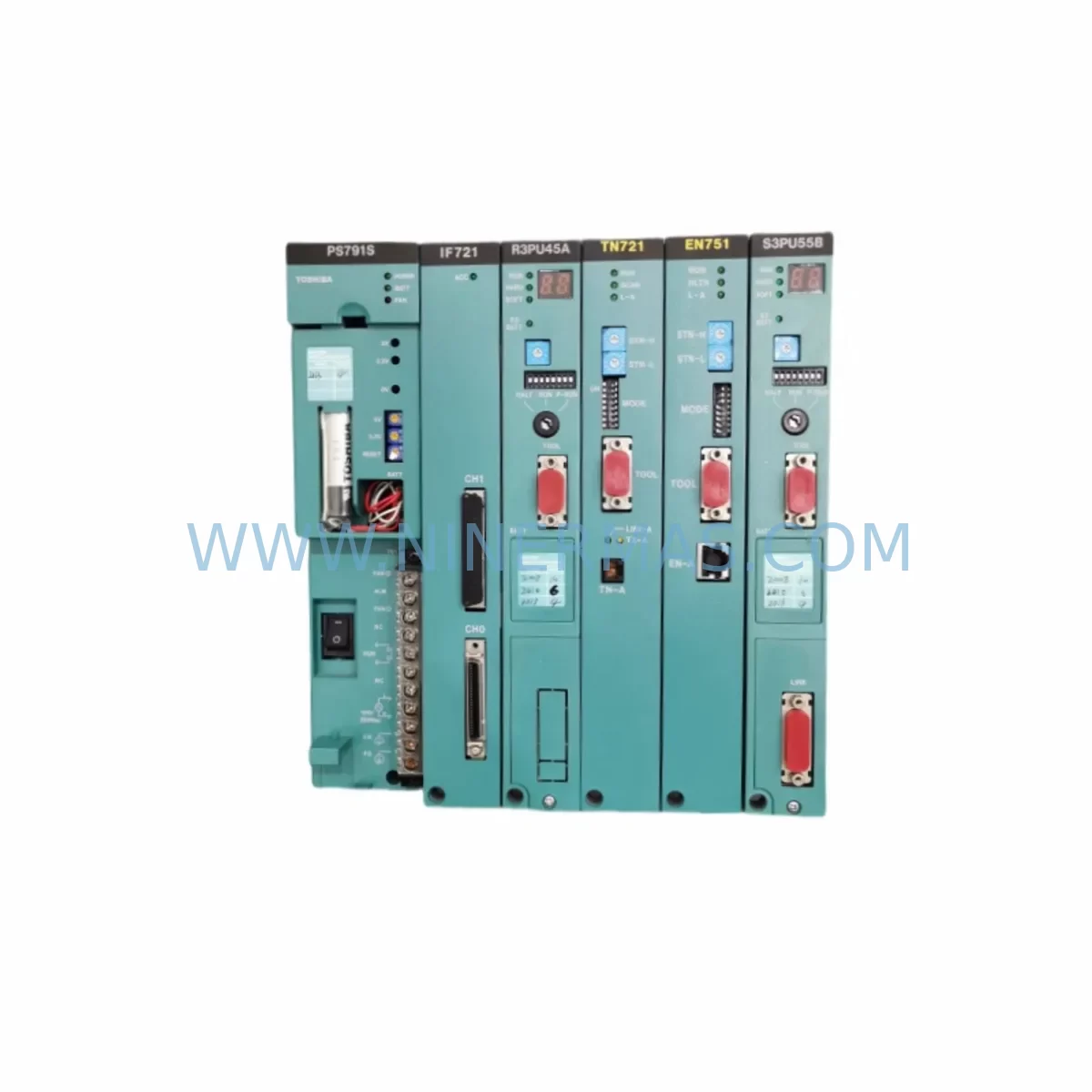
Toshiba EN751A GEN751AS Service-Ready Spare Part for Industrial Maintenance
Verify the part, confirm the platform family, and move straight into quotation with the right commercial details.
RFQ Ready
- SKUEN751A GEN751AS
- CategoryPLC & Industrial Automation Modules
- BrandToshiba
- SupportAvailability, lead time, condition, and shipping coordination
How Buyers Usually Use This Page
- Confirm the exact part number and platform family before sending the quote request.
- Use direct email when quantity, condition, and destination are already defined internally.
- Switch to the broader brand or category archive when you need alternates nearby.
Series Navigation
Move through the most common platform families behind this part.
Product RFQ
Send this part directly for quotation.
Include quantity, required condition, destination country, and target delivery timing. Current reference: Toshiba EN751A GEN751AS Service-Ready Spare Part for Industrial Maintenance with SKU EN751A GEN751AS.
Toshiba EN751A GEN751AS Service-Ready Spare Part for Industrial Maintenance
The Toshiba EN751A GEN751AS is a critical spare part designed for the Toshiba EX Series variable speed drive (VSD) platform — one of the most widely deployed inverter families in industrial automation environments across manufacturing, process control, HVAC, and material handling sectors. As legacy EX Series drives continue to operate well beyond their original design lifecycle, maintaining a reliable inventory of original spare parts such as the EN751A GEN751AS has become a cornerstone of any responsible maintenance strategy.
For maintenance engineers managing aging control systems, the EN751A GEN751AS represents a direct, service-ready replacement that preserves full compatibility with existing EX Series drive configurations. Unlike generic aftermarket substitutes, this original Toshiba component is manufactured to OEM specifications, ensuring that electrical characteristics, thermal ratings, and communication interfaces remain within the drive’s validated operating parameters. This is especially important in applications where process continuity is non-negotiable and unplanned downtime carries significant operational and financial consequences.
Procurement engineers sourcing spare parts for long-term maintenance contracts will find the EN751A GEN751AS a dependable addition to their critical spares inventory. With global supply chains for end-of-life industrial components becoming increasingly constrained, securing verified original stock from an established supplier reduces the risk of counterfeit parts, compatibility failures, and extended lead times during emergency breakdowns. Every unit shipped by NINERMAS undergoes pre-shipment functional verification and is backed by a 12-month warranty, providing documented assurance for both site engineers and procurement teams.
Whether you are executing a planned annual overhaul, responding to an unscheduled fault, or building a strategic spare parts buffer for a multi-drive installation, the Toshiba EN751A GEN751AS delivers the reliability and traceability that industrial maintenance demands.
Spare Maintenance Table
| Part Number | EN751A / GEN751AS |
| Brand | Toshiba |
| Compatible Series | Toshiba EX Series Variable Speed Drives |
| Component Type | Drive Control / Interface Spare Part |
| Application | Industrial motor control, HVAC, process automation, material handling |
| Operating Environment | Industrial panel / control cabinet installation |
| Compatibility Verification | Cross-referenced against EX Series drive firmware and hardware revision |
| Installation | Direct OEM replacement; no parameter re-mapping required for same-series swap |
| Condition | Original, new stock — not refurbished |
| Pre-Shipment Testing | Functional verification performed before dispatch |
| Warranty | 12 Months from date of shipment |
| Lead Time | Subject to stock availability — contact for current inventory status |
| Origin | Japan (OEM) |
Maintenance Planning for Continuous Operation
When replacing the Toshiba EN751A GEN751AS in an EX Series drive installation, a thorough site inspection of the surrounding electrical system is essential to prevent repeat failures and ensure a complete restoration of drive performance. Maintenance engineers should treat this replacement as an opportunity to audit the full control cabinet and associated field wiring.
Begin with the EX Series drive power supply module — verify that input voltage levels are within specification and that the DC bus capacitors show no signs of bulging or electrolyte leakage. A degraded power supply is a common root cause of control board and interface card failures. Alongside this, inspect the main circuit terminal block and input/output wiring harness for signs of thermal stress, loose terminations, or insulation breakdown, particularly on high-cycle duty applications.
The EX Series I/O expansion card and any installed communication option cards — such as the Toshiba DeviceNet, PROFIBUS, or Modbus RTU interface modules — should be seated firmly and checked for corrosion on connector pins. In environments with high humidity or airborne contaminants, these interface points are frequent failure sites. If the drive is integrated into a PLC or DCS control loop, verify that analog and digital signal references are correctly scaled and that the control logic has not been affected by the fault event that necessitated the EN751A GEN751AS replacement.
Inspect the cooling fan assembly within the drive enclosure — fan bearing wear is a leading cause of thermal shutdowns in EX Series drives and is often overlooked during reactive maintenance. Simultaneously, check the EMC filter and line reactor upstream of the drive for continuity and correct impedance values. A compromised line reactor can introduce voltage spikes that stress replacement components prematurely.
For installations using Toshiba EX Series braking resistors or dynamic braking units, verify resistor values and thermal condition before returning the drive to service. In multi-drive panel configurations, also inspect the shared DC bus connections, fuse blocks, and surge protection devices (SPDs) to confirm that the fault did not propagate to adjacent drives or distribution equipment. Finally, if the installation includes a Toshiba HMI or operator panel connected to the EX Series drive, confirm that communication parameters and display functions are restored correctly after the replacement.
Site Replacement Workflow
Step 1 — Fault Documentation: Before de-energising the drive, record all active fault codes, parameter settings, and I/O status from the operator panel or connected HMI. This baseline is critical for post-replacement verification and for identifying whether the EN751A GEN751AS failure was symptomatic of a wider system issue.
Step 2 — Safe Isolation: Isolate the drive from the main power supply and allow the DC bus to fully discharge (minimum 5 minutes, or confirm with a calibrated voltmeter). Follow site-specific lockout/tagout (LOTO) procedures before opening the control cabinet.
Step 3 — Component Removal: Carefully disconnect all connectors and fasteners securing the EN751A GEN751AS. Note the orientation and routing of all cables before removal to ensure correct reassembly. Photograph the installation if documentation is not already available.
Step 4 — Compatibility Confirmation: Cross-reference the replacement EN751A GEN751AS part number and hardware revision against the drive’s nameplate data and any available service bulletins. Confirm that the firmware version of the EX Series drive is compatible with the replacement component revision.
Step 5 — Installation and Parameter Restore: Install the replacement component, reconnect all wiring per the original configuration, and restore drive parameters from the previously recorded baseline. For same-series, same-revision replacements, no parameter re-mapping is typically required.
Step 6 — Commissioning and Test Run: Re-energise the drive under no-load conditions first, verify that no fault codes are present, and confirm correct I/O response. Gradually restore the drive to full operational load while monitoring current, voltage, and temperature readings. Document the completed replacement in the site maintenance log.
This structured workflow minimises downtime, reduces the risk of repeat faults, and provides a clear audit trail for maintenance records and warranty claims.
Spare Parts Support FAQ
Q1: Is the EN751A GEN751AS a new original part or a refurbished unit?
All EN751A GEN751AS units supplied by NINERMAS are original, new-stock components sourced from verified supply channels. We do not supply refurbished, remanufactured, or grey-market parts. Each unit is subject to pre-shipment functional verification before dispatch.
Q2: How do I confirm compatibility between the EN751A GEN751AS and my specific EX Series drive model?
Compatibility is determined by the EX Series drive model number, hardware revision, and firmware version. Please provide your drive nameplate data — including the full model code and serial number — when placing an enquiry. Our technical team will cross-reference this against known compatibility matrices and advise accordingly before shipment.
Q3: What is the warranty coverage and what does it include?
The EN751A GEN751AS is covered by a 12-month warranty from the date of shipment. This warranty covers manufacturing defects and component failures under normal operating conditions. It does not cover damage resulting from incorrect installation, overvoltage events, or operation outside the component’s rated parameters. Warranty claims are supported with replacement or credit at NINERMAS’s discretion.
Q4: Can NINERMAS support long-term or repeat supply of the EN751A GEN751AS for ongoing maintenance contracts?
Yes. NINERMAS specialises in long-term spare parts supply for legacy and end-of-life industrial components. We can support scheduled procurement programmes, blanket orders, and emergency stock reservations for the EN751A GEN751AS and related EX Series spare parts. Contact our sales team to discuss volume pricing, lead time commitments, and inventory reservation options tailored to your maintenance schedule.
| Product Series | Other series |
|---|
Catalog Continuation
More Toshiba modules in the catalog.
Use the brand lane to compare nearby part numbers, platform-adjacent modules, and other inquiry-ready listings before sending your final RFQ.
Catalog Continuation
Alternative parts within PLC & Industrial Automation Modules.
Stay inside the same system family when you need substitutes, adjacent modules, or a broader shortlist for procurement review.
SKU: HMS01.1N-W0054-A-07-NNNN HMS01.1N-W0054
Rexroth HMS01.1N-W0054-A-07-NNNN Service-Ready Spare Part
SKU: VIBRO METER VM600 IOC4T 200-560-000-019 I/O MODULE
Vibro-Meter VM600 IOC4T 200-560-000-019 Spare Part
SKU: KPC400-357-986 00-271-601 KPC400-271-601 00-271-601KPC4 00271601
KUKA KPC400-271-601 Retrofit Controller for Legacy Systems



