Original Industrial Spare Part
Intel X550-T1 Retrofit-Compatible 10GbE NIC for Legacy Systems
Verify the part, confirm the platform family, and move straight into quotation with the right commercial details.
RFQ Ready
- SKUX550-T1
- CategoryPLC & Industrial Automation Modules
- BrandIntel
- SupportAvailability, lead time, condition, and shipping coordination
How Buyers Usually Use This Page
- Confirm the exact part number and platform family before sending the quote request.
- Use direct email when quantity, condition, and destination are already defined internally.
- Switch to the broader brand or category archive when you need alternates nearby.
Series Navigation
Move through the most common platform families behind this part.
Product RFQ
Send this part directly for quotation.
Include quantity, required condition, destination country, and target delivery timing. Current reference: Intel X550-T1 Retrofit-Compatible 10GbE NIC for Legacy Systems with SKU X550-T1.
Intel X550-T1 Retrofit-Compatible 10GbE NIC for Legacy Systems
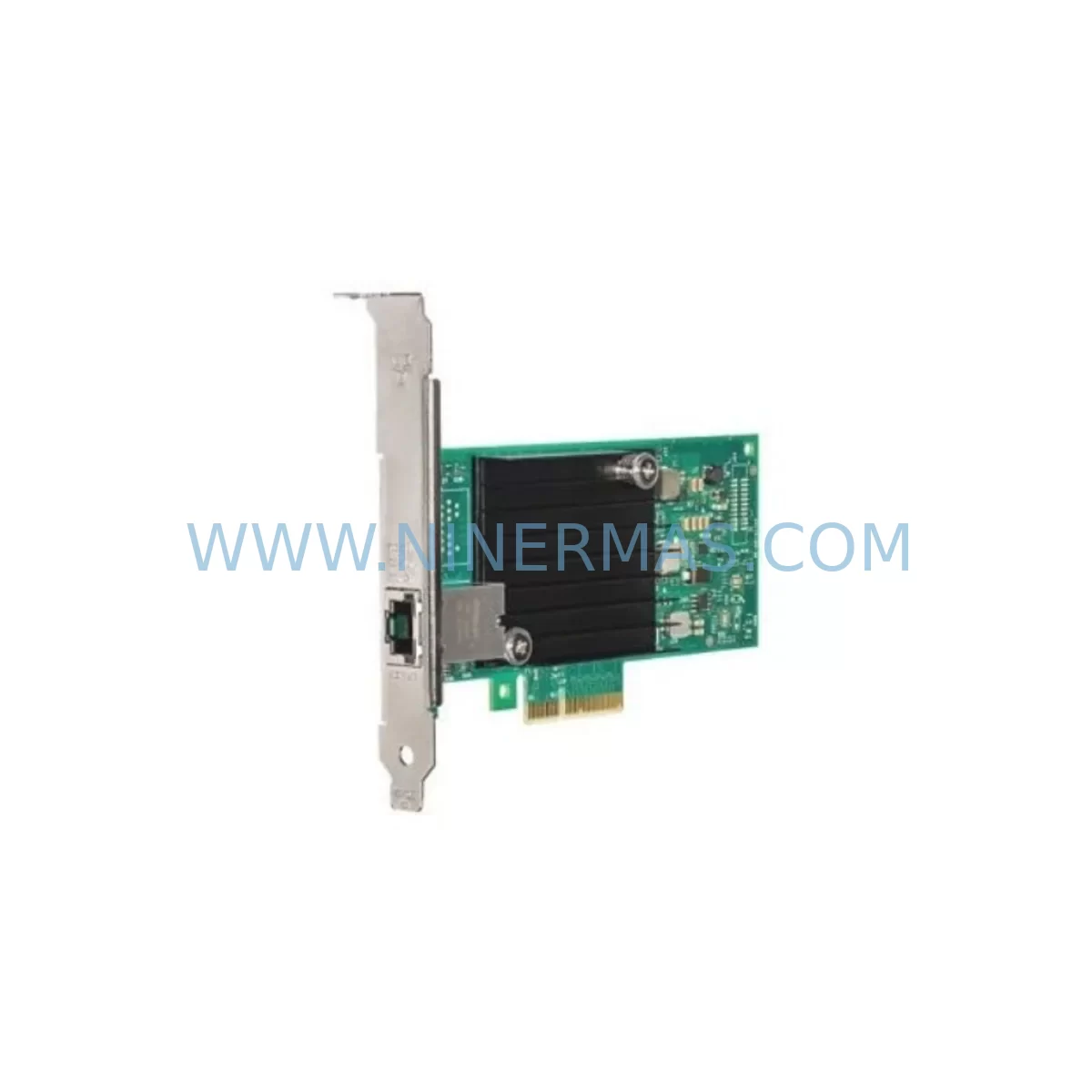
The Intel X550-T1 is a single-port 10GBASE-T network interface card built on Intel’s X550 controller silicon, designed for high-throughput server and industrial computing environments. As legacy network adapters reach end-of-life across data centers, control rooms, and edge computing nodes, the X550-T1 provides a validated retrofit path for systems originally built around the Intel X540-T1, Intel X520-DA1, or earlier 82599ES-based adapters. Its PCIe 3.0 x4 interface with full backward compatibility to PCIe 2.0, combined with a standard RJ45 copper port, makes it an accessible upgrade for facilities that cannot immediately replace structured cabling infrastructure or migrate to fiber optic backbones.
For industrial automation environments where servers running SCADA platforms, MES systems, or OPC-UA historian nodes require sustained 10GbE connectivity, the X550-T1 delivers line-rate performance without requiring SFP+ transceivers or fiber patch panels. Engineers retrofitting control room servers, data acquisition nodes, or edge computing platforms will find the X550-T1 a reliable drop-in solution that minimizes reconfiguration effort and reduces planned downtime windows. Every unit is pre-shipment tested and covered by a 12-month warranty from the date of invoice.
Upgrade Compatibility Table
| Parameter | Intel X550-T1 | Legacy / Replaced Models |
|---|---|---|
| Interface | PCIe 3.0 x4 | PCIe 2.0 x4 / x8 (backward compatible) |
| Port Configuration | 1 × 10GbE RJ45 | X540-T1 (1×10GbE RJ45), X520-DA1 (1×10GbE SFP+) |
| Cable Type | Cat6A / Cat7 copper | Cat6 / Cat6A existing runs reusable up to 55–100 m |
| Driver Compatibility | ixgbe (Linux), inbox (Windows Server 2012 R2+) | Same ixgbe driver family — no driver migration required |
| OS Support | Windows Server 2012 R2–2022, RHEL, CentOS, VMware ESXi 6.5 U2+ | Identical OS matrix — seamless transition |
| SR-IOV | Supported (64 VFs) | X540-T1: 63 VFs; X520-DA1: 64 VFs |
| Wake-on-LAN | Supported | Supported on X540-T1; not on X520-DA1 |
| Installation Space | Low-profile + full-height bracket included | Verify chassis slot height before installation |
| Commissioning Note | Update NVM firmware via Intel Ethernet Flash Firmware Utility post-install | Retain existing IP/MAC config via OS NIC rename |
| Replacement Recommendation | Direct retrofit for X540-T1; adapter bracket swap required for X520-DA1 (SFP+ to RJ45) | Confirm PCIe slot width and chassis clearance |
| Warranty | 12-Month Warranty | Pre-Shipment Tested | In-Stock Supply | |
Retrofit Planning for Existing Automation Systems
When planning a network adapter retrofit in an industrial or enterprise environment, the scope extends well beyond swapping a PCIe card. Systems running continuous SCADA polling, OPC-UA data pipelines, or Modbus TCP gateways depend on stable, low-latency NIC performance. A failed or degraded adapter in this context can disrupt historian logging, alarm annunciation, and remote HMI connectivity simultaneously.
Before installing the X550-T1, engineers should audit the host server’s PCIe slot availability and confirm the slot is electrically x4 or wider. Many legacy rack servers — including those running older Intel Xeon E5-2600 v2 platforms — populate PCIe slots with RAID controllers, fiber channel HBAs, or secondary NICs such as the Intel I350-T4 quad-port adapter used for management and storage traffic. Slot conflicts must be resolved before the retrofit proceeds. Where a server carries both a primary 10GbE NIC and a secondary Intel I210-T1 used for IPMI or iDRAC out-of-band access, the management interface remains unaffected throughout the maintenance window.
Cable plant verification is equally critical. The X550-T1 operates at 10GBASE-T over Cat6A or Cat7, with a maximum reach of 100 meters. Existing Cat6 runs may support 10GbE at reduced distances (up to 55 meters), so patch panel documentation should be reviewed before cutover. Where structured cabling is marginal, replacing patch cables with shielded Cat6A assemblies is recommended prior to commissioning.
On the software side, the ixgbe kernel module used by the X550-T1 is the same driver family as the X540-T1 and X520 series, which simplifies OS-level migration. In VMware ESXi environments, the native inbox driver supports the X550-T1 from ESXi 6.5 U2 onward. For servers running Windows Server 2016 or 2019 with NIC teaming configured via the Intel PROSet utility, existing team configurations can be preserved by renaming the new adapter to match the legacy interface name before rebooting.
In control room environments where the server also hosts an OPC server communicating with Allen-Bradley ControlLogix PLCs via EtherNet/IP, or Siemens S7-300 controllers via PROFINET, the NIC replacement must be coordinated with the network switch configuration. If the upstream switch port is configured for a specific MAC address in its ARP table or port security policy — common on managed industrial Ethernet switches such as the Cisco IE-4000 series — the new NIC’s MAC address must be registered before cutover. For servers connected to Rockwell Automation FactoryTalk Historian or OSIsoft PI Data Archive, NIC replacement should be scheduled during a historian buffer flush window to avoid data gaps.
If the server hosts a Kepware KEPServerEX OPC-UA gateway, the gateway service should be stopped cleanly before the NIC is removed and restarted only after the X550-T1 has been confirmed online. Similarly, any Moxa NPort serial device servers or Advantech ADAM-6000 series I/O modules communicating over the same 10GbE segment should be verified for reconnection after the adapter swap. Where the control system includes a Siemens SCALANCE X managed switch as the upstream aggregation point, confirm that the port VLAN and QoS settings are preserved after the MAC address change.
Downtime Control During System Migration
Minimizing downtime during a NIC retrofit requires a structured pre-cutover checklist. Begin by capturing the existing NIC’s IP address, subnet mask, gateway, DNS entries, and any static routes configured on the host. Export the network adapter’s advanced properties — including interrupt moderation rate, receive buffers, and flow control settings — from the Intel PROSet utility or via ethtool on Linux. These settings should be replicated on the X550-T1 after installation to maintain equivalent throughput and latency characteristics.
Where possible, schedule the physical swap during a planned maintenance window aligned with the facility’s shift change or process hold. For 24/7 continuous process environments, coordinate with the control system engineer to place the affected PLC or DCS node in manual mode or transfer control to a redundant controller before the server goes offline. If the server hosts a redundant pair — for example, a primary and standby historian node — fail over to the standby before beginning work on the primary.
After installing the X550-T1, verify link establishment at the switch port before restoring services. Confirm the negotiated speed is 10 Gbps full-duplex and that no CRC errors or input errors are incrementing on the switch interface. Run a brief iperf3 throughput test between the retrofitted server and a known-good endpoint to validate line-rate performance before reconnecting production traffic. Update the Intel NVM firmware using the Intel Ethernet Flash Firmware Utility to ensure the adapter runs the latest validated firmware revision — particularly important in SR-IOV environments supporting multiple virtual machines. Document the completed retrofit in the facility’s change management log, including the old adapter’s serial number, the X550-T1’s MAC address, firmware version, and date of installation, supporting future audits and warranty claims under the 12-month warranty coverage provided with every unit.
Retrofit Support FAQ
Q: Is the Intel X550-T1 a direct drop-in replacement for the Intel X540-T1?
A: Yes. Both adapters use a single RJ45 10GbE port on a PCIe x4 interface and share the same ixgbe driver family. The X550-T1 uses the newer X550 silicon with improved power efficiency and extended OS support. No driver reinstallation is required on systems already running ixgbe; a firmware update via Intel’s NVM Update Utility is recommended post-installation.
Q: Can the X550-T1 operate in a PCIe 2.0 slot from an older server platform?
A: Yes. The X550-T1 is PCIe 3.0 x4 but is backward compatible with PCIe 2.0 x4 and x8 slots. Bandwidth is sufficient for 10GbE line rate even on PCIe 2.0. Confirm the slot is not sharing bandwidth with another high-throughput device such as a RAID controller or secondary HBA.
Q: What pre-shipment testing is performed on the X550-T1 before dispatch?
A: Each unit undergoes functional verification including PCIe enumeration, link establishment at 10 Gbps, and loopback diagnostics prior to shipment. Units are shipped with both low-profile and full-height brackets. A 12-month warranty covers hardware defects from the date of invoice.
Q: How quickly can replacement stock be sourced for ongoing maintenance contracts?
A: In-stock units are available for same-day or next-business-day dispatch depending on destination. For facilities maintaining a spare parts program for critical server infrastructure, bulk stock allocation can be arranged. Contact sale@ninermas.com to confirm current inventory levels and lead times.
| Product Series | Legacy |
|---|
Catalog Continuation
Alternative parts within PLC & Industrial Automation Modules.
Stay inside the same system family when you need substitutes, adjacent modules, or a broader shortlist for procurement review.
SKU: 3G3EV-AB007M-E
OMRON 3G3EV-AB007M-E Retrofit-Compatible VFD for Legacy Systems
SKU: 2711P-RDT15C SER B
Allen-Bradley 2711P-RDT15C SER B Industrial Spare Part